

Key Takeaways
- Most SMB workloads and data already live in the cloud, but the security protecting them has not kept pace – creating a dangerous gap that attackers actively exploit.
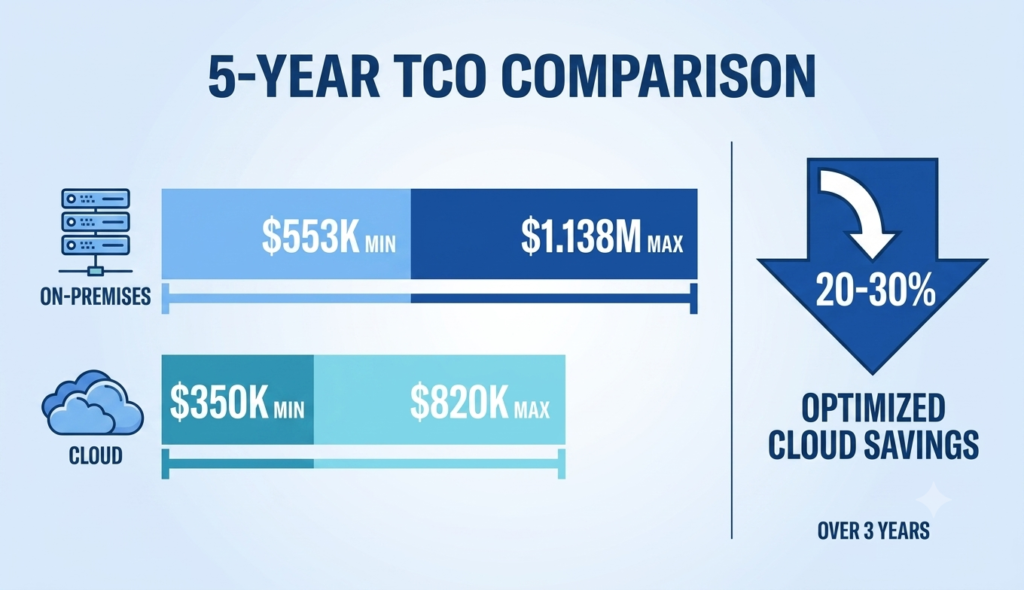
- Cloud security converts expensive, unpredictable upfront hardware costs into simple, flat monthly fees – often saving SMBs 20-30% over three years.
- The global cybersecurity talent shortage makes it nearly impossible for small businesses to hire skilled security professionals, but cloud platforms bring expert teams that would otherwise be out of reach.
- Ransomware attackers specifically target backups first – cloud disaster recovery is built to stop that strategy, cutting recovery times significantly.
- From automated patching to Zero Trust access control, the reasons SMBs are making the switch go far deeper than cost – keep reading to see the full picture.
Something important is happening in small business security. Quietly, steadily, and for very good reasons, small and medium-sized businesses (SMBs) are walking away from their physical servers, on-site firewalls, and aging security hardware — and moving protection to the cloud. Cloud security for small business isn’t a niche upgrade anymore; it’s becoming the default. This shift is a response to a genuinely dangerous reality: the threats targeting small businesses have grown faster, smarter, and more automated than most on-premise setups can handle.
63% of SMB Data Are Already in the Cloud – Yet Most Security Has Not Caught Up
Right now, approximately 63% of SMB workloads and 62% of SMB data reside in cloud environments. Email runs through Microsoft 365 or Google Workspace. Accounting lives in QuickBooks Online. Customer data sits in cloud-based CRMs. Yet for many small businesses, the security layer protecting all of that data is still built around a physical office that may not even be the center of operations anymore.
That gap is exactly what attackers look for. Automated attacks hit small businesses roughly every 11 seconds, and ransomware appears in 88% of SMB breaches. The old model – where securing a physical server room meant the business was protected – simply does not apply when the data has already moved online. Cloud security exists to close that gap, and adoption numbers show SMBs are catching on: a growing share of small businesses are actively increasing their overall cybersecurity spending, with many directing that investment toward cloud-based protection.
For small business owners looking for a plain-language starting point, TechEd Shield breaks down cybersecurity into simple, actionable steps — start with a free cybersecurity health check to see exactly where your own setup stands before making the move.
On-Premise Security Costs More Than Most SMBs Realize
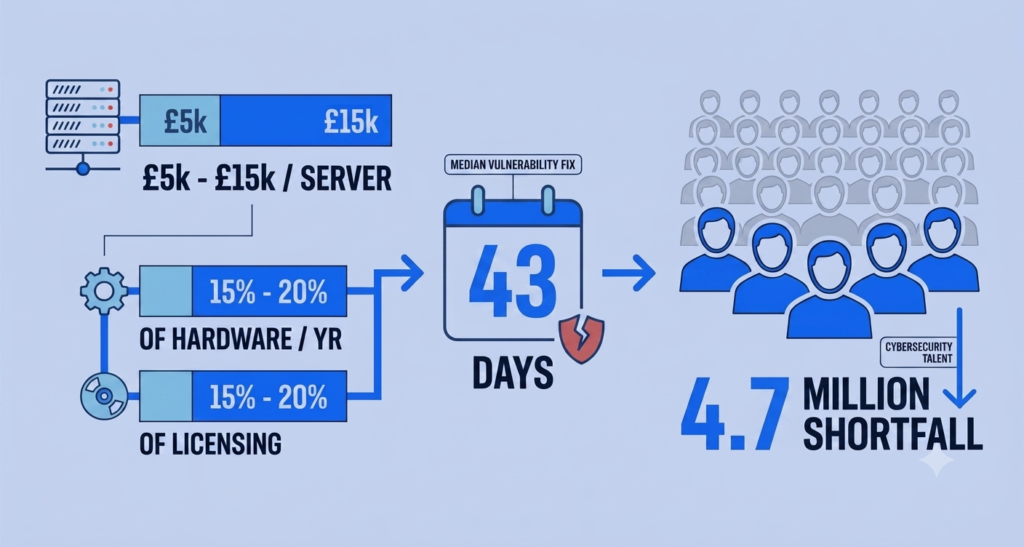
The sticker price on a physical security setup is never the real price. Hardware, installation, licensing, maintenance, power, cooling, and the staff needed to manage it all – those hidden costs compound fast and add up to far more than most SMBs ever budget for.
Every one of the seven reasons above comes down to the same question: what is your current setup actually costing you? Hardware, staffing, maintenance, and replacement cycles add up in ways that rarely show up on a single invoice. Use the calculator below to see a rough estimate of how your team size affects the gap between on-premise and cloud security costs.
These numbers are illustrative, not a quote — but they reflect the same pattern seen across the industry: predictable monthly cloud pricing versus the compounding hardware, staffing, and maintenance costs of on-premise security. The bigger the team, the bigger the gap tends to get.
Cloud Flips CapEx Into Predictable Monthly Costs
Cloud security converts volatile capital expenses into flat, predictable subscription fees, typically $5 to $50 per user per month - with zero hardware refreshes and no server room to maintain. Organizations that have made the move report meaningful reductions in infrastructure costs within the first year, with optimized setups yielding 20-30% savings over three years.
Cloud Security Scales Instantly - Physical Hardware Cannot
Growing businesses hit a frustrating wall with physical security hardware. Adding a new office location or onboarding a surge of seasonal employees means ordering new appliances, waiting 4 to 12 weeks for delivery and setup, then manually configuring and testing everything. During that window, businesses are often forced to either cap operations or loosen security controls just to keep things running.
Cloud platforms eliminate that bottleneck entirely. Security resources scale up or down in minutes, not months - no trucks, no racks, no downtime. With corporate data volumes growing steadily year over year, that kind of elastic capacity is a basic operational need. Many SMBs are finding that regional cloud providers offer simplified, purpose-built platforms that deliver strong performance - meaning security scaling does not come at the cost of application speed.
The Cybersecurity Talent Shortage Hits SMBs Hardest
There is a global shortfall of an estimated 4.7 million qualified cybersecurity professionals, according to the 2024 ISC2 Cybersecurity Workforce Study - the most recent hard estimate available, since ISC2's 2025 study shifted its focus from headcount to skills gaps. The roles hardest to fill - cloud security architects, incident responders, secure application developers - command high salaries that put them well out of reach for most small businesses. For an SMB with 50 to 100 employees, competing for that talent simply is not realistic — which is often the exact moment it makes sense to bring in a cybersecurity consultant instead of hiring in-house.
One IT Generalist Cannot Do What a 24/7 SOC Does
Most small businesses rely on a single IT generalist who handles everything from printer jams to network configuration - with security as one item on a very long list. Many organizations fall short on providing adequate security training for their staff. Manual threat triage happens during business hours, if it happens at all. Attackers do not keep office hours.
Cloud Providers Bring Expert Teams You Cannot Afford to Hire
Migrating security to the cloud means immediately gaining access to the infrastructure teams that major cloud platforms have built - threat hunters, security analysts, and AI-enabled detection tools running 24/7/365. Partnering with a cloud provider or Managed Security Service Provider (MSSP) gives SMBs a full Security Operations Center (SOC) without the overhead of building one in-house. AI-enabled tools used by these providers can significantly reduce response times compared to manual processes - a structural advantage most small businesses could not replicate at any price.
Manual Patching Is Leaving Your Business Wide Open
Attackers Exploit Vulnerabilities Faster Than Teams Can Patch Them
Before an on-premise IT team can apply a security patch, they need to run inventory audits, test compatibility, navigate change management approvals, and schedule a maintenance window that does not disrupt operations. The result is a dangerous gap called patching lag. The median time to remediate a known-exploited vulnerability now sits at 43 days, according to Verizon's 2026 Data Breach Investigations Report - and only about a quarter of these vulnerabilities are ever fully remediated. Meanwhile, the window between a vulnerability being publicly disclosed and actively exploited by attackers has shrunk dramatically - recent data points to exploitation occurring within days of disclosure, and in some high-risk categories, within hours.
This gap has been exploited repeatedly at scale. The ProxyLogon (CVE-2021-26855 and related CVEs) and ProxyShell (CVE-2021-34473, CVE-2021-34523, CVE-2021-31207) vulnerability chains in Microsoft Exchange servers allowed unauthenticated attackers to execute arbitrary commands with SYSTEM privileges, deploy backdoor webshells, and roll out ransomware across entire networks in under 72 hours - all because manual patching could not keep up. These attacks continued to impact on-premise environments years after patches were made available, highlighting the persistent challenge of manual patching cycles.
Cloud Updates Automatically, Closing the Window Before It Becomes a Crisis
Cloud platforms handle patching at the provider level, continuously and automatically. There is no maintenance window to schedule, no compatibility testing to run, and no backlog to manage. The exploitation window closes before most SMBs would even know a vulnerability existed.
Ransomware Targets Your Backups First - Cloud DR Changes That
Modern ransomware gangs do not just encrypt files - they specifically hunt for backup systems first. In 96% of ransomware incidents, threat actors locate, encrypt, or delete backup directories before deploying their payload. The logic is brutal: destroy the backups, and the victim has no choice but to pay. On-premise NAS devices and secondary servers in the same building offer no protection against this approach - and physical disasters like fires or floods can wipe out both production systems and backups simultaneously.
Faster Recovery With Far Less Business Disruption
Cloud-based Disaster Recovery as a Service (DRaaS) decouples recovery assets from the physical environment entirely. Data is stored in geo-redundant locations across multiple datacenters, with leading platforms offering up to eleven nines of annual data durability. When something goes wrong, automated failover can reduce recovery time from the typical 8 to 24 hours of an on-premise restoration to as little as 30 minutes to 2 hours - a significant reduction in downtime. Given that downtime can cost small businesses anywhere from $8,000 to over $100,000per hour depending on company size and industry, and that a major cyberattack puts many small businesses at serious risk of permanent closure, faster recovery is a survival mechanism, not just an operational convenience.
Remote Work Broke the Old Security Model
With approximately 28% of professional work now conducted remotely worldwide, the traditional corporate perimeter has dissolved. The old approach - VPN tunnels routing all remote traffic back through a central office for inspection before it can reach the internet - was never designed for a world where most applications live in the cloud to begin with.
Why Perimeter-Based Access Control No Longer Holds Up
Legacy SSL VPNs create two serious problems. First, they force cloud-bound traffic through an unnecessary detour (often called VPN hairpinning), creating latency that hurts productivity. Second, and more critically, they grant broad network-level access to anyone who authenticates - meaning one compromised remote device gives an attacker lateral access across the internal network. In 2025, unpatched VPN appliances and remote access gateways were a leading source of initial compromises across reported incidents.
ZTNA: Verify Every User, Hide Every Application
Zero Trust Network Access (ZTNA) replaces the castle-and-moat model with a fundamentally different principle: never trust, always verify. Instead of placing users on the network, ZTNA creates secure, isolated, one-to-one connections between a verified user on a compliant device and a specific application - nothing more. Corporate applications become completely invisible to public internet discovery, shrinking the external attack surface. Device posture is checked continuously: Is the OS patched? Is the endpoint detection agent running? Is disk encryption enabled? Access is granted only when every condition is met - and revoked the moment something changes.
Compliance Is Simpler When the Cloud Does the Heavy Lifting
For SMBs handling customer data, payment information, or health records, regulations like GDPR, HIPAA, and PCI DSS apply broadly. The EU's NIS2 Directive applies more narrowly - mainly to medium and large businesses (50+ employees) in specific critical sectors such as energy, health, and digital infrastructure - and carries fines of up to 10 million euros or 2% of global annual turnover, with personal liability for executives in some cases.In an on-premise environment, documenting physical security policies, maintaining audit logs, configuring encryption, and hardening hardware all fall entirely on internal staff who are already stretched thin.
Cloud platforms address this through the Shared Responsibility Model: the provider maintains and certifies the underlying infrastructure to meet rigorous global compliance standards, and the SMB focuses only on securing its own data and access configurations. Built-in Cloud Security Posture Management (CSPM) tools continuously scan for compliance gaps and auto-generate audit-ready reports - turning what was once a months-long manual process into something that runs quietly in the background. (Curious what that process costs without cloud automation? See our breakdown of small business security audit costs in 2026.
| Factor | On-Premise | Cloud |
|---|---|---|
| Cost structure | Upfront hardware/licensing + 15-20% annual maintenance + 20-25% software support + $80K-$160K/yr staffing | $5-$50 per user/month flat fee; 20-30% savings over 3 years reported |
| Scalability | 4-12 weeks to order, deliver, and configure new hardware | Scales up or down in minutes |
| Security expertise | Typically one IT generalist; business-hours-only monitoring | 24/7 SOC-equivalent access: threat hunters, analysts, AI-enabled detection |
| Patch management | Manual process; median 43-day remediation time; only ~25% fully remediated | Automatic, continuous, provider-level patching |
| Backup / disaster recovery | 8-24 hour recovery; backups often co-located with production, vulnerable to same attack | Geo-redundant storage, up to 11 nines durability; 30 min-2 hr recovery |
| Remote access model | Legacy VPN with hairpinning; broad network-level access on authentication | Zero Trust Network Access (ZTNA): per-app, continuously verified access |
| Compliance burden | Manual documentation, audit logs, and hardening handled entirely in-house | Shared Responsibility Model + automated CSPM gap-scanning and audit-ready reports |
Cloud Security Gives SMBs Protection That Actually Works - Without the Enterprise Budget
Taken individually, each of these seven drivers makes a compelling case. Together, they point to the same conclusion: on-premise security architectures were built for a world that no longer exists. The data has moved, the workforce has moved, and the threats have evolved far beyond what manual, hardware-bound defenses can reliably stop.
Cloud security gives small businesses access to something previously reserved for large enterprises: real-time, cross-tenant threat intelligence. When a platform like Microsoft Defender or Arctic Wolf detects a new attack pattern in one customer's environment, indicators of compromise are automatically distributed across the entire platform - instantly protecting every other business on it. One business encounters a threat; every other business on the platform gets protected. That kind of collective defense is simply not possible with isolated on-premise setups.
The shift to cloud security is about matching the tools to the actual risk - and giving small businesses a fighting chance in an environment where the threats are professional, automated, and relentless. If you're still weighing whether to build this in-house or hand it to a provider, our breakdown of managed security vs. in-house IT costs walks through the real numbers.