

Key Takeaways
- Ransomware is present in 88% of confirmed small business breaches – far higher than the 39% rate at larger organizations – yet most owners don’t know where their gaps actually are.
- The seven areas covered in a small business security audit – access control, network security, data protection, endpoint security, physical security, employee training, and incident response – cover the majority of real-world attack paths.
- Most small business risk traces back to a short list of fixable issues that don’t require an IT team to address.
- A tested incident response plan is the single most effective cost-reduction measure available to a small business – more on that below.
- TechEd Shield breaks these complex topics down into clear, actionable steps built specifically for business owners without technical backgrounds.
Running a small business means wearing a lot of hats. Security expert usually isn’t one of them – and that’s exactly what cybercriminals count on. A small business security audit is how you find the gaps before someone else does. Here’s what the experts actually look at, and what it means for your business.
A Single Cyberattack Can End a Small Business – The Numbers Are Clear
Small businesses are not flying under the radar. According to Verizon’s most recent Data Breach Investigations Report, ransomware is involved in 88% of confirmed small and medium business breaches, compared with just 39% at larger enterprises. The reason is straightforward: attackers know that smaller organizations often have weaker defenses and less time to monitor them.
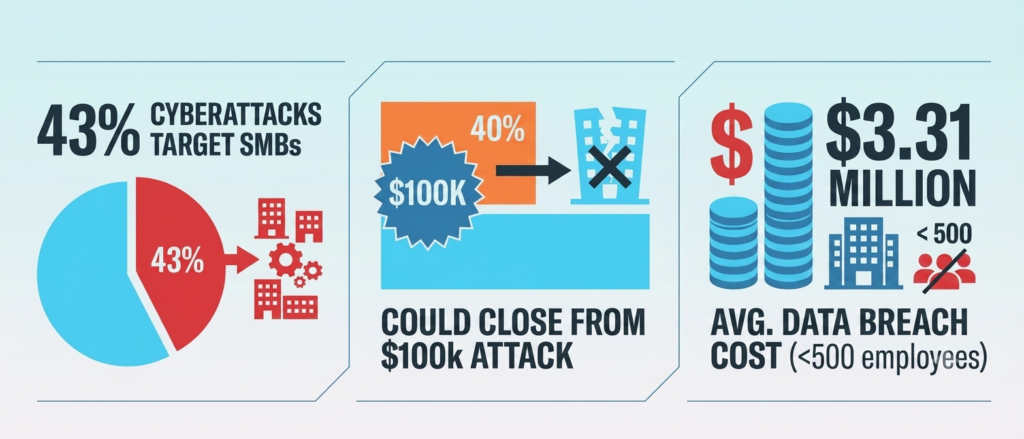
The financial reality is severe. Research shows that 40% of small business owners say an attack costing $100,000 or less would put them out of business – and for businesses operating on thin margins without a cash reserve, even smaller losses can be fatal. Resources like TechEd Shield exist specifically to help small business owners understand and close these gaps without needing a full IT department.
A small business security audit identifies where those vulnerabilities live before they become incidents. Across seven critical areas, here’s what security experts actually examine. If you’re also budgeting for this process, see our breakdown of what a small business security audit costs in 2026.
Who Controls Access to Your Business?
Why Compromised Credentials and Phishing Are the Top Ways In
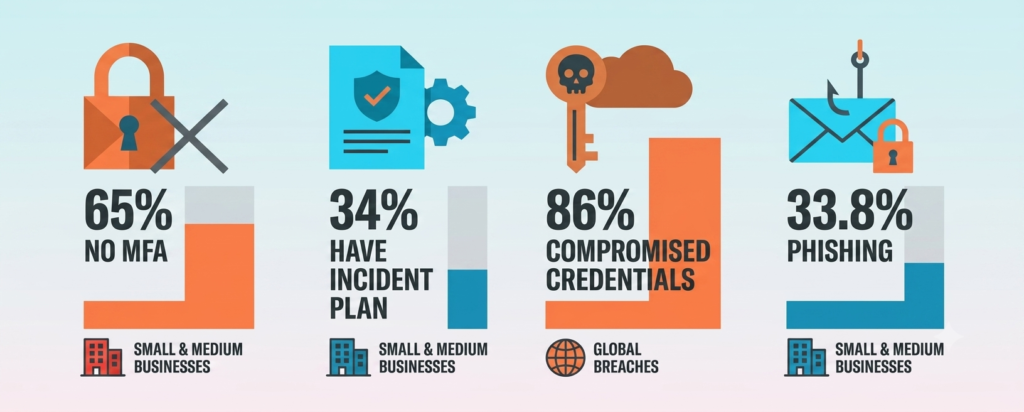
Compromised credentials remain the single most common way attackers gain initial access to a network. Attackers don’t need to hack anything in the movie sense – they steal or guess login details, then walk right through the front door. Phishing emails trick employees into handing over passwords. Password spraying tries common passwords across hundreds of accounts at once. Once inside, attackers blend in with normal traffic and move quietly through the network.
What Experts Check: MFA, Permissions, and Dormant Accounts
During the access control portion of a small business security audit, experts look at every digital entry point the business has – email, VPNs, cloud apps, admin panels. The key questions:
- Is Multi-Factor Authentication (MFA) enforced? App-based push notifications or hardware tokens are the standard. SMS-based MFA is flagged as a risk due to SIM-swapping vulnerabilities – along with four other MFA setup mistakes that quietly leave small businesses exposed. Even properly configured MFA can be bypassed entirely through session hijacking — see 9 cyber risks law firms miss even when fully compliant for how that attack works.
- Do employees have more access than their job requires? Privilege creep – where staff accumulate permissions over time – is a common and fixable problem.
- Are old accounts still active? Former employee or contractor accounts that haven’t been disabled are open doors. Best practice is prompt deactivation as soon as separation is confirmed, ideally within 24 hours.
Password policies are also reviewed. CIS Controls v8 Implementation Group 1 recommends at least 8 characters for accounts protected by MFA and 14 characters for accounts without MFA, with no credential reuse across accounts, commonly enforced with a password manager. If you’re migrating to the cloud and want the full sequence of steps rather than just the audit checklist, see our 12-step cloud security checklist for small business migration.
Is Your Network Leaving the Door Open?
The Hidden Risk of a Flat, Unsegmented Network
A flat network is one where every device can communicate with every other device. It’s common in small businesses because it’s simple to set up – but it’s dangerous. If an attacker compromises one device, a flat network gives them a clear path to the server where customer payment data is stored. There’s nothing in the way.
What Experts Check: Firewall Rules and Network Isolation
Experts review the firewall ruleset to confirm a default-deny posture – meaning nothing gets through unless it’s explicitly allowed. They also check whether the internal network is segmented:
- Is the guest Wi-Fi completely isolated from the business network? Weak WiFi configuration is one of the most common ways that isolation fails in practice — see 7 business WiFi security tools that stop small business breaches for the platforms and standards that enforce it properly.
- Are servers and databases on a separate segment from employee workstations?
- Are management consoles only accessible through a VPN – not exposed directly to the internet?
Network segmentation using VLANs and Access Control Lists (ACLs) is the practical tool here. It doesn’t eliminate risk, but it contains it – meaning a compromised device can’t easily reach everything else. Ecommerce stores hit a version of this problem too — PCI’s own CDE segmentation can leave everything outside the payment environment under-defended. See 9 ecommerce security risks PCI compliance leaves unprotected. These same controls are increasingly what cyber insurers verify directly — see does cyber insurance require a pen test or vulnerability scan for when insurers demand independent proof.
Could You Recover If Your Data Disappeared Tomorrow?
What Experts Check: Encryption and the 3-2-1 Backup Rule
According to Verizon’s 2025 DBIR, roughly 19% of small businesses face a real risk of bankruptcy following a cyberattack, and separately, 40% of small business owners say an attack costing $100,000 or less would put them out of business. Ransomware attacks are designed to exploit exactly that vulnerability – encrypt your data, then demand payment to get it back.
Experts check two things: how the data is protected, and whether it can actually be recovered. On protection, they verify that sensitive data is encrypted at rest using AES-256 and in transit using TLS 1.2 or higher. On recovery, they evaluate the backup strategy against the 3-2-1 rule:
- 3 copies of data
- On 2 different media types
- With 1 copy stored offsite
Critically, that offsite copy needs to be immutable – meaning even if an attacker gains admin access, they can’t delete or alter the backup. Experts also look for evidence of actual restoration tests. A backup that’s never been tested is not a backup – it’s a guess.
Your Devices Are the Front Line
What Experts Check: EDR Tools, Patch Status, and BYOD Risks
Every laptop, workstation, and mobile device that touches business data is a potential entry point. Endpoint security audits focus on three areas:
- Detection tools: Traditional antivirus is no longer sufficient. Experts look for Endpoint Detection and Response (EDR) solutions, which monitor behavior continuously rather than scanning for known malware signatures. Tamper protection should be enabled so the agent can’t be switched off by malware. For specific product picks that satisfy this without an IT team, see our roundup of the best cybersecurity tools for small businesses with no IT team.
- Patch status: Unpatched software is one of the most exploited weaknesses in small business environments. Security updates should be deployed automatically, with critical patches prioritized for rapid remediation based on severity.
- BYOD risk: Personal devices used for work – without Mobile Device Management (MDM) enrollment – often lack basic protections. MDM tools allow the business to enforce security profiles, isolate corporate data, and remotely wipe a lost device.
Device configuration basics are also checked: automatic screen locks after 15 minutes of inactivity, password-on-wake requirements, and restricted USB access.
Physical Security: The Overlooked Gap
Digital defenses mean very little if someone can walk into the server room. Physical security is consistently underestimated by small businesses, yet it’s one of the most straightforward areas to address.
Experts conduct a walk-through of the facility, checking that server rooms and network closets are locked and restricted to authorized staff only. Surveillance cameras should cover all external entry points, with footage retained for at least 30 days. Visitor and contractor access should be logged, escorted, and limited to approved areas. Experts also check for environmental risks – specifically, whether critical hardware is protected by Uninterruptible Power Supplies (UPS) and monitored for temperature anomalies. A power surge or HVAC failure can take down a firewall just as effectively as an attacker.
Your Staff Are Both the Biggest Risk and Your Best Defense
How Phishing and Vishing Attacks Target Small Teams
The human element remains a major factor in confirmed cyber breaches – Verizon’s most recent Data Breach Investigations Report places that figure at 60%, down from 68-74% in the two prior years. Phishing accounts for a large share of small business incidents, and the tactics have evolved. AI tools now eliminate spelling errors from phishing emails, raising click-through rates substantially. QR code phishing (called quishing) has surged by 400% or more in recent years, according to industry trackers, as a way to bypass standard email filters. Voice phishing (vishing) involves attackers calling staff directly, impersonating IT support, and convincing employees to reset passwords or approve MFA requests.
What Experts Check: Training Frequency and Simulated Phishing Results
Experts review whether security awareness training is mandatory from day one of employment – for all staff, including executives and contractors. They look at training content to confirm it covers current threats: vishing verification, MFA fatigue, and quishing. Most importantly, they evaluate simulated phishing campaigns – periodic tests that measure how many employees actually click a malicious link. The results guide targeted retraining, and the trend over time reveals whether the program is working. A one-click reporting button integrated into the email client, so employees can flag suspicious messages instantly, is another practical measure experts look for. For a deeper walkthrough of specific defenses, see our 5 steps for small business phishing protection that actually work.
No Response Plan Means Chaos When It Counts
What Experts Check: Your Incident Response Plan Against NIST SP 800-61
When an attack happens, the speed of the response determines the damage. Most small businesses don’t have a documented incident response plan – and in the absence of one, costly mistakes happen: keeping infected machines online while malware spreads, or wiping systems before forensic evidence is preserved.
Experts review the written Incident Response Plan (IRP) against the NIST SP 800-61 lifecycle: Preparation; Detection and Analysis; Containment, Eradication, and Recovery; and Post-Incident Activity. A well-structured plan defines severity levels, outlines who does what, includes pre-drafted communication templates for regulators and customers, and has been practiced through tabletop simulation exercises with key decision-makers. IBM’s 2025 Cost of a Data Breach Report found that maintaining a tested incident response plan saves organizations an average of $2.66 million per incident – a figure that makes this one of the highest-return investments a small business can make.
Most Small Business Risk Traces Back to a Short List of Fixable Gaps
A small business security audit can feel overwhelming in concept – but in practice, the findings across these seven areas tend to cluster around the same set of issues: no MFA, flat networks, untested backups, unpatched devices, unlocked server rooms, untrained staff, and no response plan. These aren’t exotic problems. They’re fixable ones.
The Center for Internet Security’s Controls Implementation Group 1 (IG1) – a prioritized set of 56 safeguards designed for resource-constrained organizations – has been shown by CIS’s own Community Defense Model research to defend against roughly three-quarters of common attack techniques, such as malware. If a customer contract specifically requires a formal SOC 2 report, see our SOC 2 compliance for small businesses with no IT team guide. That’s the practical reality: covering the basics properly and consistently puts most small businesses in a far stronger position than the majority of their peers. Security doesn’t require a dedicated IT team or a large budget. It requires a clear system, applied consistently – and knowing which areas to check first. Nonprofits often face the tightest version of this constraint — see our nonprofit cybersecurity budget under $1,500/year for how the numbers actually work.
You’ve just read what a small business security audit checks for. Now check yourself. Answer seven quick questions — one for each area covered above — and see where your business actually stands before an attacker finds out for you.
Small Business Security Self-Check
Answer 7 quick questions. Takes about 60 seconds.
A single “no” doesn’t mean disaster is coming. It means you know exactly where to start. That’s the whole point of a small business security audit — turning seven vague worries into one short, fixable list. If your results point to gaps you can’t close alone, New York City owners can start comparing options in our guide to the 7 best cybersecurity firms in NYC for small businesses.
Visit TechEd Shield to find simple, step-by-step cybersecurity guidance built specifically for small business owners who want to protect what they’ve built. Want a faster read on where you stand? Take the free Cybersecurity Health Check and see your gaps in a few minutes.