

Key Takeaways
- Most VPN comparison articles skip the dedicated IP cost — a fee that can add $40+ per month to your bill and completely change which plan makes sense for your team.
- Twingate’s zero-trust model eliminates dedicated IP charges entirely by using your own existing infrastructure, making it one of the lowest true-cost options for small teams.
- NordLayer looks affordable at $8-$14 per user per month, but the $40/month gateway fee means a 10-person team could pay $1,800/year — not the $1,320 the base price suggests.
- Ongoing support and maintenance can account for up to 80% of your total VPN cost — a factor almost never mentioned in pricing tables.
- Keep reading to see how IdP integration (single sign-on) and zero-trust architecture can quietly pay for themselves — or quietly cost you more.
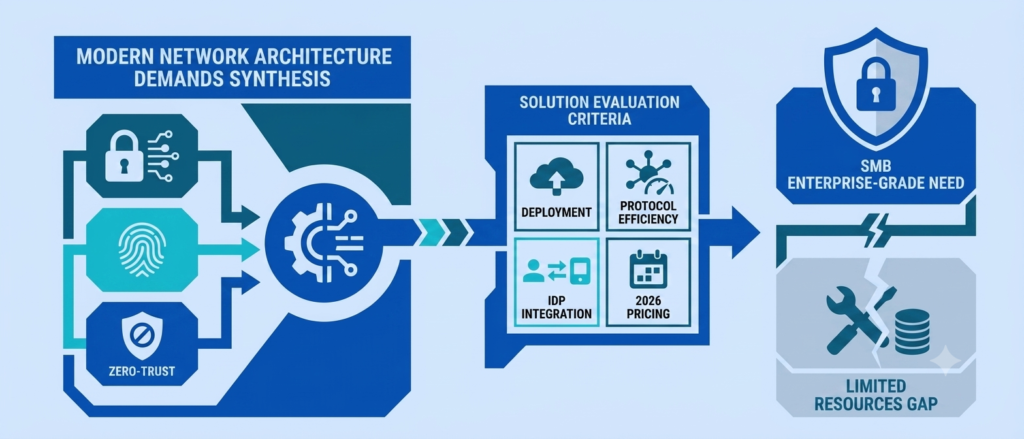
Shopping for a business VPN without IT support feels a bit like buying a car based only on the sticker price, then discovering insurance, fuel, and maintenance triple what you budgeted. The monthly per-user price is just the beginning. That’s exactly the gap this roundup of the 7 best VPNs for small business remote teams is built to close: the real cost often hides in a single line item, the dedicated IP address fee.
This guide cuts through the noise. It compares seven of the most commonly recommended business VPNs — not just on features, but on what a small team of 5 to 20 people will actually pay when everything is added up. It pairs well with our complete small business security stack under $10 a month, which covers the other tools a VPN alone won’t.
The Hidden Fee Most VPN Comparisons Skip
Almost every VPN review online leads with a per-user monthly price. It looks clean. It looks affordable. What those reviews rarely show is the line below it — the gateway fee, or what providers sometimes call a dedicated server cost.
A dedicated IP address means your team always connects from the same IP. That matters more than it sounds. Without one, your business shares an IP with thousands of other users. Banks flag it. Internal tools block it. SaaS platforms throw CAPTCHA after CAPTCHA at your team. Dedicated IPs solve all of that — but they come at a price that most comparison tables quietly bury.
The problem isn’t that dedicated IPs cost money. The problem is that many providers don’t mention the fee until you’re already mid-signup. For a small business owner without IT support, discovering a surprise $40/month charge after committing to an annual plan is a real hit — and it happens constantly.
What a Dedicated IP Actually Costs You
Why Shared IPs Create Real Business Problems
When a VPN assigns your team a shared IP, that address is simultaneously used by dozens — sometimes hundreds — of other businesses and individuals on that provider’s network. Most of the time, that’s invisible. But when one of those other users does something that triggers a security flag, your team pays for it.
Shared IPs create practical problems that slow down real work:
- Banking and financial portals often block or freeze access from shared IPs flagged as suspicious
- Internal tools and cloud apps that use IP allowlisting won’t recognize your team’s connection
- CAPTCHA loops become a daily frustration, especially on Google properties and e-commerce platforms
- Compliance risks grow when there’s no consistent, traceable IP tied to sensitive logins
A dedicated IP solves each of these. It gives your team a stable, recognized online identity — one that banking systems trust, that internal tools can allowlist, and that makes compliance audits cleaner.
Dedicated IP Pricing Ranges Widely — From Under $10 to Over $40/Month
Not all dedicated IP add-ons are created equal. Consumer-focused VPNs that offer a business tier typically charge an additional $2.50-$10 per month for a dedicated address. That’s manageable.
Business-grade VPN platforms that offer private gateways charge significantly more. NordLayer and Proton VPN for Business both list $39.99-$40 per month for a dedicated server. Perimeter 81 (now Check Point Harmony SASE) goes further, requiring a gateway fee per location — and that’s before user seat costs. Note that Check Point Harmony SASE gateway pricing varies by contract and configuration; confirm current rates directly with the provider before budgeting.
The distinction matters because a gateway isn’t just an IP address — it’s a private server being rented. More control, yes. But also a much bigger line item than the headline per-user price suggests.
How Dedicated IP Costs Reshape Your True Monthly Bill
Here’s a practical example: NordLayer’s Core plan is listed at $11 per user per month. For a 10-person team, that’s $110/month or $1,320/year. Reasonable enough. But if that team needs IP allowlisting for even one internal tool — which most growing businesses do, eventually — they’ll need a dedicated gateway at $40/month. That’s an extra $480/year, pushing the real annual cost to $1,800.
That 36% increase never shows up in the headline pricing. It shows up in the invoice.
Proton VPN for Business runs a similar calculation: 10 users on the Professional plan at $9.99/month equals $1,198.80/year. Add one dedicated server at $39.99/month and the real total becomes approximately $1,678/year. Still competitive — but not the number that catches your eye on the pricing page.
The 7 VPNs: Side-by-Side Cost Reality
1. NordLayer — Fast Setup, But the $40/Month Gateway Fee Changes the Math
NordLayer is genuinely one of the fastest business VPNs to get running. An admin with no networking background can configure the platform, connect it to Google Workspace or Microsoft Entra ID, and deploy the client app across a team in under ten minutes. The WireGuard-based NordLynx protocol keeps speeds high and latency low — especially for mobile workers switching between Wi-Fi and cellular.
The pricing tiers break down like this:
- Lite: $8/user/month — shared IPs only, no dedicated gateway option; SSO available, SCIM provisioning costs extra
- Core: $11/user/month — dedicated gateway available at +$40/month per server; SSO available, SCIM provisioning costs extra
- Premium: $14/user/month — dedicated gateway at +$40/month, SCIM provisioning included
- Enterprise: Custom pricing; minimum user count and exact pricing vary — confirm directly with NordLayer
For teams that just need encrypted remote access over public Wi-Fi, the Lite plan is clean and cost-effective. But the moment a business needs IP allowlisting — and most do, eventually — the $40/month gateway cost kicks in and the math changes fast. A 5-person Core team paying $55/month in seats becomes a $95/month team the moment that gateway is added.
2. Twingate — Zero-Trust Model Eliminates the Need for a Dedicated IP Charge Entirely
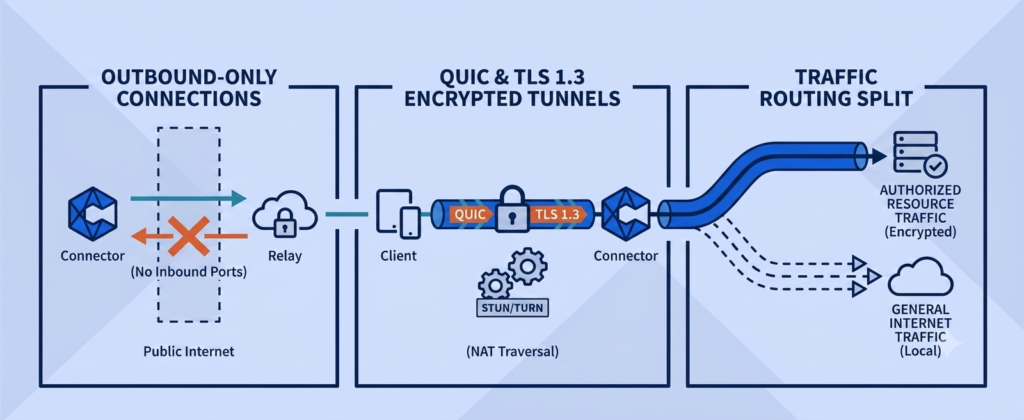
Twingate takes a fundamentally different approach. Rather than routing a team’s traffic through a cloud server, it connects authenticated users directly to specific applications inside the private network — and nothing else. There’s no central gateway to buy. There’s no shared IP to escape.
The architecture works through four components: a client app on each user’s device, a lightweight connector deployed inside the private network (via a single Docker command), a cloud-based policy engine, and Twingate’s global relay infrastructure. The connector initiates only outbound connections, meaning no inbound ports are exposed — the internal network stays completely invisible to the public internet.
Pricing is seat-based with no infrastructure add-ons. Note: Twingate’s pricing has seen updates across billing cycles — verify current rates on Twingate’s website before budgeting.
- Starter: Free — up to 5 users, 1 remote network
- Teams: $5/user/month — up to 100 users, 5 remote networks
- Business: $10/user/month — up to 500 users, IdP provisioning, DNS filtering, endpoint integrations
Regardless of the exact per-user rate, Twingate charges no gateway fee and no dedicated IP add-on. The connector runs on infrastructure the business already owns or rents. That transparency makes Twingate’s total cost of ownership one of the most predictable in this comparison.
The one real trade-off: setup requires more planning than a client-only VPN. Deploying connectors means understanding where resources live — AWS, a local server, a cloud environment. It’s not plug-and-play, but setup typically completes in under 15 minutes once the network layout is mapped out.
3. Proton VPN for Business — Privacy-First With Bundled Value
Proton VPN for Business is built in Switzerland and operates outside of the Fourteen Eyes intelligence-sharing network — a meaningful distinction for legal firms, healthcare providers, or any team handling sensitive client data across borders. The platform maintains a strict no-logs policy; Proton has published independent audit results, though buyers should review the most current audit documentation on Proton’s website for full details.
The platform supports OpenVPN and WireGuard protocols, augmented by a custom Stealth protocol designed to bypass deep packet inspection in restrictive regions. For teams with international members working in high-surveillance environments, that capability carries real weight.
Pricing highlights:
- Essentials: $6.99/user/month — shared servers, malware and ad blocking, 2-user minimum
- Professional: $9.99/user/month — SAML SSO, SCIM, private gateways (+$39.99/month per server)
- Business Suite: $12.99/user/month — VPN bundled with Proton Mail, cloud storage, Proton Pass, and Calendar; verify exact storage allocation per user on Proton’s current pricing page
The Business Suite is where Proton delivers its strongest value. For under $13/month per user, a business replaces its VPN and its email, cloud storage, and password manager — all with end-to-end encryption. For teams already paying for those tools separately, the bundle math often works strongly in Proton’s favor.
4. OpenVPN CloudConnexa — Transparent Pricing, But Connectors Consume Seats and Raise Total Cost
OpenVPN CloudConnexa is the managed cloud version of the open-source OpenVPN protocol. It’s well-suited for businesses transitioning off aging hardware into a cloud-delivered model that still supports site-to-site routing between offices and cloud environments. The built-in Cyber Shield feature — a combination intrusion detection system and DNS-based content filter — is genuinely rare at this price point and removes the need for a separate web filtering tool.
Where CloudConnexa gets tricky is its seat model. A seat applies to both human users and network connectors. A team of 40 people connecting to 5 cloud environments needs 40 user seats plus 5 connector seats — totaling 45 billable seats. It’s not hidden, but it’s a detail that catches teams off guard when budgeting based on headcount alone.
- Starter: Free — 3 seats maximum, includes zero trust, IDS/IPS, and DNS filtering
- Essential: $7/seat/month — LDAP/SAML, IPsec, API, SIEM integration
- Premium: $9.50/seat/month — SCIM, dedicated account manager, 99.9% SLA
No hidden gateway fees. The seat-counting nuance aside, total cost of ownership is transparent and scalable — and the free Starter plan (no credit card required) is a legitimate way to test the platform before committing.
5. Perimeter 81 (Check Point Harmony SASE) — Enterprise Power, Steep Floor
Perimeter 81 was acquired by Check Point in late 2023 and rebranded as Check Point Harmony SASE. The platform now combines zero trust network access, a cloud firewall, and a secure web gateway into one unified system. For compliance-heavy industries like finance or healthcare, that consolidation has real value.
Pricing for Check Point Harmony SASE varies by contract structure and configuration. Published rates have differed across sources, so the figures below should be treated as a starting-point reference — confirm current pricing directly with Check Point before budgeting:
- Essentials: Starting around $8-$10/user/month — minimum 10 users — plus a mandatory gateway fee per location
- Premium: Starting around $12-$15/user/month — 10-user minimum — plus gateway fee per location
- Premium Plus: Starting around $16-$20/user/month — minimum user count varies by source; confirm with Check Point — plus gateway fee per location
Gateway fees also vary by contract. One commonly cited figure is $50/month per gateway, though other structures exist. A team of 15 users on the Essentials plan using two regional gateways for redundancy should expect a meaningful baseline cost well above the per-user seat total alone — the exact figure depends on the gateway pricing confirmed at time of purchase. For a lean team without dedicated IT, the configuration complexity compounds the cost problem. Harmony SASE is built for compliance-driven organizations with trained IT oversight — not for small businesses managing their own administration.
6. Surfshark for Business — Cheapest Entry, Biggest Renewal Trap
Surfshark for Business is built on Surfshark’s consumer infrastructure — a large global server network across 100 countries, supporting WireGuard, OpenVPN, and IKEv2. For teams that simply need encrypted connections over public Wi-Fi, it delivers that reliably and cheaply.
Unlike the other providers in this roundup, Surfshark for Business does not publish self-serve per-user pricing. Businesses submit a request through Surfshark’s team sales form and choose between the One plan, the One+ plan, or a custom combination, with a minimum of 5 user licenses required. Unlimited simultaneous device connections per user are included. Because pricing is quote-based rather than listed, teams should confirm exact per-user rates and any renewal terms directly with Surfshark’s sales team before budgeting.
The deeper limitation is architectural. Surfshark for Business does not offer SSO, SCIM, or SAML integration — user onboarding is handled through an admin panel via email invite, with no IdP-driven automation. There is no device posture enforcement and no network segmentation. It works well as an internet privacy tool — it doesn’t work as a structured business security solution for teams handling sensitive data.
7. Personal VPNs Rebranded — What Small Businesses Are Missing
A sizable portion of the business VPN market is simply consumer VPN products with a team billing page bolted on. The giveaways are consistent: no centralized user management beyond an email invite, no way to enforce MFA across the team, no access to internal company resources, and no IdP integration of any kind.
These products aren’t fraudulent — they do encrypt traffic. But they leave critical gaps that matter once a business grows beyond two or three people:
- No way to segment access by role or department
- No audit logs for compliance purposes
- No automated offboarding when an employee leaves
- No protection for internal tools, databases, or private servers
The risk isn’t that a rebranded personal VPN will cause an immediate breach. The risk is a false sense of security — making it feel like the network is protected when the internal layer is completely unaddressed. Small businesses handling customer payment data, health records, or legal information need controlled access to the right tools, by the right people, and nothing else.
| VPN | Price Range (per user/mo) | Dedicated IP / Gateway Fee | IdP (SSO/SCIM) | Best For |
|---|---|---|---|---|
| NordLayer | $8–$14 | +$40/mo on Core & Premium; not available on Lite | SSO on Lite+; SCIM requires Premium or Enterprise | Fast setup, mobile-first teams |
| Twingate | $5–$10 (free tier up to 5 users) | None — zero-trust model, no gateway to rent | Built into all paid plans; full SCIM on Business tier | Lowest true total cost; teams comfortable deploying a connector |
| Proton VPN for Business | $6.99–$12.99 | +$39.99/mo on Professional & Business Suite; not on Essentials | SAML SSO + SCIM on Professional & Business Suite | Privacy-first industries (legal, healthcare); teams wanting bundled tools |
| OpenVPN CloudConnexa | $7–$9.50/seat (free Starter, up to 3 seats) | None — but connectors count as billable seats | LDAP/SAML on Essential; SCIM on Premium | Technical teams managing multi-cloud environments |
| Check Point Harmony SASE | ~$8–$20 (varies by contract; 10-user minimum) | Mandatory, per location (commonly cited ~$50/mo) | Full IdP sync across paid tiers | Compliance-heavy orgs with dedicated IT support |
| Surfshark for Business | Quote-based (5-user minimum) | Not publicly specified | None — no SSO, SCIM, or SAML | Basic encrypted access; not built for sensitive data |
| Personal VPNs, Rebranded | Varies (consumer pricing) | N/A | None | Not recommended for businesses handling sensitive data |
Every VPN in this comparison publishes a clean per-user price. Almost none of them show you the second line — the dedicated IP or gateway fee — until you’re already mid-signup. Plug in your team size and the plan you’re considering below, and see the number that actually lands on your invoice.
True Cost Calculator
What Will You Actually Pay For a Business VPN?
We need a dedicated IP / gateway
For IP allowlisting on banking portals, internal tools, or compliance logging
Estimates use published per-user rates and gateway fees as reported at time of writing. Providers marked “est.” (Check Point Harmony SASE) publish contract-dependent pricing — confirm current rates directly with the provider before budgeting. Not a quote.
That gap between the advertised price and the real one is exactly why this guide compares total cost, not sticker price. If your number came back higher than expected, it’s worth reading the zero-trust section below — it’s the one architecture in this list that removes the gateway fee from the equation entirely.
Total Cost of Ownership Goes Beyond the Sticker Price
Ongoing Support and Maintenance: Up to 80% of Real TCO
The purchase price of software is often the smallest part of what it actually costs to run. For VPN and network access tools, ongoing support and maintenance can account for up to 80% of the total cost of ownership over the life of a subscription. That includes time spent troubleshooting connection issues, managing user accounts, updating configurations when team members join or leave, and handling security incidents that stem from access gaps.
For a business owner handling everything personally, that overhead translates directly into hours pulled away from actual work. A VPN that requires 30 minutes of admin time per week adds up to 26 hours per year — time with a real dollar value, even if it never appears in a pricing table.
This is one of the strongest arguments for choosing a platform with automated user provisioning (SCIM) and centralized policy management. The faster access can be granted and revoked without manual steps, the lower the real operational cost over time.
The Deployment Tax: Setup Time for Non-IT Owners
Every VPN in this list has a different setup complexity. Surfshark requires almost no configuration — install, sign in, done. Twingate requires deploying a connector inside a private network, which takes planning but typically completes in under 15 minutes. OpenVPN CloudConnexa requires understanding routing, access groups, and connector placement across cloud environments — closer to an afternoon for someone without networking experience.
Harmony SASE sits at the most demanding end: policy engines, web filtering rules, IPsec tunnel configuration, and device posture profiles are not tasks an office manager can realistically handle without guidance. The deployment tax isn’t just the initial setup time — it includes the learning curve, the troubleshooting when something breaks, and the ongoing cognitive load of maintaining a system not designed for non-technical owners. Those hours are just as real as the monthly invoice.
IdP Integration: A Feature That Pays for Itself
What SSO and SCIM Actually Do for a Small Team
Identity Provider (IdP) integration sounds like enterprise jargon, but the practical benefit is straightforward. Single Sign-On (SSO) lets every team member log into the VPN using the same credentials they use for Google Workspace or Microsoft 365 — no separate VPN password to forget, reset, or have stolen.
SCIM (System for Cross-domain Identity Management) automates the next step. When a new employee is added to the business’s directory, they automatically get the right VPN access. When someone leaves and their account is deactivated, their VPN access is cut off simultaneously. No manual steps. No forgotten accounts that become security gaps months later.
For small businesses managing their own accounts, that automation is worth real money. SSO solutions designed for SMBs now run at roughly $2-$7 per user per month, often bundling directory services and device management alongside. When a VPN includes IdP integration natively, it removes the need for additional tools — and removes the risk of a departing employee retaining access to internal systems because nobody remembered to revoke it manually.
Which Plans Include It vs. Charge Extra
The pattern is clear: IdP integration typically requires stepping up at least one tier from a provider’s baseline offering, or choosing a platform like Twingate where identity is built into the core architecture rather than layered on top.
ZTNA vs. Traditional VPN: Does It Change the Math?
Application-Level Access vs. Full Network Exposure
A traditional VPN works like a tunnel. Once a user connects, they’re inside the network — and depending on how it’s configured, they may have broad access to everything on it. That’s efficient for simple setups, but it carries a meaningful risk: if one device is compromised, an attacker gets a foothold inside the entire network.
Zero Trust Network Access (ZTNA) works differently. Instead of giving users access to a network, it gives them access to specific applications or resources — and nothing else. A sales employee who needs the CRM and a shared drive gets exactly that. They can’t see the database server, the accounting software, or the engineering environment, even if all those resources sit on the same internal network.
For small businesses, this distinction carries a direct cost implication: ZTNA platforms tend to eliminate the need for dedicated IP addresses entirely, because access isn’t defined by where the connection comes from — it’s defined by who the user is and what they’re allowed to reach.
When Twingate’s Zero-Trust Model Lowers Your Total Bill
Twingate’s architecture makes the dedicated IP question essentially irrelevant. Because access decisions are made based on verified user identity — authenticated through an IdP like Google Workspace or Okta — there’s no need for a stable outbound IP to allowlist. The connector inside the private network recognizes the authenticated user, not a specific IP address.
That architectural choice has a direct cost consequence: no gateway fee, no dedicated IP add-on, no per-server rental. Whatever the current per-user rate, Twingate’s total monthly cost is the seat count multiplied by that rate — nothing more.
Compare that to a NordLayer Core team needing one dedicated gateway: user seat costs plus $40 in gateway costs. Over 12 months, that gateway alone adds $480 — before accounting for SCIM provisioning costs on NordLayer’s Core tier. For teams with even basic technical confidence, the combination of lower ongoing cost, stronger access control, and no hidden infrastructure fees makes a compelling case for the zero-trust approach.
For Most Small Teams, Twingate or NordLayer Win on True Cost
After accounting for dedicated IP fees, gateway costs, IdP provisioning, and the real operational overhead of managing each platform, two options consistently rise to the top for small business remote teams.
Twingate wins on true total cost of ownership. Its seat-only pricing model, elimination of gateway fees, and built-in zero-trust architecture mean the invoice reflects the actual cost of running the tool — no surprises at renewal. It’s the right choice for teams comfortable deploying a connector inside their network and who want granular access control as they grow.
NordLayer wins on speed and simplicity. For businesses that need to be up and running in minutes and aren’t yet managing complex internal infrastructure, NordLayer’s deployment experience is excellent. The $40/month gateway fee is a real cost — but for teams that need it, the tradeoff is a polished, fast platform with strong mobile performance and solid compliance tooling. Just budget for the full number, not the headline price.
Proton VPN for Business is the right call for privacy-sensitive industries — legal, healthcare, journalism — where data sovereignty and a verifiable no-logs policy are the top priority. The Business Suite bundle adds enough value to justify the per-user cost for teams already paying separately for email and cloud storage.
Surfshark and rebranded personal VPNs serve internet privacy needs — not structured business security. OpenVPN CloudConnexa rewards technical teams managing multi-cloud environments. Harmony SASE is built for compliance-driven organizations with dedicated IT support — not lean small business teams doing their own administration.
The right VPN isn’t the one with the lowest per-user price. It’s the one where the total annual cost — seats, gateways, provisioning, and administrative time — fits the budget and the business actually gets protected. Worth remembering: a VPN secures the connection, not the person on the other end of it. Training employees to spot the scams a VPN can’t stop closes that gap. For most small teams, that’s Twingate or NordLayer. Know which number is really being compared before signing up.
For clear, jargon-free guidance on protecting a business online, our free cybersecurity health check helps small business owners work through exactly these decisions — with practical tools and step-by-step systems built for non-technical teams.
A note on pricing: Prices correct at time of writing. Always check current pricing before purchasing.