

Key Takeaways
- AI-powered scams are now faster, cheaper, and far more convincing — AI-automated phishing emails achieve a 54% success rate compared to just 12% for standard attempts, making every employee a potential target.
- Four specific threats dominate in 2026: deepfake voice and video calls, QR code phishing (quishing), MFA fatigue attacks, and social engineering on platforms like Slack and Teams.
- Annual training no longer cuts it — short, frequent micro-learning sessions improve knowledge retention by up to 60% compared to traditional once-a-year training.
- A no-blame reporting culture can be the difference between a minor incident and a catastrophic breach — the faster an employee reports a mistake, the faster it can be contained.
- Out-of-band verification is the single most effective defense against deepfake fraud — keep reading to see exactly how it works and why it needs to apply to everyone, including the CEO.
Cybersecurity used to feel like a big company problem. Not anymore. In 2026, small businesses are squarely in the crosshairs, and the attacks look nothing like the clunky, typo-filled emails of five years ago. The scams hitting inboxes and phone screens today are polished, personalized, and in some cases, powered by the same AI tools employees use for everyday work. The good news? Small business cybersecurity training still stops the majority of attacks cold — because most of them still need a human to click, approve, or transfer before anything goes wrong.
AI Makes Every Employee a Potential Target
There was a time when a suspicious email was easy to spot. Broken English, a strange sender address, a vague request for money — the red flags practically waved themselves. That era is over. Generative AI now allows cybercriminals to produce contextually precise, grammatically flawless messages at massive scale, and the numbers back it up: AI-automated phishing emails have surged 4.5 times in volume and now achieve a 54% success rate, compared to just 12% for traditional phishing attempts.
What makes this shift particularly dangerous for small businesses is that AI has erased the skill gap. Sophisticated, targeted attacks that once required hours of manual research can now be executed in minutes. CERT-In, India’s national cybersecurity agency, issued a high-severity warning specifically about AI-powered attacks targeting small and medium-sized businesses — noting that AI lets attackers automate and scale operations in ways that make SMBs a primary, not secondary, focus.
The financial stakes are real. The average data breach costs businesses with fewer than 500 employees $3.31 million — and for many small businesses, an attack costing even a fraction of that can mean permanent closure. Resources like our breakdown of a security stack under $10 per user exist specifically to help small business owners cut through the noise and build practical, employee-ready defenses without needing a full IT department. The reality is that human error contributes to roughly 60 to 82% of all corporate security incidents — which means the workforce is not just a vulnerability. With the right training, it becomes the strongest line of defense.
4 Scams Your Team Will Face in 2026
Modern scams do not arrive through one channel. They are multi-layered, carefully timed, and designed to exploit exactly the kind of fast-paced, trust-based environment that small businesses run on. These four are the ones employees are most likely to encounter — and least likely to recognize without specific training.
1. Deepfake Voice and Video Calls
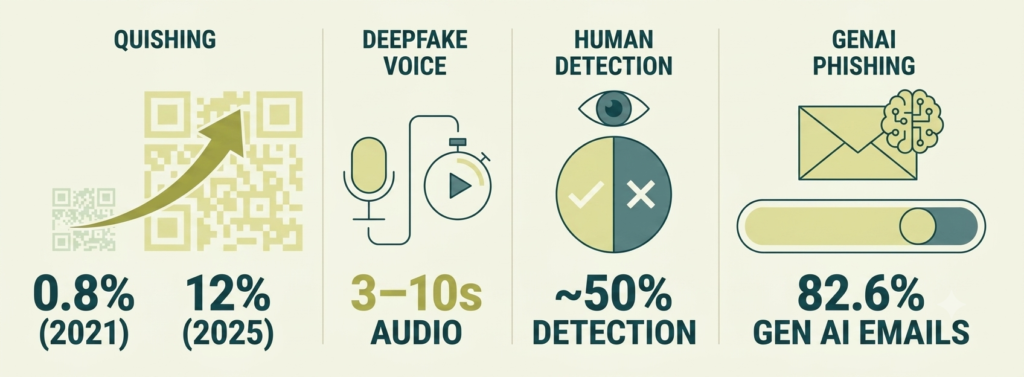
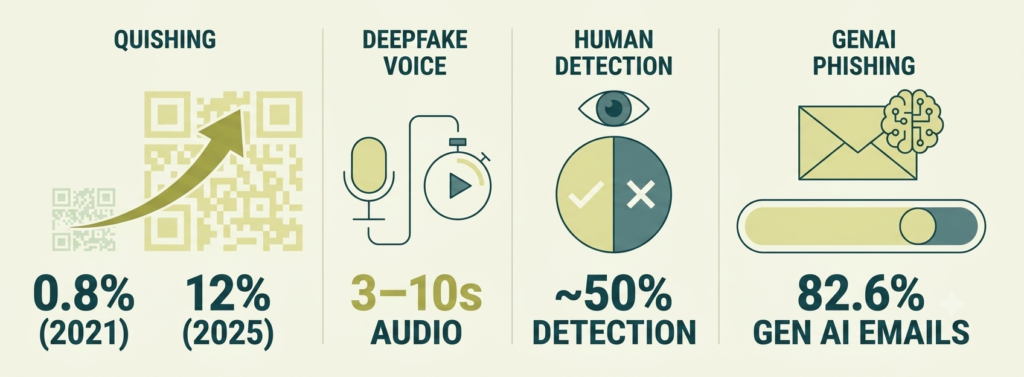
Deepfake technology has moved well past novelty. Criminals can now create a convincing voice clone of an executive for under five dollars, using as little as three to ten seconds of audio pulled from a YouTube video, a LinkedIn post, or a company webinar. In live video calls, real-time face-swapping software can make an attacker appear as the CFO — complete with mannerisms and voice — during a live conference call.
This is not hypothetical. In one of the most documented cases of deepfake fraud, multinational engineering firm Arup lost $25 million after a finance employee authorized wire transfers following a video call where every other participant — including the apparent CFO — was a real-time deepfake. Deepfakes now drive 40% of business email compromise incidents in 2026, and humans can correctly identify synthetic media only about 50% of the time. Trusting eyes and ears alone is no longer a reliable defense.
The training takeaway: employees should know that no phone call or video meeting — no matter how convincing — is sufficient authorization for a financial transaction or a change to banking details. Verification must always happen through a separate, independent channel.
2. QR Code Phishing (Quishing)
QR codes have become a trusted shortcut in the workplace — scan to join a meeting, scan to access a document, scan to view payroll details. Attackers have noticed. Quishing is currently the fastest-growing attack method of 2026, with QR code phishing increasing 25% year-over-year and representing approximately 12% of all global phishing attacks in 2025.
Here is why it works so well: standard email security tools are built to scan text and hyperlinks. A URL buried inside a QR code image passes right through those filters undetected. When an employee scans the code with their personal phone, the session moves off the corporate network — away from endpoint protection, DNS filtering, and secure sign-on — and onto an unmanaged personal device with far fewer guardrails. The user then lands on a spoofed login page designed to capture credentials and MFA tokens simultaneously.
Quishing also happens in the physical world. In one documented incident in Austin, fake QR code stickers were placed over legitimate parking meter payment stations. The fraudulent codes redirected users to a fake payment page designed to capture credit card details. The full financial impact of this specific incident has not been publicly detailed, but such scams are purpose-built to steal payment information at scale. The rule employees need to internalize: treat unexpected QR codes — in emails, printed flyers, or even around the office — with the same skepticism as unexpected links.
3. MFA Fatigue and Push Bombing
Multi-factor authentication is one of the most effective security tools available — but it has a human weak point. Once a criminal has stolen an employee’s password (often through a phishing site), they still need to get past the MFA prompt. Their solution: flood the employee’s phone with rapid-fire approval requests until frustration, confusion, or sheer habit causes them to tap Approve just to make the notifications stop.
This is called push bombing, and it is often timed deliberately — late at night, early in the morning, or during a high-pressure workday when people are distracted and notifications blur together. One accidental approval hands an attacker fully authenticated access to corporate systems.
The most effective technical countermeasure is switching to phishing-resistant MFA, such as FIDO2-compliant passkeys or hardware security keys like YubiKeys. Because FIDO2 authentication is cryptographically bound to a specific physical device and website origin, push notifications are eliminated entirely — there is nothing to bomb. Employees should also know: no legitimate IT team will ever ask for an MFA bypass code. That request, from any source, is a scam. Push bombing is just one of five common MFA setup mistakes that leave small businesses exposed – most are fixable in minutes.
4. Collaborative Platform Social Engineering
Email filters have gotten smarter. So attackers have moved the conversation to Slack and Microsoft Teams, where the psychological atmosphere is fundamentally different. Messages on internal platforms carry a built-in sense of legitimacy — it feels like a colleague, not a stranger. Between October 2025 and March 2026, Teams-based attacks surged 41%.
These attacks range from fake IT support bots requesting credentials to impersonated executives sending urgent direct messages. Some attackers gain initial access to one account and then use internal channels for lateral movement — staying hidden inside company systems for months. The Disney internal Slack breach is a documented example: after harvesting credentials from a single compromised device, attackers moved undetected across channels and eventually exfiltrated over 1.1 terabytes of data, including 44 million messages and financial details.
The training message here is simple: the platform a message arrives on does not make it trustworthy. Any request for credentials, payment changes, or urgent action — regardless of whether it comes through email, Teams, or Slack — deserves the same verification process. A VPN doesn’t help here either — see the dedicated IP cost realities for remote teams for what a VPN actually does and doesn’t protect against.
3 Psychological Triggers Scammers Exploit
AI does not change how the human brain works — it just automates the exploitation of the shortcuts and emotional reflexes people have always had. Spotting a typo is no longer the skill employees need. Recognizing the feeling of being manipulated is.
1. Fake Authority From the Boss
People are wired to respond quickly to authority. When a message appears to come from the CEO, an IT administrator, or legal counsel, the instinct is to comply — quickly, and without asking too many questions. Attackers use AI voice cloning and email spoofing to impersonate senior leadership and issue instructions that bypass normal procedures.
The telltale sign is not the identity of the sender — it is the nature of the request. Any communication that asks an employee to skip a security step, keep something confidential from IT, or rush a financial transaction is using authority as a manipulation tool. Employees need to internalize that verifying a request — even one that appears to come from the owner — is professional, not insubordinate. Real executives do not ask people to skip security checks.
2. Artificial Urgency and Fear
Urgency is the most common weapon in social engineering because it works. A message like Your account will be permanently locked in 15 minutes or This supplier payment must be confirmed before end of day or the contract is void triggers a physiological stress response. Adrenaline kicks in, rational thinking slows down, and the path of least resistance — clicking the link, approving the request — feels like the right move.
Training employees to recognize this trigger is about reframing the feeling itself. The moment a message creates a spike of anxiety and pressure to act immediately, that emotion should become a stop signal, not a green light. Urgency combined with secrecy — do not discuss this with anyone else — is almost always a scam.
3. False Social Proof
Humans look to others when they are uncertain. Attackers exploit this by claiming that the action being requested is already normalized — “Everyone on your team has already updated their login through this link” or “John from Accounting already approved this vendor change, we just need your sign-off.” The message implies that hesitation is the unusual behavior.
Employees should treat any peer reference in an unsolicited message with skepticism. The fix is straightforward: verify the claim independently, using an internal directory or a direct message to the person supposedly involved — not by replying to the original request or using contact details provided within it.
Annual Training Is No Longer Enough
For most small businesses, cybersecurity training looks like this: once a year, employees sit through a 60-to-90-minute online course, click through the slides, pass a short quiz, and check a compliance box. Done for another twelve months. The problem is that the threats employees are now facing change month to month — and the human brain does not retain a wall of information delivered once a year.
Why Compliance-Based Training Fails
Compliance-based training was never designed to change behavior. It was designed to satisfy audit requirements. The result is a flat-line simulation failure rate that hovers between 18% and 22% — meaning roughly one in five employees will still fall for a simulated phishing attack no matter how many annual modules they have completed.
The gap is not knowledge — it is habit. Knowing that phishing emails exist does not create the reflex to pause before clicking a suspicious link at 4:45 PM on a Friday. Training delivered once a year, in a dense block, falls victim to what learning researchers call the Ebbinghaus Forgetting Curve — the brain discards most of what it does not use repeatedly. Voluntary completion rates for this style of training routinely fall between 20% and 30%, meaning the majority of staff never fully engage with it in the first place.
The Micro-Learning Model That Works
Micro-learning flips the model. Instead of a single long session, it delivers focused, interactive modules of three to seven minutes — consistently, throughout the year — directly inside the tools employees already use, like Slack or Microsoft Teams. Research shows this approach improves knowledge retention by up to 60% compared to traditional methods, with completion rates reaching 90% or higher because the sessions fit naturally into a workday.
The content stays current. A module on quishing gets pushed when quishing campaigns are trending. A deepfake awareness exercise gets distributed when a major case hits the news. The training mirrors real conditions — including unannounced simulated phishing and quishing attempts — so that employees build genuine reflexes, not just quiz-passing familiarity. The primary metric shifts from who completed the module to how quickly employees reported a suspicious message, which is a far more accurate measure of real-world readiness.
Build a Culture Where Mistakes Get Reported
No training program eliminates human error entirely. What separates a contained incident from a full-scale breach is almost always timing — specifically, how quickly a mistake gets reported after it happens. A culture that punishes employees for security errors is, paradoxically, one of the biggest security risks a small business can have.
Studies show that more than 27% of employees are actively afraid to tell IT when they make a security mistake, and 40% of organizations pursue punitive disciplinary actions against staff who click the wrong thing. Fear of punishment encourages silence — and silence gives attackers weeks of undetected access to move through systems, exfiltrate data, and set up ransomware before anyone notices.
Aim to Report Within 10 Minutes
Establish a clear, written policy with a specific window: any employee who reports a security mistake to IT within ten minutes receives complete immunity — no disciplinary action, no negative performance notes, no punitive retraining. This policy needs to be communicated clearly, repeatedly, and backed by leadership behavior. The goal is to structurally separate early reporting from fear, so the instinct to speak up wins over the instinct to hide the mistake.
The ten-minute window matters because speed is everything in incident response. A reported error allows the IT team to isolate a compromised account before credentials are used for lateral movement. An unreported error can mean weeks of undetected access.
Focus Post-Incident Reviews on Systems, Not Blame
When something goes wrong, the investigation should ask what process failed, not who failed. Did the phishing email bypass the email security filter? Were external email banners missing? Was the verification step too cumbersome to realistically complete under normal work conditions? This kind of systems-level analysis improves the actual defense — whereas blame-focused reviews just make employees quieter next time.
Reward Employees Who Speak Up
Publicly recognizing employees who catch and report suspicious activity — in team meetings, internal newsletters, or all-hands updates — normalizes transparency and gradually shifts the cultural default. When reporting a near-miss is celebrated rather than stigmatized, more employees do it. Leadership modeling matters too: when senior staff openly share stories of their own security slip-ups and how they handled them, it signals that fallibility is human and reporting is always the right call.
A Key Protocol Against Deepfakes and Wire Fraud
Process-level defenses are often more reliable than technical ones — because they do not depend on software catching something first. Out-of-band verification is the clearest example: a simple, enforceable rule that makes deepfake fraud and business email compromise dramatically harder to execute, regardless of how convincing the scam looks.
How Out-of-Band Verification Works
Out-of-band verification (OOBV) means confirming any sensitive request through a communication channel that is completely separate from the one used to deliver the request. If a request to update a supplier’s banking details arrives by email, verification happens by phone — using a number from the company’s internal directory, not the number provided in the email. If the request comes by phone or video call, verification happens through a secure internal chat or the financial management system directly.
The rule is simple: never use the contact details, links, or phone numbers contained in the suspicious message itself. Attackers deliberately provide their own contact details inside fraudulent messages — so calling the number in a fake invoice just routes the employee back to the attacker. Verification must always trace back to a trusted, pre-existing source.
Security Protocols Apply to Everyone, Including Executives
One of the most important things to codify in writing is an even-if-the-CEO-is-on-the-line rule. Attackers specifically exploit executive authority to pressure employees into bypassing standard approval steps — and they are increasingly able to simulate that authority convincingly with voice and video deepfakes. The policy must make clear: verifying an executive’s request is an act of professional diligence, not disrespect. Business owners and senior leaders should actively model this by welcoming verification when employees apply it to them.
For any financial transfer above a set threshold — many businesses use $10,000 as a starting point — dual authorization plus out-of-band verification should be a non-negotiable step, documented in writing and applied consistently.
What to Do the Moment Something Goes Wrong
Every employee should be able to answer one question without hesitation: if I just clicked something I should not have, what do I do right now? The difference between a minor, contained incident and a serious breach often comes down to the three to ten minutes immediately following a mistake. These three steps should be trained, practiced, and posted somewhere visible.
Step 1: Disconnect the Device Immediately
The first action is to cut the device off from the network immediately. On a wired connection, unplug the Ethernet cable. On Wi-Fi, turn Wi-Fi off and disable any active VPN connections. This stops any malware from communicating with the attacker’s servers, halts active data exfiltration, and prevents the threat from spreading to other devices on the business network.
Do not shut the computer down or restart it. Powering off the machine wipes volatile memory (RAM) that contains critical forensic data — active session logs, running processes, and evidence of what the attacker was doing — that the IT team needs to understand the scope of the incident and contain it properly.
Step 2: Report It as Quickly as Possible
Immediately contact the IT administrator or managed service provider through a separate, uncompromised channel — a direct phone call, an in-person conversation, or an unaffected device. Provide as much specific detail as possible: the email subject line, the approximate time of the click, the URL where credentials were entered, and whether any files were downloaded or unexpected prompts appeared.
Speed is everything here. Reporting quickly under the Ten-Minute Window Policy guarantees administrative immunity and, more importantly, gives the technical team the window they need to isolate the compromised account before an attacker can use it to move deeper into business systems.
Step 3: Reset Credentials From a Safe Device
Using a completely separate, uncompromised device — ideally a personal phone on a cellular network, not the business Wi-Fi — log into the company identity portal and reset the password for any account that may have been exposed. This immediately invalidates stolen credentials.
Once connected with IT support, they should also check for active session tokens that may still be granting attacker access, audit MFA settings to confirm no rogue authenticator device has been registered, and verify that no unauthorized backup codes or bypass routes were generated during the incident window.
Reading about these scams is one thing. Knowing your own instinct in the moment is another. Before you go further, take 90 seconds to test yourself against six real scenarios pulled straight from this article — the same ones your team will face this year. No signup, no email required. Just an honest look at where your reflexes already work, and where they don’t.
What’s Your Team’s 2026 Scam Readiness Score?
6 quick scenarios. Answer honestly — this is a mirror, not a test.
However you scored, the takeaway is the same: these aren’t trick questions, they’re the actual decisions your employees will make under pressure, often in under ten seconds. The gap between “I know this in theory” and “I did this instinctively” is exactly what separates a contained near-miss from a six-figure wire fraud. That gap is what training closes — not with a once-a-year slide deck, but with the kind of repetition that turns the right answer into a reflex.
Trained Employees Are Your Strongest Defense in 2026
The scams hitting small businesses in 2026 are more convincing, more targeted, and more frequent than anything that came before — but they still rely on one thing: a human being taking an action. A deepfake call cannot wire money by itself. A QR code cannot hand over credentials without someone scanning it. A push notification cannot approve itself.
That human dependency cuts both ways. The same employee who represents a vulnerability with outdated habits becomes a genuine asset with the right training. Businesses that move from once-a-year compliance modules to consistent, practical, behavior-focused training are building something that no firewall alone can provide: a workforce that pauses, questions, and verifies before acting — by instinct, not just by policy.
The investments that matter most are not complicated or expensive. A written out-of-band verification policy costs nothing to implement. A no-blame reporting culture costs nothing to build. Short monthly training sessions cost far less than a single successful attack. For small businesses operating without a dedicated IT team, the path to meaningful protection starts with the five-step phishing defense playbook — practical, specific, and built around the real threats employees will actually face. Our free cybersecurity health check offers exactly that: a simple, step-by-step starting point built specifically for small business owners who want clear answers, not technical overwhelm.