

Key Takeaways
- A 15-person nonprofit can build a real, layered cybersecurity system for just $1,492.50 per year – that’s under $100 per person annually.
- Microsoft quietly ended its free Business Premium grant on July 1, 2025, which means many nonprofits will face surprise costs at their 2026 renewal – but a split-licensing model keeps the bill at $198/year.
- Free federal programs from CISA and vendors like Cloudflare can stretch your budget further without adding a single dollar to your spend.
- The biggest gaps in a budget stack aren’t the tools – they’re the blind spots no one warns you about. More on those below.
- TechEd Shield breaks down practical cybersecurity systems for non-technical leaders, and this guide follows that same philosophy: clear steps, no jargon, real numbers.
A nonprofit cybersecurity budget under $1,500 a year is more achievable than most leaders think. Nonprofits are not small targets – they hold donor payment records, client case files, grant documentation, and staff credentials, all of it valuable, and much of it poorly protected. The good news is that a realistic, working security system doesn’t require an IT department or an enterprise budget. It requires the right combination of tools, grants, and a little structure.
Most Nonprofits Were Attacked – and Most Were Underprepared
Research on small and mid-sized organizations consistently shows that a majority experience cyberattacks within any given two-year window – which is exactly why a nonprofit cybersecurity budget matters, even for organizations that assume they’re too small to be a target. Not sure where your organization actually stands? Take the free Cybersecurity Health Check to see your exposure before you build the stack. Cybercriminals don’t exclusively target corporations. They actively go after nonprofits because the data is valuable and the defenses are often minimal.
Building a nonprofit cybersecurity budget starts with a hard truth: most small and mid-sized nonprofits don’t have a dedicated IT person. Security decisions fall on an executive director, operations manager, or whoever is least busy that week. The result is a patchwork of free tools, default passwords, and good intentions – which is not a security strategy. Covering the basics properly reduces risk dramatically. You don’t need to solve every possible threat. You need to solve the common ones, consistently. TechEd Shield is built around exactly that idea – translating what works into steps non-technical leaders can actually follow. For a broader look at what a formal review checks, see the 7 critical areas a small business security audit covers.
The Microsoft Licensing Shift Nonprofits Can’t Ignore
Before building any security stack, nonprofit leaders need to understand what changed in their cloud licensing – because it affects both cost and security capability.
The Free Business Premium Grant Ended July 1, 2025
For years, Microsoft offered eligible nonprofits 10 free Microsoft 365 Business Premium licenses. That grant was retired on July 1, 2025. Organizations that haven’t adjusted their setup will hit a wall at their next renewal date – either facing an unexpected charge or watching their accounts quietly downgrade in capability. Neither outcome is good.
12 Free Basic Seats + 3 Paid Premium Seats = $198/Year
The practical fix is a split-licensing model. Microsoft still provides up to 300 free Microsoft 365 Business Basic seats for eligible nonprofits. Business Basic covers cloud email, Teams, and web-based Office tools – enough for most staff. The key move is purchasing just 3 paid Microsoft 365 Business Premium seats at $5.50/user/month. Those three seats bring Entra ID Conditional Access, Microsoft Defender for Business, and Microsoft Intune to the accounts that hold them. Assign those three seats to your executive director, finance lead, and IT admin – the accounts with the highest access risk. Standard staff continue on free Basic seats with full cloud access, while your highest-risk accounts receive the advanced protections included with Business Premium.
Total annual cost: $198.00. That’s it. For comparable endpoint and training options at standard commercial rates, see our roundup of the best cybersecurity tools for small businesses with no IT team.
The Full $1,492.50 Stack, Broken Down
This is where the rest of the nonprofit cybersecurity budget comes together – with the Microsoft foundation in place, the remaining spend covers six additional layers. Here’s what each one does, what it costs, and why it earns its spot.
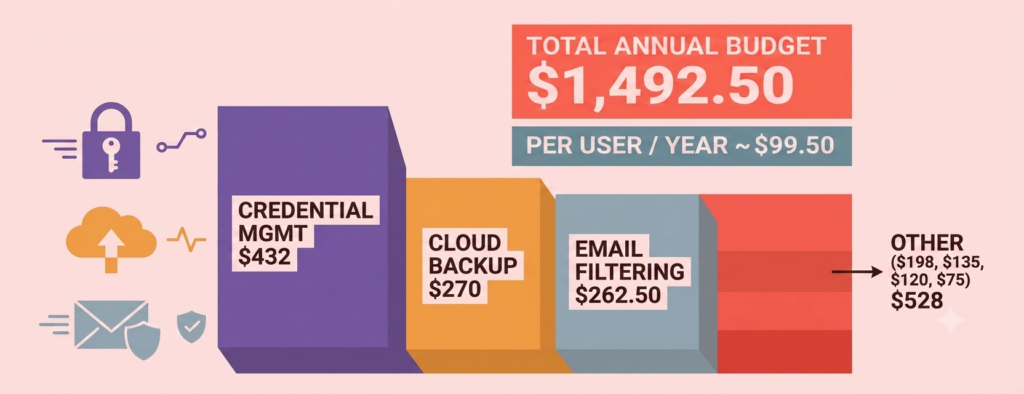
| Layer | Tool / Provider | What It Does | Annual Cost (15 users) |
|---|---|---|---|
| Cloud licensing | Microsoft 365 (split-licensed: 12 Basic + 3 Premium) | Conditional Access, Defender, and Intune on highest-risk accounts | $198.00 |
| Endpoint protection | Bitdefender GravityZone (via TechSoup) | Malware blocking, USB control, behavioral analysis, ransomware mitigation | $135.00 |
| Password security | Bitwarden Teams (nonprofit rate) | Encrypted credential vaults, secure sharing, Bitwarden Families included | ~$432.00 |
| Cloud backup | Afi.ai immutable backup | Daily automated backups of Exchange, OneDrive, SharePoint, Teams | ~$270.00 |
| Email defense | Topsec filtering + Blended Threats Module (via TechSoup) | Sender authentication, domain reputation, real-time link re-analysis | $262.50 |
| Staff training | CyberHoot awareness + phishing simulations | Micro-learning modules, quarterly simulated phishing tests | ~$120.00 |
| Zero Trust + hardware MFA | Cloudflare Zero Trust (free) + 2 FIDO2 keys | DNS-level filtering; physical key MFA for global admin accounts | $75.00 |
| Total (15-person organization) | $1,492.50 | ||
Endpoint Protection: Bitdefender GravityZone via TechSoup ($135)
Endpoint protection is one of the highest-value line items in any nonprofit cybersecurity budget. Consumer antivirus software installed individually on each laptop is a starting point with no oversight. Bitdefender GravityZone Business Security, available through TechSoup at a discounted administrative fee, gives one person a single web-based dashboard to monitor all devices. It covers malware blocking, USB device control, behavioral risk analysis, and automated ransomware mitigation that creates temporary encrypted file copies during suspicious activity. For up to 25 devices on a one-year subscription, the TechSoup admin fee is a flat $135.00. Deployment is straightforward: generate an install link from the console, email it to staff, and the software handles the rest – including uninstalling conflicting legacy programs.
Password Security: Bitwarden at Nonprofit Rates ($432)
Credential theft is one of the most common ways attackers get into cloud accounts. Staff reusing passwords, sharing logins over text, or writing credentials on sticky notes are all open doors. Bitwarden Teams closes them. Open-source and end-to-end encrypted, it allows secure credential sharing through organized vaults. Bitwarden offers a nonprofit discount – verify the current rate directly with Bitwarden, as pricing may vary – with an estimated annual cost of approximately $432.00 for 15 users based on available nonprofit program rates. Setup takes minutes: create an org vault, invite staff via email, and they install the browser extension. Enterprise tiers also include free Bitwarden Families accounts for employees, which extends good password habits beyond the office.
Cloud Backup: Afi.ai Immutable Protection ($270)
Microsoft 365 operates under a Shared Responsibility Model – Microsoft guarantees platform uptime, but data retention and recovery remain the customer’s responsibility. While Microsoft does offer native backup options for some services, default retention windows are limited, and deleted emails, corrupted SharePoint files, or ransomware-encrypted OneDrive folders can be difficult or impossible to recover without a dedicated third-party solution. If your nonprofit is still mid-migration to the cloud, see our 12-step cloud security checklist for small business migration for the full sequence. Afi.ai runs automated daily backups of Exchange mailboxes, OneDrive, SharePoint, and Teams channels, storing everything in isolated, immutable cloud storage. Afi.ai offers nonprofit pricing – verify the current rate directly with Afi.ai – with an estimated annual cost of approximately $270.00 for 15 users based on available nonprofit program rates. No local software required; setup is an OAuth authorization inside the Microsoft 365 Admin Center.
Email Defense: Topsec Filtering and Link Analysis ($262.50)
Phishing emails targeting nonprofit staff don’t always look suspicious. Business Email Compromise (BEC) attacks – where a scammer impersonates an executive to redirect a wire transfer or payroll deposit – are crafted specifically to pass standard spam filters. Topsec Email Security, available through TechSoup, sits in front of Microsoft 365 as a cloud email gateway. It checks sender authentication, domain reputation, and message payloads. The Blended Threats Module rewrites every URL inside incoming emails and analyzes the destination in real time when clicked – catching delayed link weaponization that basic filters miss. Pricing through TechSoup is approximately $10.50/mailbox/year for the base engine plus $7.00/mailbox/year for the Blended Threats Module, totaling $17.50/user/year and $262.50 for 15 mailboxes. Verify current availability and pricing directly through TechSoup before purchasing. Deployment involves updating one DNS record (the MX record) to route incoming email through Topsec first.
Staff Training: CyberHoot Awareness and Phishing Simulations ($120)
Every technical control in this stack can be bypassed by one employee clicking the wrong link. CyberHoot addresses the human side with automated 2-3 minute micro-learning modules delivered directly to staff inboxes, covering phishing identification, password hygiene, and safe browsing. It also runs automated simulated phishing tests quarterly – staff who click a fake malicious link get enrolled in targeted follow-up training automatically. CyberHoot offers nonprofit and small-organization pricing; verify the current rate directly with CyberHoot, as plan structures may vary. The estimated annual cost referenced here is approximately $120.00 for small teams. No manual scheduling required; the platform runs itself.
Zero Trust and Hardware MFA: Cloudflare + FIDO2 Keys ($75)
Cloudflare Zero Trust provides DNS-level filtering that blocks staff devices from connecting to malicious domains, malware distribution sites, and newly registered phishing pages – before anything loads. For teams under 50 users, the platform is completely free. The $75.00 in this line item covers two physical FIDO2 hardware security keys (such as YubiKeys) at roughly $37.50 each, assigned exclusively to global admin accounts. SMS-based and push-notification MFA can be intercepted or fatigued; a physical key cannot be remotely bypassed. Standard staff continue using app-based authenticators, while administrative logins require inserting the physical key to complete.
Check off what you’d actually add. Watch the total stay under $1,500.
Build Your Stack
Check what you’d add for a 15-person team. Watch the total.
Every checkbox above is optional — the licensing shift and MFA are the two with the clearest immediate payoff if you’re starting from zero. Everything else layers on from there.
Free Federal Tools That Multiply Your Budget
CISA Vulnerability Scanning and Regional Advisors
Free federal resources stretch a nonprofit cybersecurity budget even further. The U.S. Cybersecurity and Infrastructure Security Agency (CISA) offers free services most nonprofits never claim. CISA Cyber Hygiene Vulnerability Scanning continuously scans an organization’s public-facing IP addresses and domains, delivering weekly automated reports flagging open ports, unpatched software, and misconfigured servers. Nonprofits hosting donor portals can also request Web Application Scanning to detect SQL injection or cross-site scripting vulnerabilities. CISA’s Regional Cybersecurity Advisors – staffed across ten regional offices – will conduct a free on-site or virtual assessment against national cybersecurity baseline goals and provide a prioritized action list. None of this costs anything.
Cloudflare Project Galileo and Google for Nonprofits
Eligible human rights, public interest, and community advocacy organizations can apply for Cloudflare Project Galileo, which provides enterprise-grade Web Application Firewall (WAF) and DDoS protection for public websites at zero cost. Separately, Google for Nonprofits offers eligible organizations $10,000/month in Google search advertising and free Google Workspace tiers – which can function as a redundant collaboration environment or additional file backup layer.
3 Real Gaps This Stack Won’t Cover
Honesty matters here: a nonprofit cybersecurity budget of $1,492.50 a year is not the same as a fully managed enterprise security program. There are three structural blind spots every nonprofit leader should understand before considering this setup complete.
- Siloed monitoring: Each tool operates independently. Bitwarden may flag a suspicious login, Cloudflare may block a DNS query, and Microsoft 365 may log an unfamiliar IP – but no single dashboard connects these dots. A sophisticated multi-stage attack could move through the environment without triggering any single alert loud enough to notice.
- Configuration drift and shadow IT: Without centralized device management across all seats, staff may connect unauthorized personal cloud apps (personal Dropbox, unapproved AI tools) or quietly disable security prompts. These gaps grow silently over time.
- No 24/7 incident response: This stack is built around prevention. If an attacker gets through using a zero-day exploit or hands-on session hijacking, there is no Managed Detection and Response (MDR) team watching for it. A compromised account could sit undetected for weeks.
These gaps don’t make a lean nonprofit cybersecurity budget invalid. They make it a strong foundation – not a ceiling.
One Person, 15 Minutes a Week: Managing It All
The Security Champion Model
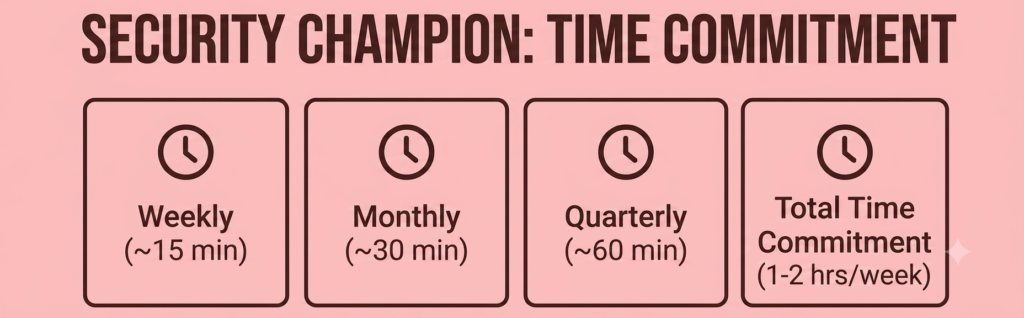
Managing a nonprofit cybersecurity budget comes down to one thing: the most common failure mode isn’t a bad tool – it’s good tools that nobody checks. The solution is designating one non-technical staff member (an Operations Director, Office Manager, or Program Lead works well) as the internal Security Champion. This person doesn’t troubleshoot servers. They manage dashboards, verify automated reports, and handle basic access changes. The time commitment is realistic: roughly 1-2 hours per week, most of which is automated summary review.
Weekly, Monthly, and Quarterly Checklists
The Security Champion follows a simple recurring cadence:
Weekly (~15 minutes):
- Review the Topsec quarantine dashboard and release any legitimate flagged emails
- Check Bitdefender GravityZone to confirm all endpoint agents are active and updated
- Verify that Afi.ai sent a successful daily backup confirmation email
Monthly (~30 minutes):
- Audit Microsoft 365 user accounts – disable departed staff, reallocate licenses
- Review Bitwarden vault health reports and confirm all staff accounts are enrolled
- Check CyberHoot training completion rates and reassign anyone who missed a module
Quarterly (~60 minutes):
- Review CISA weekly scan reports and coordinate with the web host on any flagged vulnerabilities
- Run a test file restoration in Afi.ai to confirm backup recovery actually works
- Audit global admin roles in Microsoft 365 and Cloudflare; verify FIDO2 keys are assigned correctly
Under $100 Per Person Annually – If You Start Now
This is what a realistic nonprofit cybersecurity budget looks like: $1,492.50 total for a 15-person organization – just under $100 per person per year. For comparison, industry benchmarks put managed IT support for a 15-person nonprofit at $1,500 to $3,750 per month. This stack doesn’t replace that kind of support entirely, but it gives organizations without that budget a defensible, structured alternative that covers the most common attack paths: credential theft, endpoint compromise, phishing, data loss, and weak authentication.
Any nonprofit cybersecurity budget built today has to account for the Microsoft licensing shift already affecting organizations at 2026 renewal dates. Email threats are not slowing down. And the free federal resources from CISA are sitting unclaimed by most nonprofits that qualify. The tools exist. The discounts exist. Building a nonprofit cybersecurity budget just takes someone deciding to use them.
For nonprofits looking for guided support building a nonprofit cybersecurity budget from the ground up, TechEd Shield helps non-technical leaders put practical systems in place – step by step, without the jargon.