

Key Takeaways
- 46% of confirmed data breaches affect small and mid-sized businesses, and an unsecured WiFi network is often the entry point attackers exploit first.
- Consumer-grade routers running static shared passwords leave SMB networks wide open to credential theft, rogue access points, and lateral movement attacks.
- WPA3-Enterprise with 802.1X authentication is the current gold standard for business wireless security – and it’s more accessible to SMBs than most realize.
- Seven platforms stand out for SMB use in 2026, each suited to a different IT budget and team size – from Cisco Meraki MR for lean teams to Ubiquiti UniFi Enterprise for cost-conscious owners.
- A free network safety check can reveal exactly where your wireless setup is exposed before attackers find it first.
Business WiFi security tools are no longer a “nice to have” for small and mid-sized businesses. The difference between staying open and shutting down often comes down to how well the wireless network is protected. This guide breaks down the encryption standards that matter, the attack vectors most SMBs overlook, and seven platforms built to handle the threat.
Small and Mid-Sized Businesses Are a Prime Target – and WiFi Is the Front Door
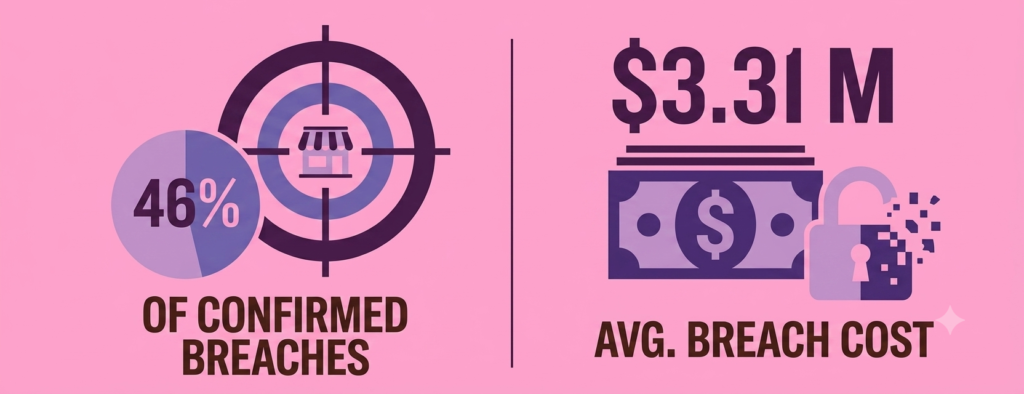
The case for business WiFi security tools starts with the numbers: 46% of confirmed data breaches affect small and mid-sized businesses. According to IBM’s Cost of a Data Breach Report, the average cost of a breach for organizations under 500 employees is $3.31 million – a hit severe enough that some businesses never recover financially. These aren’t just statistics; they represent real businesses, real owners, and real consequences.
This is exactly why business WiFi security tools matter so much: WiFi is everywhere, often misconfigured, and rarely monitored. Unlike a locked server room, a radio signal bleeds through walls, into parking lots, and across neighboring spaces. An attacker doesn’t need to walk through the front door – they just need to be within range. Before comparing platforms, it’s worth confirming whether your team actually needs a firewall, a VPN, or both — see our firewall or VPN for small business breakdown.
TechEd Shield’s free WiFi security checker is a practical starting point for any SMB owner who wants to know exactly where their wireless network stands before a breach forces the answer. Understanding current exposure is the first step toward fixing it.
Why Consumer-Grade WiFi Fails SMBs
Without dedicated business WiFi security tools, the core problem isn’t budget – it’s architecture. Most small businesses start with a consumer router, set a single shared password, and never revisit it. That setup works fine for streaming video at home. It doesn’t hold up for a business handling customer payment data, employee credentials, or proprietary records.
Static PSKs: A Credential Harvester’s Dream
Understanding PSK weaknesses is fundamental to choosing the right business WiFi security tools. A static Pre-Shared Key (PSK) means every device on the network uses the same password. When one device is compromised – an old laptop, a contractor’s phone, a forgotten IoT sensor – the attacker gains access to everything. There’s no way to revoke access for just that one device without changing the password for the entire network, which means re-credentialing every printer, camera, terminal, and workstation.
This is why credential harvesting is so effective against SMBs. Fake login portals, packet sniffers, and offline dictionary attacks all exploit the same fundamental weakness: one shared secret protecting everything.
KRACK, Evil Twins, and Rogue APs in Unsegmented Networks
Static passwords aren’t the only exposure. WPA2 networks are still vulnerable to Key Reinstallation Attacks (KRACK), a documented exploit that forces a device to reuse cryptographic keys – allowing an attacker to replay, decrypt, and forge network traffic. Evil Twin attacks involve setting up a rogue access point that mimics a legitimate business SSID, tricking devices into connecting to attacker-controlled hardware.
In a flat, unsegmented network – where guest devices, employee laptops, point-of-sale terminals, and smart office hardware all share the same broadcast domain – a single compromised device can reach everything else. A real-world example: a small salon suffered a POS breach because its guest WiFi shared the same network as its payment system. This exact scenario is common enough in retail to deserve its own breakdown — see our guide to securing guest WiFi vs. POS on your retail network. Ecommerce sellers face a version of the same segmentation problem on the wired side — see 9 ecommerce security risks PCI compliance leaves unprotected. Malware from a customer’s infected phone reached the card reader with nothing blocking its path.
The Encryption Standards That Actually Matter
WPA3-Enterprise vs. WPA2-Enterprise
Encryption standards are where business WiFi security tools start to differ meaningfully. Both WPA2-Enterprise and WPA3-Enterprise use 802.1X authentication – meaning devices authenticate against a RADIUS server using individual credentials or certificates rather than a shared password. Getting that authentication layer wrong is just as common as skipping it — see 5 MFA setup mistakes that quietly leave small businesses exposed. That’s a significant upgrade over WPA2-Personal. WPA3-Enterprise goes further in three important ways.
First, it makes Protected Management Frames (PMF) mandatory. In WPA2, management frames – the packets that handle device association, disassociation, and deauthentication – were unencrypted by default, leaving them open to spoofing attacks. WPA3 closes that gap entirely. Second, WPA3 upgrades the key derivation process using HMAC-SHA-256, replacing the weaker HMAC-SHA-1 used in WPA2. Third, for high-security environments, WPA3-Enterprise’s optional 192-bit mode adds GCMP-256 data encryption, ECDH key exchange on P-384, and BIP-GMAC-256 management frame protection – a cryptographic profile aligned with the Commercial National Security Algorithm (CNSA) Suite and NIST SP 800-187 guidance for high-assurance wireless deployments.
Enhanced Open (OWE) for Guest Networks
Guest networks have historically been unencrypted open SSIDs – meaning anyone with a wireless adapter in promiscuous mode could passively capture every packet transmitted. Enhanced Open, defined under RFC 8110, solves this through Opportunistic Wireless Encryption (OWE). During the initial connection, the client and access point perform an Elliptic Curve Diffie-Hellman key exchange directly within the association frames, establishing a unique encrypted tunnel per session – no password required, no friction for the guest.
OWE does not authenticate the network’s identity, so it does not prevent Evil Twin attacks on its own. Supplementary controls are still needed, but OWE eliminates passive eavesdropping entirely – a significant improvement over legacy open networks.
The Hidden Danger of WPA2/WPA3 Transition Mode
Many businesses enable WPA2/WPA3 mixed mode to support older hardware – legacy printers, specialized equipment, older laptops – while rolling out WPA3. Mixed mode creates a downgrade attack surface. A rogue AP broadcasting only WPA2 capabilities can coerce a WPA3-capable device into connecting over the weaker protocol, re-exposing it to KRACK and offline dictionary attacks. Transition mode should be treated as a temporary migration bridge, not a permanent configuration.
What Every Business WiFi Platform Must Do
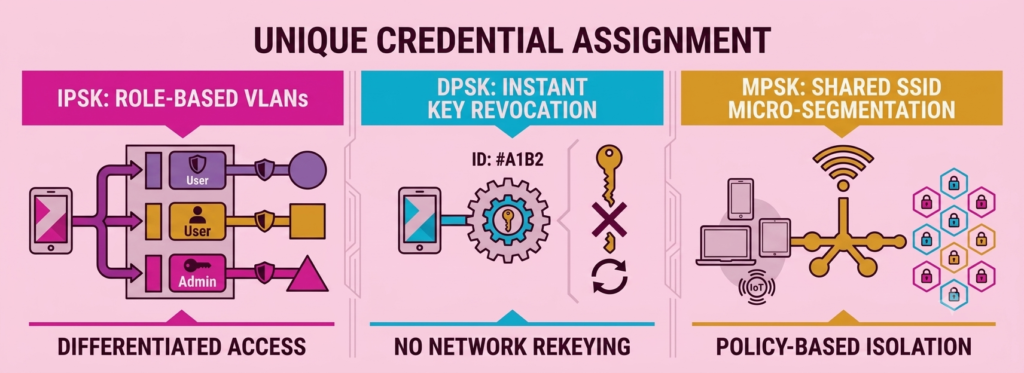
Three capabilities separate real business WiFi security tools from consumer-grade wireless platforms. A Wireless Intrusion Prevention System (WIPS) continuously scans the RF environment, identifying and neutralizing rogue APs, Evil Twins, and unauthorized clients in real time. Dynamic Pre-Shared Keys (DPSK) – sometimes called IPSK, MPSK, or PPSK depending on the vendor – assign unique passphrases or credentials per device or user, so revoking one compromised device doesn’t affect anyone else. Zero Trust Network Access (ZTNA) enforces the principle that no device is trusted by default; every access request is validated against current identity, device health, and policy before resources are granted. VLAN segmentation rounds out the picture by isolating guest traffic, IoT devices, and corporate endpoints into separate broadcast domains. This is the same principle a formal review checks on the wired network — see the 7 critical areas a small business security audit covers.
7 Business WiFi Security Platforms Evaluated
| Platform | Best For | Key Differentiator | Main Limitation |
|---|---|---|---|
| Cisco Meraki MR | Lean IT teams, 50-250 users | Dedicated Air Marshal WIPS radio; zero-touch provisioning | Mandatory per-device cloud license; higher long-term TCO |
| HPE Aruba Networking Central | Growing mid-sized SMBs | AI Insights (DPI + spectrum telemetry); Cloud Auth via Entra ID/Google Workspace | Advanced config (NetConductor, gateway tunneling) needs network engineering skill |
| WatchGuard Secure WiFi | Most accurate WIPS detection | Detects 6 threat categories; overlay sensors work with existing hardware | Fragmented management without a WatchGuard Firebox appliance |
| Ruckus Wireless | Certificate-based BYOD onboarding | Cloudpath PKI automation; time-bound DPSK per MAC address | High complexity: CA setup, AD/LDAP integration |
| Ubiquiti UniFi Enterprise | Budget-conscious SMBs | No recurring licensing fees; WPA3-Enterprise on Wi-Fi 6/6E/7 hardware | No dedicated WIPS radio — relies on periodic scans, not continuous monitoring |
| Fortinet FortiAP | Existing FortiGate firewall users | Inline DPI/IPS via FortiGate; zero additional per-AP fees for FortiGate users | Significantly reduced capability standalone (no FortiGate controller) |
| Sophos Wireless | Businesses already on Sophos endpoint security | Security Heartbeat — auto-isolates compromised endpoints network-wide | Value depends on existing Sophos endpoint investment |
Cisco Meraki MR: Best for Lean IT Teams
Cisco Meraki MR access points run a cloud-managed architecture centered on the Meraki Dashboard. Security is handled by Air Marshal, a dedicated third scanning radio built into tri-radio MR hardware that performs continuous WIPS without reducing throughput on client-serving radios. Identity PSK (IPSK) assigns unique passphrases per user or device category on a single SSID, dynamically mapping sessions to VLANs via Layer 3-7 stateful firewall policies at the AP edge. Zero Touch Provisioning (ZTP) means physical installation requires little more than plugging the AP into a PoE port. The trade-off is a mandatory per-device cloud license – hardware goes dark if the license lapses – and higher long-term TCO. Best suited to SMBs with 50-250 users and limited in-house IT expertise.
HPE Aruba Networking Central: Best AI-Driven Security
HPE Aruba Networking Central manages ArubaOS 10 access points through a cloud-native platform with built-in AI telemetry. Cloud Auth integrates directly with Microsoft Entra ID and Google Workspace, replacing shared passwords with OAuth/SAML workflows. Multi-PSK (MPSK) assigns unique keys per device, and Central NetConductor enforces role-based access control using VXLAN-GBP tags across the network. The AI Insights engine uses deep packet inspection (DPI) and spectrum telemetry to surface anomalies before they escalate. Advanced configurations – particularly custom NetConductor policy matrices and gateway tunneling – require network engineering expertise, making this platform better suited to growing mid-sized SMBs than very small operations.
WatchGuard Secure WiFi: Best WIPS Accuracy
WatchGuard Secure WiFi is built around a patented WIPS engine that adheres to the Trusted Wireless Environment security standard. Access points can operate as active client-serving APs, dedicated WIPS scanning sensors, or overlay sensors layered on top of existing third-party WiFi infrastructure – making it possible to add enterprise-grade intrusion prevention without replacing current hardware. The platform automatically detects and neutralizes six threat categories: Evil Twins, rogue APs physically connected to the LAN, neighbor/unauthorized AP connections, rogue clients, ad-hoc networks, and misconfigured APs. Integration with WatchGuard AuthPoint MFA extends Zero Trust enforcement to the wireless edge. The main limitation is a fragmented management experience when deployed without a WatchGuard Firebox appliance.
Ruckus Wireless: Best for Certificate-Based Onboarding
Ruckus Wireless pairs high-density RF performance with the Ruckus Cloudpath Enrollment System, a PKI onboarding engine that automates 802.1X x509 digital certificate issuance for BYOD and corporate devices. Dental practices need this same certificate-based authentication to meet HIPAA’s device identity requirement — see our HIPAA-compliant WiFi for dental offices: secure setup guide. Its patented Dynamic PSK (DPSK) generates unique, time-bound passphrases bound to individual MAC addresses – a compromised key is revoked instantly without affecting other users. BeamFlex+ adaptive antenna arrays deliver superior RF propagation in challenging physical environments. Cloudpath configuration – particularly Certificate Authority setup, Active Directory/LDAP integration, and custom provisioning workflows – carries a high complexity overhead. Entry costs and administrative burden make this platform a stronger fit for mid-market SMBs, education, and hospitality than for very small teams.
Ubiquiti UniFi Enterprise: Best for Budget-Conscious SMBs
Ubiquiti UniFi Enterprise runs on the license-free UniFi Network platform – no recurring per-device software subscriptions, no cloud management fees. Medical offices in particular benefit from its local-only data handling — see our HIPAA-compliant WiFi for medical offices without an IT team for how that affects BAA requirements.Hardware supports WPA3-Enterprise and WPA3-Personal (SAE) across its Wi-Fi 6, 6E, and Wi-Fi 7 access point lineup. Private Pre-Shared Key (PPSK) assigns individual passwords per user on a shared SSID, dynamically mapping each to a designated VLAN. 802.1Q VLAN tagging, Layer 3 inter-VLAN firewall rules, and automated guest isolation provide solid network segmentation. The primary limitation is the absence of a dedicated WIPS scanning radio – rogue AP detection relies on periodic background radio sweeps rather than continuous monitoring. For budget-conscious SMBs willing to trade some detection speed for a dramatically lower TCO, UniFi is the strongest value proposition in this category.
Fortinet FortiAP: Best for Existing FortiGate Users
FortiAP access points integrate directly into the Fortinet Security Fabric, managed by FortiGate Next-Generation Firewalls over encrypted CAPWAP tunnels. All wireless traffic flows through FortiGate’s inline Deep Packet Inspection (DPI) and Intrusion Prevention System (IPS) engines – a level of inspection most wireless platforms can’t match natively. FortiClient agents on endpoint devices feed continuous health telemetry back to the controller, enabling posture-based ZTNA decisions and automated wireless quarantine on malware detection. For SMBs already running FortiGate firewalls, there are zero additional per-AP management license fees. Deployed standalone via FortiCloud without a physical or virtual FortiGate controller, the security capabilities are significantly reduced.
Sophos Wireless: Best for Endpoint-Integrated Security
Sophos Wireless, managed through Sophos Central, is defined by its Security Heartbeat framework – a continuous health-status link between connected endpoints running Sophos Endpoint protection and the access point layer. If an endpoint’s health status degrades, indicating active infection or compromise, the AP automatically isolates that device from the network without waiting for manual intervention. The platform supports WPA3-Enterprise, WPA3-Personal, dynamic VLAN steering, guest isolation, and rogue AP detection. For SMBs already invested in Sophos endpoint security, this creates a tightly integrated defense where the wireless layer and the device layer respond as a single system.
Seven platforms, seven different situations. Answer two questions to get a starting recommendation.
Which WiFi Platform Fits Your Business?
Answer 2 questions to get a starting recommendation.
Match this against the complexity guidance below before committing — the best platform on paper is still the wrong one if your team can’t configure it correctly.
How to Choose the Right Platform for Your SMB
Matching Platform Complexity to IT Capacity
When evaluating business WiFi security tools, the most secure platform is the one that actually gets configured correctly. Matching platform complexity to IT capacity is one of the most overlooked steps when choosing business WiFi security tools. An under-resourced IT team that deploys Ruckus Cloudpath without PKI expertise will end up with a misconfigured certificate authority – which is arguably worse than a simpler, properly deployed alternative. Cisco Meraki MR and Ubiquiti UniFi Enterprise are both designed to be managed by generalist IT personnel. WatchGuard, Aruba, Ruckus, Fortinet, and Sophos each carry higher configuration complexity and deliver more in return for teams with the skills to match.
Licensing Models and Total Cost of Ownership
Total cost of ownership for business WiFi security tools goes beyond hardware – hardware cost is only part of the picture. Meraki, Aruba Central, WatchGuard, and Ruckus all require ongoing per-device or per-user subscription licenses – costs that compound over multi-year deployments. Fortinet FortiAP eliminates per-AP management fees for existing FortiGate users. Ubiquiti UniFi carries no recurring management licensing at all, making it the lowest long-term TCO option for small SMBs. Canadian businesses have a comparable no-cost option at the DNS layer with CIRA Canadian Shield — see our guide to cyber security for small business with no IT team in Canada. Before committing to any platform, map out the three-to-five-year total cost including hardware refresh cycles, license renewals, and implementation labor.
Your WiFi Is an Attack Surface – Secure It Now
This is why business WiFi security tools are no longer optional: wireless security is a live exposure that attackers are actively probing. Static shared passwords, unmonitored access points, flat unsegmented networks, and legacy WPA2 configurations are not theoretical risks. They are the mechanisms behind real breaches at real small businesses, right now.
Business WiFi security tools exist at every budget level, and the path from vulnerable to defended is clearer than it’s ever been. Start with an honest assessment of the current network, match the platform to the team’s actual capacity, prioritize WPA3-Enterprise and VLAN segmentation on day one, and treat WIPS as a non-negotiable operational control – not an optional upgrade. If you’re starting from router-level basics rather than a full platform deployment, see our small business WiFi security checklist: 8 fixes that matter.
For SMB owners and IT leads ready to evaluate business WiFi security tools for their own network, start with our roundup of cybersecurity tools for small businesses with no IT team for the rest of the stack, or take the Free Cybersecurity Health Check to see exactly where your setup stands before you invest in new hardware.