

Key Takeaways
- Small businesses face roughly four times more confirmed breaches than large organizations, with ransomware present in 88% of SMB breaches – and the average cost to recover from a single incident can reach $1.24 million in 2025.
- The most effective cybersecurity tools for small businesses work automatically, requiring little to no technical management after setup.
- Endpoint protection, smart firewalls, identity tools, and security awareness training together cover the most common ways attackers get in.
- One of the biggest – and most overlooked – risks is not your software. It is your employees. The right training changes that.
- You do not need an IT team or a big budget to build solid protection. The right cybersecurity tools for small businesses can close most of these gaps — starting with even one from this list puts you ahead of most.
Running a small business already means wearing a dozen hats. Cybersecurity usually ends up at the bottom of the pile – until something goes wrong. This guide covers seven specific cybersecurity tools for small businesses that protect your operation without requiring a technical background or a dedicated IT hire. These map closely onto what a formal review checks — see the 7 critical areas a small business security audit covers.
Small Businesses Face a Disproportionate Share of Attacks – Here’s What’s at Stake
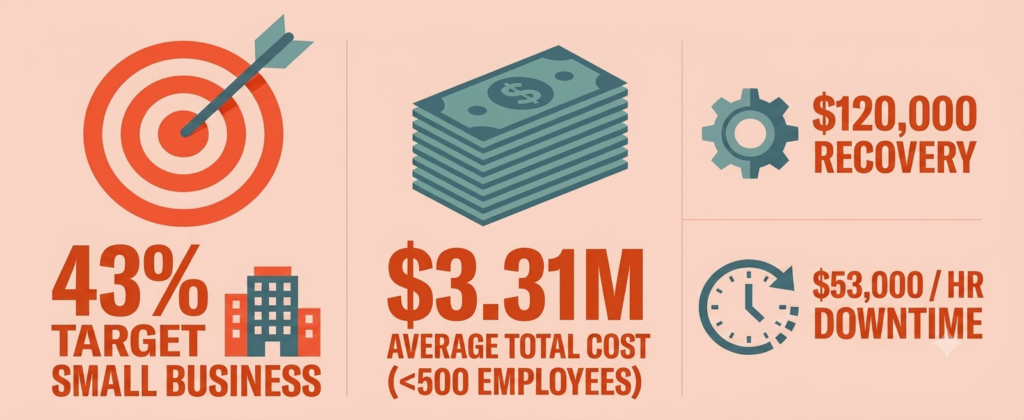
Small businesses face a disproportionate share of cyberattacks. Not because attackers have something personal against them – but because small businesses are easier targets. Fewer defenses, smaller budgets, no dedicated security staff. Attackers know this, and they exploit it.
The numbers are hard to ignore. In 2025, the average cost to respond to and resolve a single security incident for a small business ranges from $120,000 to $1.24 million. The median ransomware payment alone was $115,000 in 2025 – and that excludes recovery costs, which can average $1.53 million once downtime and remediation are factored in. Even more alarming: Verizon’s 2025 DBIR puts real bankruptcy risk after a cyberattack at around 19% for small businesses, and 40% of owners say an attack costing $100,000 or less would put them out of business. A serious breach can be a business-ending event.
Resources like TechEd Shield exist specifically to help non-technical business owners understand these risks in plain language and take real steps to address them – without needing to become a cybersecurity expert first.
Why Automated Tools Are the Only Realistic Option
Most small business owners do not have time to monitor security dashboards, interpret threat logs, or manually update firewall rules. The only tools worth considering are ones that work in the background – detecting, blocking, and responding to threats automatically.
Automated, cloud-managed cybersecurity tools for small businesses are genuinely effective. They receive real-time updates, do not rely on someone remembering to run a patch, and alert you only when something actually needs attention. The goal is to remove the most common attack paths with as little ongoing effort as possible.
Stop Threats at the Door: Endpoint Protection
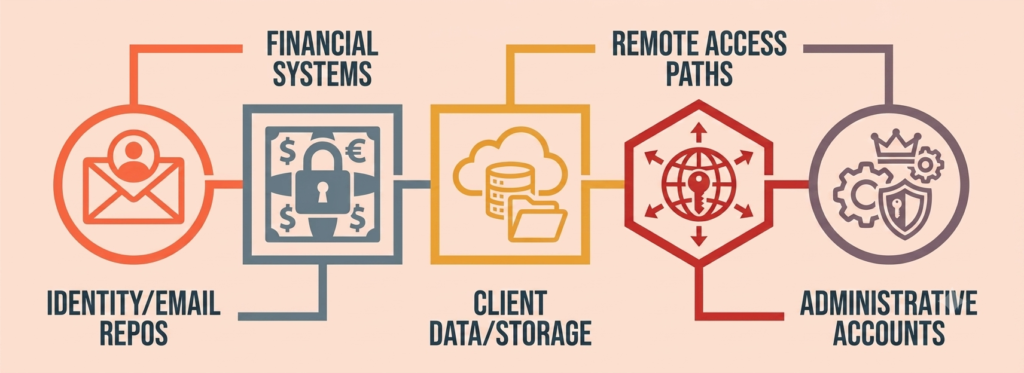
Every device connected to your business – laptops, desktops, phones – is a potential entry point. Among cybersecurity tools for small businesses, endpoint protection software is often the first line of defense: it monitors those devices, blocks malicious activity, and responds to threats before they spread. Two tools stand out for small businesses specifically.
CrowdStrike Falcon Go
CrowdStrike Falcon Go is built for small businesses that want serious protection without the complexity. Instead of relying on outdated virus signature databases, it uses behavioral AI to spot threats as they happen – including ransomware and zero-day attacks that traditional antivirus would miss entirely.
Setup is straightforward: a single lightweight agent installs across devices with minimal performance impact. All management happens through a cloud dashboard – no servers, no manual updates. Pricing is straightforward and budget-friendly (see comparison table below for exact figures). Device control is included, which means USB drives can be restricted on company machines – a simple but effective way to block a common data theft method. For online sellers, tools like this also directly affect underwriting — see cyber insurance for online sellers: is $1,500 a year worth it?
Microsoft Defender for Business
For businesses already on Microsoft 365, Microsoft Defender for Business is the most friction-free option available. Protection is built directly into Windows and the Microsoft 365 admin portal, so there is no separate agent to deploy. When a threat is detected, its Automated Investigation and Response (AIR) engine handles everything – isolating the affected endpoint, revoking credentials if needed, and restoring clean system states. All of this happens in real time, even overnight when no one is watching.
Pricing scales with your existing Microsoft 365 plan (see comparison table below for specifics).
Your Network Needs More Than a Wall: Smarter Firewall Options
Cloud-Managed vs. On-Premise: What Changes for You
Traditional hardware firewalls sit in your office, protect what is physically on your network, and need someone to manually update and configure them. That model worked when everyone was in one building. It does not hold up as well when employees are remote, business systems live in the cloud, and threats are constantly shifting.
Cloud-managed firewalls – sometimes called Firewall-as-a-Service – deploy virtually, update automatically with real-time threat intelligence, and are managed through a simple web dashboard. No rack hardware, no firmware scheduling, no on-site expertise required. For a small business without IT staff, that difference is significant — it’s exactly the kind of gap the right cybersecurity tools for small businesses are designed to close.
Cisco Meraki Go and Aruba Instant On
For businesses with a physical office and under 50 employees, two options make network security genuinely approachable.
Cisco Meraki Go is designed for micro-businesses – retail shops, small offices, service locations. Setup takes under 10 minutes through a mobile app, there are no recurring licensing fees, and no networking knowledge is required. The trade-off is simplicity: it does not offer deep application filtering or complex routing. For basic, reliable network protection, it delivers.
Aruba Instant On is a comparable option at a similar price point, also targeting environments with fewer than 50 users. Mobile app setup, zero licensing costs, and minimal ongoing management make it one of the most cost-effective starting points available. For businesses that need dedicated wireless security beyond basic firewall protection — WPA3-Enterprise, rogue AP detection, network segmentation — see 7 business WiFi security tools built for exactly this.
Lock Down Every Login: Identity and Access Tools
Multi-Factor Authentication (MFA)
Stolen credentials are one of the most common ways attackers get into business accounts. A strong password alone is not enough – passwords get reused, leaked in breaches, and guessed. Ecommerce stores see this same weakness exploited at scale through credential stuffing against customer accounts — see 9 ecommerce security risks PCI compliance leaves unprotected. Multi-Factor Authentication (MFA) adds a second verification step, so even if a password is compromised, access is blocked without additional confirmation.
MFA should be enabled on every business account: email, banking, cloud storage, admin portals. If you’re in the middle of a cloud migration, see our 12-step cloud security checklist for where this fits into the full sequence. It’s one of the cheapest, highest-impact cybersecurity tools small businesses can deploy today. Authenticator apps like Microsoft Authenticator or Google Authenticator are more secure than SMS codes, which are vulnerable to SIM-swapping. That’s just one factor to get right – see the five most common small business MFA setup mistakes for the other four.
MFA is also a baseline requirement for most cyber insurance policies — see does cyber insurance require a pen test or vulnerability scan for what else insurers expect.
1Password Business for Credential Management
Weak and reused passwords are a widespread problem in small businesses, which is why password managers are consistently ranked among the most-recommended cybersecurity tools for small businesses. 1Password Business solves this with a zero-knowledge credential vault – meaning even 1Password’s own servers cannot read stored passwords. It generates strong, unique passwords for every account, monitors for compromised logins through its Watchtower dashboard, and lets teams share credentials securely without emailing passwords around. Deployment requires no server setup, and the business admin manages access centrally through a browser extension and mobile app.
Your Employees Are the Biggest Risk – and the Best Defense
What Effective Phishing Training Actually Looks Like
Social engineering – getting an employee to click a malicious link or hand over credentials – sits behind a significant portion of breaches. The median time between a phishing email arriving and someone clicking it is under 60 seconds. That is a human problem, not a technology one.
Annual compliance videos do not fix this. Effective training is continuous: short monthly modules, realistic simulated phishing emails sent without warning, and immediate feedback when someone clicks. The goal is building a reflex, not checking a compliance box.
KnowBe4, Huntress Managed SAT, and Wizer
Three of the more accessible cybersecurity tools for small businesses in this category make ongoing training manageable for a small team:
- KnowBe4 runs on AI-driven automation through its AIDA system, handling training scheduling and phishing simulations with minimal admin input. It has one of the largest libraries of training content available.
- Huntress Managed SAT is fully managed by security experts – ideal for businesses that want to hand off the entire training program. It uses story-driven animated episodes and only charges for active users.
- Wizer offers a free tier for smaller teams (see comparison table below for current Boost plan pricing). Nonprofits in particular can stretch a budget even further — see our nonprofit cybersecurity budget under $1,500/year for a full layered stack built on nonprofit-rate tools. Its short video-based lessons are built around real-world incidents, making the content feel relevant rather than abstract.
Around-the-Clock Monitoring Without Hiring Anyone: Huntress SOC
Even with the right tools in place, threats can still slip through. The question becomes: who is watching? For most small businesses, the honest answer is nobody – especially overnight or on weekends.
Huntress addresses this with a 24/7 human-led, AI-assisted Security Operations Center (SOC) that monitors endpoints, flags suspicious activity, and responds to confirmed threats on behalf of the business. It currently protects more than 5 million endpoints and 13 million identities across small and mid-sized businesses. Think of it as having a dedicated security analyst on call at all times, without the cost of a full-time hire — the kind of coverage that’s normally out of reach for small businesses without cybersecurity tools like this handling monitoring for them.
| Tool | Category | Price | Setup | Best For |
|---|---|---|---|---|
| CrowdStrike Falcon Go | Endpoint Protection | $59.99/device/year (up to 100 devices) | Single lightweight agent, cloud dashboard | Behavioral AI detection; includes USB device control |
| Microsoft Defender for Business | Endpoint Protection | $3.00/user/month (included free with Microsoft 365 Business Premium) | No separate agent; built into Microsoft 365 | Businesses already on Microsoft 365 |
| Cisco Meraki Go | Network / Firewall | No recurring licensing fees | Mobile app, under 10 minutes | Micro-businesses; basic, reliable protection (no deep app filtering) |
| Aruba Instant On | Network / Firewall | Zero licensing costs, similar price point to Meraki Go | Mobile app setup | Businesses under 50 users |
| 1Password Business | Identity / Password Management | Not specified in article | No server setup; browser extension + mobile app | Zero-knowledge vault; Watchtower breach monitoring |
| KnowBe4 | Security Awareness Training | Not specified in article | AI-driven automation (AIDA) | Largest training content library |
| Huntress Managed SAT | Security Awareness Training | Charges only for active users | Fully managed by security experts | Businesses wanting to hand off training entirely |
| Wizer | Security Awareness Training | Free tier; Boost plan ~$20-25/user/year (volume-based, confirm current rate) | Self-serve, short video lessons | Budget-conscious teams; real-incident-based content |
| Huntress SOC | 24/7 Monitoring | Not specified in article | Fully managed service | Businesses with no after-hours coverage; 5M+ endpoints protected |
Seven cybersecurity tools for small businesses, one question: which one do you actually need first? Pick your biggest concern below and get a straight answer.
Which Security Tool Should You Start With?
Pick your biggest concern right now.
Whichever tool you start with, the goal isn’t to deploy all seven at once. It’s to close your biggest gap this week, and the next one next month.
Covering All Bases Without an IT Team Is Possible – Start With One Tool Today
The combination of cybersecurity tools for small businesses outlined here – endpoint protection, a smart firewall, MFA and password management, phishing training, and 24/7 monitoring – addresses the vast majority of real-world threats small businesses face. None of these cybersecurity tools for small businesses require a technical background to set up or maintain. Most run automatically once they are in place.
The biggest mistake is waiting until something goes wrong. The cost of prevention is a fraction of the cost of recovery. If you’re weighing a full third-party audit alongside these tools, see what a small business security audit typically costs in 2026. Pick one of these cybersecurity tools for small businesses, get it running, and build from there. Solid protection does not happen all at once – it happens one layer at a time.
For a clear, step-by-step system to protect your business without needing technical expertise, TechEd Shield offers practical cybersecurity guidance built specifically for small business owners. Not sure which tool to start with? Take the free Cybersecurity Health Check to find your biggest gap first.
A note on pricing: Prices correct at time of writing. Always check current pricing before purchasing.