

Key Takeaways
- A Security-only Type I audit, achievable in 2 to 3 months, or 3 to 6 months once preparation is included, is the most realistic first step for a small business with no IT team
- Compliance automation platforms and managed advisory tools can replace much of the work a dedicated IT or GRC hire would otherwise do
- First-year SOC 2 costs for a small business can range from $40,500 to $87,000 once audit fees, tooling, and staff time are counted, with the total depending heavily on internal labour costs and which optional add-ons apply
- Six recurring pitfalls, from delayed offboarding to premature audit windows, cause most non-IT audit failures – each one is avoidable with the right routine
- Locking down passwords, devices, and vendor oversight covers most of the ground non-technical owners need before an auditor ever gets involved
SOC 2 for small businesses used to feel like something only big companies with in-house security teams could manage. That reputation is not entirely fair. With the right scope, the right tools, and a bit of planning, a small business with no IT department can walk through the same process and come out the other side with a report enterprise customers actually trust.
SOC 2 Is Achievable Without an IT Team
SOC 2 for small businesses starts with understanding what’s actually being evaluated: an independent assessment of how well a business protects customer data, built around the AICPA’s five Trust Services Criteria: security, availability, confidentiality, processing integrity, and privacy. For a company under 15 people without a dedicated IT, cybersecurity, or governance specialist, that list can look intimidating on paper. In practice, most of those criteria will not even apply to a first audit, and the ones that do can be handled through smart tooling rather than a full-time hire.
The real obstacle for small teams is rarely technical skill. It is usually a lack of time, unclear priorities, and the sense that compliance requires specialist knowledge nobody on staff has. TechEd Shield has long argued that most everyday business security comes down to getting a handful of basics right and keeping them consistent, and SOC 2 turns out to work on exactly the same principle. A business owner managing everything solo can get there, provided the audit scope, the tools, and the daily habits are set up correctly from the start.
The rest of this guide walks through how to do that: choosing the right scope, picking tools that do the heavy lifting, setting up the handful of controls that matter most, and avoiding the mistakes that trip up non-technical teams during the audit itself.
Picking the Right Scope From the Start
Scoping SOC 2 for small businesses correctly starts with the Security criterion, often called the Common Criteria. It covers logical access, perimeter defence, incident response, and governance, and it is mandatory for every audit regardless of size. The other four criteria – Availability, Confidentiality, Processing Integrity, and Privacy – are optional, and they should only be added if a customer contract explicitly demands them.
This distinction matters more than most first-time founders realise when planning SOC 2 for small businesses. Over-scoping the initial audit is one of the most common mistakes small companies make, and it tends to inflate auditing fees while adding controls nobody actually asked for. Availability might make sense if enterprise contracts mention uptime guarantees or disaster recovery service levels. Processing Integrity is rarely relevant unless the business runs complex transactional systems, and Privacy involves extensive data mapping that is usually best deferred until a customer specifically requires it. Sticking to Security alone for the first audit keeps the process lean and the auditor’s fieldwork focused.
Before you spend a dollar on an auditor or a compliance platform, it helps to see roughly what you’re signing up for. Scope and audit type are the two biggest levers on your final bill — use the estimator below to sketch out a realistic range for your business based on the criteria and audit path you’re considering.
SOC 2 Scope & Cost Estimator
Select your audit type and any extra Trust Services Criteria to see a rough first-year range.
Illustrative estimate only, based on the cost and timeline ranges discussed in this article. It is not a quote. Actual pricing depends on your vendor, team size, and which optional add-ons (penetration testing, MDM tooling, background check credits) you require.
These numbers are a starting point, not a quote — your actual spend will depend on the vendor you choose, your team’s internal labour costs, and how many optional add-ons you bring in. But as a directional check before you talk to an auditor or a sales rep, it should keep expectations grounded and help you avoid scoping in criteria you don’t actually need yet.
Type I vs Type II: Which Comes First
Choosing Type I or Type II is one of the biggest early decisions in SOC 2 for small businesses. A Type I report checks whether security controls are designed properly at a single point in time, essentially confirming that policies and configurations are structured the right way. A Type II report goes further, testing whether those same controls actually operated effectively over a sustained window, typically three to twelve months.
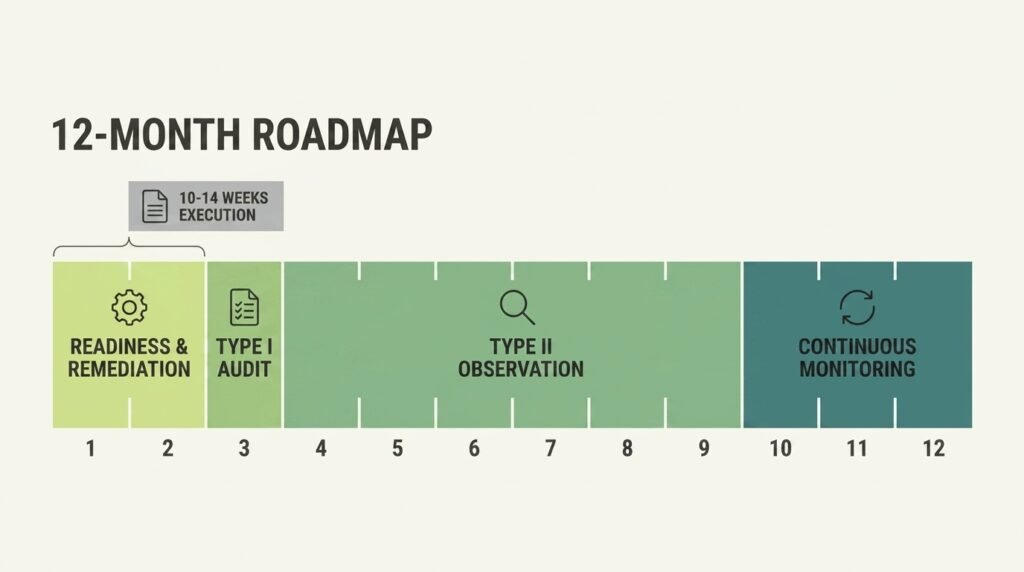
For a business without dedicated compliance staff, starting with Type I is almost always the smarter move. It can typically be completed in 2 to 3 months, or 3 to 6 months once preparation work is included, giving a business proof of security readiness fast enough to unblock a stalled sales conversation. Once that report is issued, the Type II observation window can begin immediately, letting the business build a track record of consistent controls without losing sales momentum in the meantime.
Letting Automation Do the Heavy Lifting
Automation is what makes SOC 2 for small businesses realistic without extra headcount. Manually tracking evidence in spreadsheets is exactly the kind of work that sinks a small team with no dedicated compliance person. Compliance automation platforms solve this by connecting directly to identity providers, cloud infrastructure, code repositories, and HR systems, then continuously pulling evidence and flagging configuration drift before it becomes an audit finding. For a closer look at these platforms specifically, see our breakdown of 7 SOC 2 compliance tools small businesses actually use. This shift from manual tracking to continuous monitoring is what makes SOC 2 realistic without extra headcount, and industry cost analyses show that compliance automation platforms can cut total SOC 2 costs by 30 to 50 percent through automated evidence collection and reduced manual work.
Software-Only Tools vs Managed Advisory Platforms
Not all automation platforms work the same way, and the difference matters a great deal for a non-technical owner. Broadly, two models exist:
- Software-only platforms act as a monitoring layer over existing infrastructure. Vanta offers one of the broadest integration libraries on the market and clean, template-driven onboarding, though features like vendor risk management often sit behind higher pricing tiers. Drata provides strong automated control mapping and AI-assisted questionnaire parsing but leans toward teams with some engineering capacity for custom configurations. These tools detect gaps and gather evidence, but they generally do not fix misconfigurations themselves – someone still has to do the remediation work.
- Managed advisory platforms bundle that same monitoring software with human consulting and, in some cases, the CPA audit itself. Sprinto pairs its platform with a dedicated compliance concierge who walks a team through setup step by step, which can compress readiness down to around 25 to 30 days. Thoropass runs a “connected audit” model that combines software, advisory support, and the formal CPA engagement under one contract, removing the need to source an auditor separately. Secureframe provides a similarly guided, plug-and-play experience backed by dedicated compliance managers.
Choosing a software-only tool without any internal technical support can quietly create hidden costs, since someone will eventually need to configure cloud logging, endpoint enforcement, and identity settings by hand. For a business with no IT team, a concierge-supported or connected-audit option often works out cheaper overall once that hidden remediation labour is accounted for.
| Platform | Model | Key Strength | Consideration |
|---|---|---|---|
| Vanta | Software-only | Broadest integration library on the market; clean, template-driven onboarding | Features like vendor risk management often sit behind higher pricing tiers |
| Drata | Software-only | Strong automated control mapping; AI-assisted questionnaire parsing | Leans toward teams with some engineering capacity for custom configuration |
| Sprinto | Managed advisory | Dedicated compliance concierge walks the team through setup step by step | Can compress readiness to roughly 25–30 days |
| Thoropass | Managed advisory | “Connected audit” model — software, advisory, and the CPA engagement under one contract | Removes the need to source an auditor separately |
| Secureframe | Managed advisory | Guided, plug-and-play experience backed by dedicated compliance managers | — |
Controls Any Non-Technical Owner Can Set Up
Written policies form the backbone of SOC 2 for small businesses – ten of them, covering areas like information security, acceptable use, access control, incident response, and data classification. These documents matter because auditors check that management has defined clear expectations before they ever test the technical evidence behind them. None of the ten require specialist drafting skills – most compliance platforms provide templates that only need light customisation for the business.
Locking Down Access and Devices
Identity and access management is where most of the weight in SOC 2 for small businesses sits, and it is also the area a non-technical owner can control most directly. Centralising every login around a single identity provider, such as Google Workspace or Microsoft Entra ID, and enabling single sign-on wherever possible removes the risk of forgotten or duplicate accounts. A password manager covers the handful of legacy tools that do not support SSO.
Current guidance from the National Institute of Standards and Technology’s SP 800-63B standard favours length over complexity, recommending a minimum of 8 characters for user-chosen passwords and at least 15 characterswhen a password is the only authentication factor, rather than forced complexity rules. It also advises against routine password expiry in favour of resets only when a compromise is suspected. Multi-factor authentication, ideally through an authenticator app or hardware key rather than SMS, should apply to every account with system access. This is one piece of a broader security picture — see our breakdown of the 7 critical areas a small business security audit covers for what a formal review checks beyond SOC 2 scope. Device security matters just as much: mobile device management software installed across company laptops can enforce full-disk encryption, automatic screen locks, and timely security updates without anyone needing to check each machine by hand.
Configuring Cloud Logging for Security and Availability
Cloud logging is another piece of SOC 2 for small businesses that’s easy to overlook. Cloud providers such as AWS, Azure, and Google Cloud Platform secure the physical infrastructure underneath a business, but the business itself remains responsible for how that infrastructure is configured and monitored. This is the shared responsibility model, and it applies directly to SOC 2.
Services like AWS CloudTrail, Azure Monitor, or GCP Cloud Audit Logs need to be switched on across every active region, with logs streamed into an isolated, encrypted storage bucket. These services cover infrastructure-level activity; a thorough audit may also call for application-level logging depending on the systems involved. A retention period of at least 365 days is generally recommended to cover the full observation window, though default settings on many platforms are shorter and need to be reconfigured. Alongside logging, encryption should be enabled by default across storage and databases, and backups should run automatically with a defined recovery window. None of this requires a computer science degree – it requires switching on settings that most cloud providers already offer, then documenting that they are switched on.
Managing Risk From Your Vendors
Vendor risk is a required piece of SOC 2 for small businesses. A small business rarely operates in isolation, and every SaaS tool, cloud utility, and outside contractor introduces its own security risk, and SOC 2 expects a business to manage that risk deliberately rather than assume it away. This means keeping a simple register of every vendor in use, sorting them by how sensitive the data they touch actually is, and reviewing the highest-risk ones, the ones with direct access to production systems or customer data, every year.
For vendors handling sensitive information, requesting their own SOC 2 report or an equivalent security assessment on an annual basis is standard practice. It is also worth checking a vendor’s SOC 2 report for any “complementary user entity controls” it lists – these are the security steps the vendor expects its customers to have in place on their end, and missing them can create a gap an auditor will notice even if the vendor itself is fully compliant.
Six Pitfalls That Sink Non-IT Audits
Understanding common pitfalls is essential to getting SOC 2 for small businesses right. Most audit failures come from operational gaps and inconsistent processes rather than a lack of technical safeguards. For a business with no dedicated compliance staff, a handful of predictable mistakes tend to repeat:
- Delayed offboarding. A departing employee’s main account gets revoked quickly, but access to a secondary tool lingers for days because it was not tied to single sign-on.
- Log retention gaps. Default log settings expire after a matter of weeks, well before an auditor requests evidence from deep inside a months-long observation window.
- Policies without enforcement. A written policy demands multi-factor authentication everywhere, but one account quietly bypasses it for convenience, and auditors treat known non-compliance far more harshly than an honest gap.
- Background checks completed too late. A new hire gets system access before their background check clears, creating a timing mismatch auditors flag immediately.
- Starting the Type II clock too early. Declaring the observation period open before controls are stable means the first stretch of the audit window is spent fixing infrastructure instead of collecting clean evidence.
- Undefined ownership. Nobody is clearly accountable for compliance tasks, so small gaps go unnoticed until an auditor finds them.
Each of these has a straightforward fix. Centralising access behind single sign-on, extending log retention before the audit clock starts, and running a short readiness check before declaring the observation window open all reduce the risk considerably.
What First-Year Compliance Really Costs
Budgeting properly for SOC 2 for small businesses avoids nasty surprises partway through the process. A compliance automation platform typically costs between $7,500 and $15,000 a year for a startup-tier plan. This is roughly in line with SOC 2 pricing in our broader breakdown of what a small business security audit costs in 2026, which also covers ISO 27001 and CMMC. CPA audit fees add another layer: a Type I examination generally runs $7,500 to $15,000, while a Type II audit costs more, usually $10,000 to $20,000, because it involves testing controls over a sustained period rather than a single point in time. External penetration testing typically adds $5,000 to $15,000 depending on testing depth, while MDM tooling, background check credits, and optional implementation consulting add further costs on top of these figures.
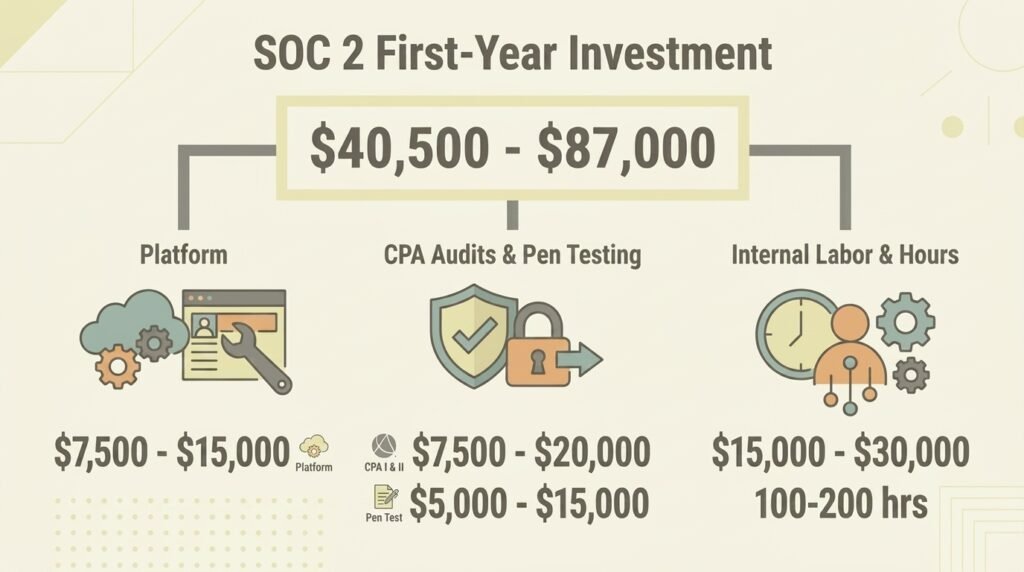
Once internal staff time is factored in, typically 100 to 200 hours of combined founder and team effort, the total first-year investment for a small business tends to fall somewhere between $40,500 and $87,000, depending heavily on internal labour costs and which optional add-ons (penetration testing, MDM tooling) apply. That figure covers platform licensing, CPA audit fees, security software, and the labour burden of getting everything ready. It is a meaningful outlay for a lean team, but it compares favourably against the cost of losing an enterprise deal over the absence of a report.
Compliance Is a System, Not a Specialist
SOC 2 for small businesses rewards consistency far more than it rewards technical brilliance. A business that keeps its access controls tight, its logging switched on, its vendor list reviewed, and its policies enforced day to day will sail through an audit that would trip up a team relying on last-minute scrambling. The scope stays manageable, the automation platform carries the evidence-gathering load, and the ten core policies give auditors exactly what they need to see.
Getting SOC 2 for small businesses right demands a clear order of operations, a bit of patience through the observation window, and the discipline to fix small gaps before they become audit findings, not a computer science background or a dedicated hire. For a business already thinking about its wider online presence, a good starting point is checking how secure its network security basics actually are before building a compliance programme on top of them.