

Key Takeaways
- Small medical practices account for more than half of all HIPAA fines – and weak password habits are one of the most common reasons why.
- HIPAA doesn’t name a specific password tool, but it does require written procedures for creating, changing, and protecting passwords under 45 CFR § 164.308(a)(5)(ii)(D), an addressable implementation specification that must be documented.
- A Business Associate Agreement (BAA) is legally required from any cloud vendor storing your credentials – even if they use zero-knowledge encryption.
- Bitwarden and Zoho Vault are currently the two major password managers that will sign a BAA, making them the safest choices for medical practices.
- Setting up a HIPAA-ready password manager doesn’t require an IT team – a one-time checklist and a simple monthly routine covers most of what regulators look for.
HIPAA password managers for small practices solve one of the most overlooked problems in running a medical office without a dedicated IT person. Add HIPAA compliance to the mix, and it can feel overwhelming. But password security – one of the most cited gaps in OCR audits – is actually one of the easiest problems to fix with the right tool and a clear plan.
Small Practices Are HIPAA’s Most Fined Targets
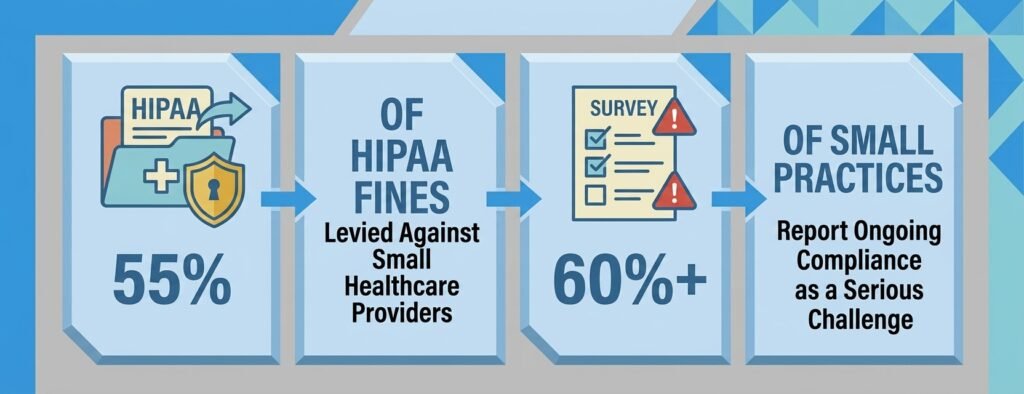
In 2022 (the most recent year with complete OCR breakdown data), 55% of HIPAA fines were levied against small healthcare providers, and more than 60% of small practices report that staying compliant is a serious ongoing challenge. The pattern is consistent: limited staff, shared logins, passwords written on sticky notes near terminals, and no formal process for what happens when an employee leaves.
These aren’t just bad habits – they’re regulatory violations. This is exactly why HIPAA password managers for small practices matter so much. The HHS Office for Civil Rights (OCR) knows exactly where to look, and one of the most frequently cited justifications for significant fines is the absence of a current risk analysis, which includes evaluating how credentials to EHR systems, payer portals, and diagnostic tools are managed. A well-configured password manager directly addresses most of these gaps – without needing anyone technical on staff.
For practices just getting started, TechEd Shield’s free password generator and strength checker is a practical first step toward understanding what strong credentials actually look like before rolling out a full solution.
What HIPAA Actually Requires for Passwords
HIPAA doesn’t explicitly name HIPAA password managers for small practices as a requirement. What it does say is more nuanced – and understanding that distinction matters.
Administrative Safeguards: Procedures, Not Prescriptions
Under the Security Awareness and Training standard at 45 CFR § 164.308(a)(5)(ii)(D), covered entities must establish formal procedures for creating, changing, and safeguarding passwords. This is an addressable implementation specification, meaning practices must either implement it or document an equivalent alternative – but it cannot simply be ignored. Practices also need to conduct periodic risk assessments that evaluate credential exposure and train their workforce on those procedures. A password manager gives those written policies something concrete to point to.
Technical Safeguards That Password Managers Satisfy
Several specific technical standards under 45 CFR § 164.312 map directly onto what a good password manager provides:
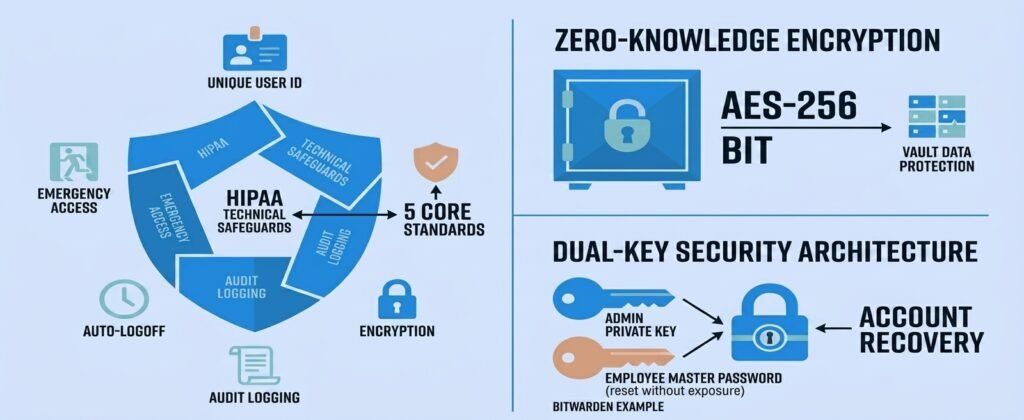
- Unique User Identification (§ 164.312(a)(2)(i)): Shared logins violate HIPAA. Password managers let every staff member have an individual account while still accessing shared credentials through controlled collections.
- Emergency Access Procedures (§ 164.312(a)(2)(ii)): Practices need a way to retrieve critical credentials during emergencies or after sudden staff departures – without compromising security.
- Automatic Logoff (§ 164.312(a)(2)(iii)): This is an addressable specification – practices should configure vaults to lock after a defined period of inactivity, or document an equivalent control, to prevent access at unattended workstations.
- Audit Controls (§ 164.312(b)): The system must record who accessed what, when, and from where.
- Encryption (§ 164.312(a)(2)(iv) and § 164.312(e)(2)(ii)): Encryption of credentials at rest and in transit is an addressable specification. While not an absolute mandate in every scenario, it is a critical safeguard that regulators expect to see implemented or formally justified using validated algorithms like AES-256.
Zero-Knowledge Plus a BAA: Why You Need Both
A lot of practices make a costly assumption about HIPAA password managers for small practices – that because a tool is “encrypted,” no paperwork is needed. That’s not how HIPAA works.
What Zero-Knowledge Architecture Actually Means
Understanding zero-knowledge architecture is essential when evaluating HIPAA password managers for small practices. Zero-knowledge means all encryption and decryption happens on the user’s device. The vendor’s servers only ever receive ciphertext – scrambled, unreadable data. Even if the vendor’s cloud were breached, subpoenaed, or compromised by an insider, the stored data would be meaningless without the master key that only the user holds. For a practice, this means patient data accidentally stored in a vault note can’t be read by the vendor or any attacker who reaches their servers. For the broader cloud-vs-self-hosted cost and risk trade-off behind this decision, see our cloud vs. self-hosted password manager guide.
Why HHS Still Requires a BAA Even With Encryption
The HHS Office for Civil Rights has been explicit: cloud service providers that store encrypted ePHI are Business Associates – even if they can’t decrypt it. A signed BAA is required regardless of the vendor’s architecture. Without one, the practice carries full legal liability for a strict-liability HIPAA violation, with civil penalties ranging from $145 to over $2.19 million per violation category (adjusted for inflation effective January 28, 2026). The BAA also legally obligates the vendor to report security incidents without unreasonable delay and within 60 days under § 164.410, and to submit to HHS audits.
6 Features That Make or Break HIPAA Compliance
Not all HIPAA password managers for small practices are built for regulated environments. These are the six capabilities that matter most for a small medical practice.
- Zero-Knowledge Encryption: AES-256 client-side encryption, with master keys generated locally and never stored on vendor servers.
- Multi-Factor Authentication (MFA): Required for all users before vault access, ideally via an authenticator app.
- Admin Account Recovery: A mechanism to reset a locked-out employee’s credentials without breaking zero-knowledge principles – critical when a nurse or receptionist forgets their passphrase.
Emergency Access Procedure
When a key employee is suddenly unavailable – whether due to illness, termination, or emergency – the practice still needs access to critical system credentials. A proper emergency access policy, backed by the password manager’s admin recovery tools, ensures clinical operations don’t stall while maintaining a clear audit trail of who accessed what and why.
Role-Based Access Control (RBAC)
RBAC is how practices enforce HIPAA’s “minimum necessary” standard at the credential level. Front desk staff shouldn’t have access to billing database passwords. Billing staff shouldn’t be able to reach the state prescription monitoring portal. Shared collections – segmented by department – let managers grant view-only, edit, or full-manage rights at a granular level, creating a clean, auditable permission structure.
Tamper-Proof Audit Logging
Audit logs are what an OCR investigator will ask for first. A compliant password manager tracks sign-in events, credential reveals, permission changes, item deletions, and failed authentication attempts – tied to timestamps and IP addresses. Reviewing these logs monthly and documenting that review is a concrete way to demonstrate the audit controls required under § 164.312(b).
Before you read another word, take 90 seconds to find out where your practice actually stands. The checklist below pulls the eight HIPAA safeguards regulators check first — score yourself honestly, and you’ll know exactly which sections below deserve your full attention.
HIPAA Password Manager Readiness Score
Check every box that’s already true for your practice.
Wherever you landed, the gap between your score and 100% is really just a punch list — and every item on it maps directly to a section below. The good news, as you'll see, is that closing these gaps doesn't require hiring anyone technical. It requires a BAA, a checklist, and about 30 minutes of onboarding per employee.
Top Password Managers: Which Sign a BAA?
When evaluating HIPAA password managers for small practices, the BAA question is the single fastest filter for suitability. Most major platforms fail it immediately.
BAA-Friendly Options: Bitwarden and Zoho Vault
Bitwarden (Teams and Enterprise plans) is open-source, regularly audited by third parties, and offers a BAA on its Enterprise tier to qualifying business customers, arranged through Bitwarden's sales team as part of setup. Its Account Recovery Administration policy solves the biggest operational headache in zero-knowledge systems: a locked-out staff member. When enabled, an administrator can reset an employee's master password using the organization's private key - without ever seeing the employee's private vault items. Pricing details for both tiers are summarized in the comparison table below.
Zoho Vault also executes a BAA upon request and adds a compliance-specific feature: administrators can explicitly tag custom fields as "ePHI," which automatically applies stricter access rules, masks the data in the interface, and restricts export. For practices that want a tighter compliance control layer, this is a meaningful advantage. Full pricing tiers are summarized in the comparison table below.
Platforms That Do Not Offer BAAs
1Password, Keeper Security, and Dashlane do not offer BAAs — though all three are strong options outside a healthcare context, as covered in our breakdown of the best password managers for small businesses in 2026. A practice can still use these platforms - but only if strict internal policies are enforced that prohibit any patient identifiers, MRNs, or clinical notes from ever entering a vault item. That's a meaningful compliance burden to manage and document, and it shifts all liability to the practice.
| Password Manager | Signs a BAA? | Pricing | Key HIPAA Feature |
|---|---|---|---|
| Bitwarden (Enterprise) | Yes | Teams: $4/user/mo · Enterprise: $6/user/mo (billed annually) | Account Recovery Administration — resets locked-out employees without exposing their private vault |
| Zoho Vault | Yes | Standard: ~$1/user/mo · Enterprise: ~$7–8/user/mo | Custom "ePHI" field tagging — masks data and restricts export |
| 1Password | No | Not specified in source article | Usable only with strict internal policy banning any patient data from vault entries |
| Keeper Security | No | Not specified in source article | Usable only with strict internal policy banning any patient data from vault entries |
| Dashlane | No | Not specified in source article | Usable only with strict internal policy banning any patient data from vault entries |
Setup and Ongoing Governance Without IT Staff
The biggest concern practice managers have about HIPAA password managers for small practices is that running one properly requires someone technical. It doesn't.
One-Time Setup Checklist
- Execute the BAA before inviting a single staff member.
- Create the admin account using a passphrase of four or more random words (e.g., Stethoscope-River-Pancake-Doctor). Print the emergency recovery key and lock it in a fireproof safe.
- Enable the Account Recovery Administration policy with automatic enrollment - do this before inviting staff, or locked-out employees can't be helped.
- Enforce MFA for all users via the organization settings.
- Set session timeout to 15 minutes of inactivity across all devices.
- Create shared collections segmented by department: Billing, EHR, Lab, Admin.
Weekly, Monthly, and Quarterly Maintenance
Weekly (5 minutes): Confirm browser extensions are updated across clinical terminals. Check for pending staff invitations in the admin dashboard.
Monthly (15-20 minutes): Export and review the event log. Look for failed logins, unusual IP addresses, and permission changes. Review any dark web breach alerts. Document this review in the practice's HIPAA compliance binder.
Quarterly (30 minutes): Compare active password manager seats against the current payroll list and remove any former employees. Audit shared collection permissions to confirm role assignments still match job functions.
On staff departure (same day): Revoke the employee's account in the admin console immediately. Rotate all passwords in any shared collections they had access to.
Getting Your Team to Actually Use It
Even the best HIPAA password managers for small practices don't help if staff find workarounds. Three things drive adoption in non-technical clinical environments.
First, frame it as a convenience tool, not a compliance burden. Staff only need to remember one master passphrase to access every portal they use - a genuine time-saver during busy clinic shifts. Second, enable biometric unlock (Touch ID or Face ID) on mobile devices and supported workstations - vault access in under two seconds removes the "it's slower" objection entirely. Third, show the anti-phishing benefit concretely: password manager browser extensions only autofill on exact domain matches. If a staff member clicks a malicious link disguised as an EHR login page, the extension simply won't fill in the credentials because the domain doesn't match - stopping one of the most common credential theft methods in healthcare.
A 30-minute onboarding session covers the full setup for any non-technical staff member: install the extension, create the master passphrase, import and save portal credentials, disable native browser password saving, collect and shred any written passwords, and walk through the lockout escalation procedure.
Your Vendor Touches ePHI - A BAA Is Non-Negotiable
This is the core rule behind HIPAA password managers for small practices: if a cloud vendor stores anything connected to the practice's credentials or patient data - even encrypted - and there is no signed BAA on file, the practice is exposed. Inadequate vetting of third-party vendors and outdated or missing BAAs are consistently cited in enforcement actions as grounds for significant penalties. Texas practices face this same requirement plus additional state-specific enforcement — see our cyber security firms for Texas medical practices & clinics guide. The BAA isn't a technicality. It's the contractual mechanism that legally obligates the vendor to maintain HIPAA-required safeguards, notify the practice of breaches, cooperate with HHS audits, and securely dispose of data when the relationship ends. Choosing a platform like Bitwarden or Zoho Vault that offers a BAA means shared legal accountability rather than the practice absorbing all of it alone. This BAA requirement sits inside a broader five-tool HIPAA compliance stack — see our HIPAA cybersecurity for small clinics: no-IT-staff buyer's guide.
For ongoing guidance choosing HIPAA password managers for small practices with clear, jargon-free steps, TechEd Shield provides cybersecurity education and practical tools built specifically for non-technical business owners. CPA firms face a comparable BAA-style vendor requirement under a different regulation — see our password managers for CPA firms: FTC Safeguards & MFA compliance guide.