

Key Takeaways
- Password-related breaches have long been one of the biggest risks small businesses face – and reusing the same password across accounts is a primary reason small businesses get hit.
- Password managers eliminate password reuse automatically, making credential stuffing attacks nearly impossible to execute successfully.
- Zero-knowledge architecture, when robustly implemented, means even the password manager company itself cannot see your stored passwords – your vault is private by design.
- Passkeys, now supported by many password managers, take security even further by replacing passwords entirely with cryptographic keys that are immune to phishing.
- Beyond security, a password manager simplifies onboarding, offboarding, and even compliance – benefits most small business owners don’t realize they’re getting.
One reused password. That’s often all it takes for a small business to experience a full account takeover, a data breach, or worse. The good news is that a password manager for small business owners closes this risk — one of the most common and costly in cybersecurity — without any technical background required.
Weak and Stolen Passwords Remain a Leading Cause of Breaches
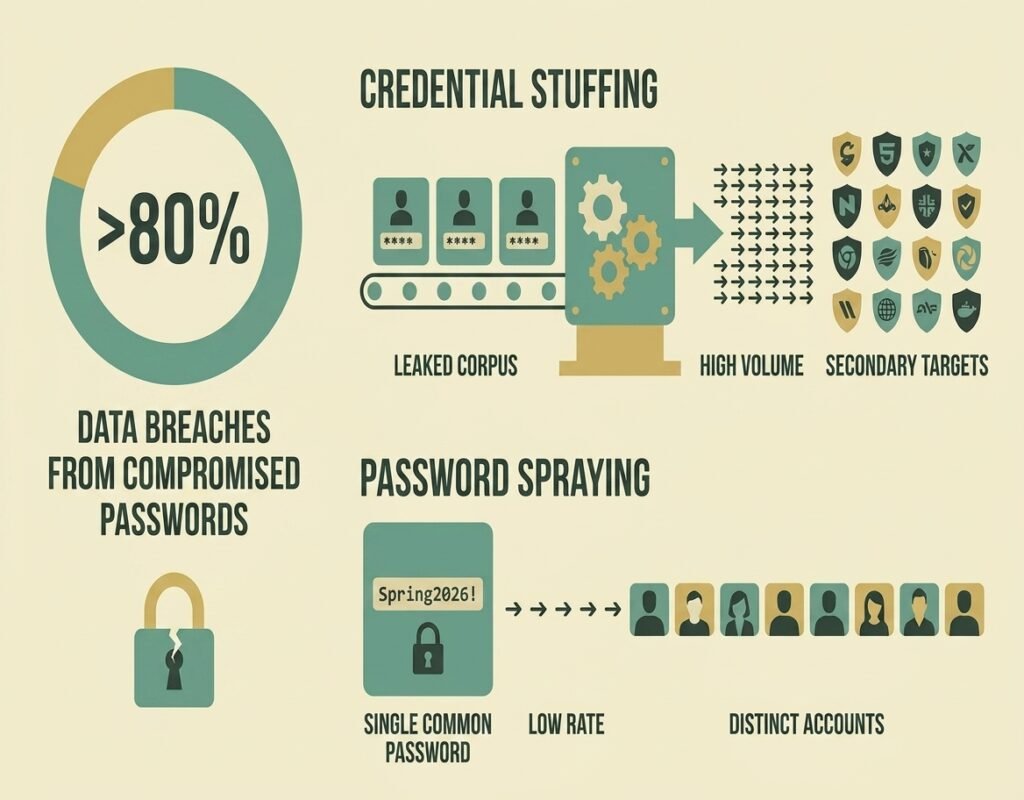
This isn’t a scare tactic – it’s a documented pattern. The Verizon Data Breach Investigations Report (DBIR) found in 2017 that 81% of hacking-related breaches leveraged stolen or weak passwords, a figure that held roughly steady (80%) as of the 2019 report. The 2026 DBIR shows the landscape shifting – software vulnerability exploitation (31%) has now overtaken stolen credentials (13-16%) as the top way attackers get in, the first time that’s happened in the report’s 19-year history. Even so, password reuse remains one of the most common and easily preventable ways attackers get in, and it’s still a habit almost everyone has: using the same password in more than one place.
Research from SpyCloud found a 70% password reuse rate among users whose credentials were already exposed in prior breaches, and a 2026 industry survey of small-to-midsize business employees found 76% admitted to reusing passwords at work. When one service gets breached – a shopping site, a forum, an old app – those credentials don’t just disappear. They get compiled into massive databases and sold or shared across criminal networks. From there, attackers run automated tools that test those leaked username-and-password pairs across hundreds of other services: banking portals, email accounts, payroll software. It’s called credential stuffing, and it runs at scale with almost no human effort required.
If even one employee reused a password from a breached service on a business account, the door is already open.
Why Small Businesses Are Easy Targets
No IT Team, No Safety Net
Large companies have dedicated security teams monitoring logins, flagging suspicious activity, and enforcing password policies across the organization. Small businesses almost never have that. There’s no one watching the dashboard, no automatic alert when an account gets accessed from an unusual location, and no policy forcing employees to use strong, unique passwords.
That gap is exactly what attackers exploit. Automated credential stuffing tools don’t discriminate by company size – they simply look for accounts where reused passwords work. Small businesses are disproportionately targeted because they tend to have fewer security controls, making them easier and faster to compromise.
How One Reused Password Opens Every Door
Think of it like a master key that fits multiple locks. If an employee uses the same password for their personal Netflix account, their work email, and the business’s accounting software, a breach at Netflix hands attackers potential access to everything else. No hacking required – just a login attempt that succeeds because the credentials match.
How Many Accounts Would One Breach Actually Expose?
The “master key” comparison earlier in this article isn’t an exaggeration — it’s math. Drag the slider below to see exactly what happens when one reused password gets caught in a breach. The number might be higher than you’d guess.
That's the entire mechanism behind credential stuffing in one number. Every account on that list becomes reachable the moment any one of them is compromised — and attackers don't need to guess which one, they just try all of them automatically. A password manager breaks this chain at the source: every account gets its own password, so the blast radius drops to exactly one, no matter what gets breached elsewhere.
What Credential Stuffing Actually Does to Your Business
Credential stuffing is an automated attack where hackers take stolen username-and-password pairs from one breach and use bots to test them across dozens of unrelated services simultaneously. The attack works entirely because of password reuse. If employees use unique passwords everywhere, credential stuffing produces zero results - the stolen credentials simply don't match anything else.
The business impact goes well beyond account access. A successful credential stuffing attack can mean stolen customer data, drained funds, fraudulent orders, or ransomware deployed through a compromised admin account. Recovery costs - legal fees, customer notifications, lost revenue - routinely far exceed what prevention would have cost.
The LinkedIn-Dropbox Breach: A Real-World Warning
In 2012, LinkedIn suffered a major data breach. Among the affected users was a Dropbox employee who had reused their LinkedIn password for their Dropbox work account. Attackers used that one reused credential to access Dropbox's internal systems, ultimately stealing approximately 68 million user credentials. The initial breach wasn't even at Dropbox - it was at a completely unrelated service. That's how far one reused password can travel, and Dropbox is a company with a dedicated engineering team. The risk for a small business with no monitoring in place is considerably higher.
How Password Managers Block These Attacks
Unique Passwords for Every Account, Automatically
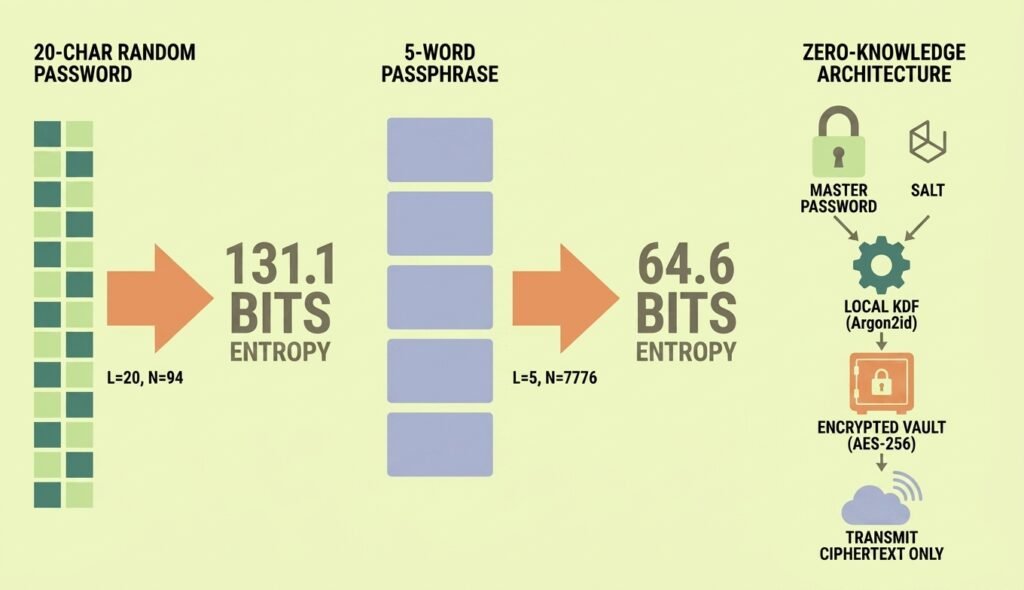
A password manager generates a long, random, cryptographically strong password for every account and stores it securely so no one needs to memorize it. A 20-character randomly generated password drawn from the full range of uppercase letters, lowercase letters, numbers, and symbols (about 94 characters) provides over 130 bits of entropy. To put that in perspective, cracking it with current computing power would take longer than the age of the universe.
Because every account gets its own completely different password, credential stuffing becomes mathematically useless. Even if one service gets breached, the stolen credentials work nowhere else. That's the core protection - and it requires zero effort from employees after initial setup.
For small business owners who want to start building stronger password habits right now, TechEd Shield offers a free password generator and strength checker that shows exactly what a strong password looks like before committing to a full solution.
Autofill That Refuses Fake Login Pages
Password managers don't just store passwords - they remember which website each password belongs to. When an employee visits a login page, the manager checks whether the site's address exactly matches the stored record before filling anything in.
This is quietly one of the most powerful phishing defenses available. A phishing email might send someone to login.micros0ft.com - a convincing fake. But the password manager sees an address that doesn't match login.microsoftonline.com and simply won't autofill. No credentials get entered. The attack fails, even if the employee didn't notice the difference themselves.
Zero-Knowledge Architecture: Your Vault Is Private by Design
A common concern with password managers is: what happens if the password manager company gets hacked? Zero-knowledge architecture is the answer.
Under this model, passwords are encrypted on the local device before anything is sent to the cloud. The encryption key is derived from the master password, which the company never receives or stores. What gets uploaded is an unreadable encrypted blob. In a robustly implemented zero-knowledge system, if a password manager's servers were ever breached, attackers would get nothing usable. The data is ciphertext without the key, and the key never leaves the user's device.
This means the vault is truly private. Not even the password manager provider can see what's inside. For small businesses storing sensitive credentials - banking, payroll, client portals - that architectural guarantee matters significantly.
Passkeys: Beyond Passwords Entirely
Why Passkeys Are Highly Resistant to Phishing and Direct Theft
Passkeys represent the next step beyond traditional passwords. Instead of a string of characters, a passkey uses a pair of cryptographic keys - one stored on the user's device, one held by the website. To log in, the device signs a challenge from the website using the private key. No password is ever typed, transmitted, or stored on a server.
What makes passkeys especially valuable is that they are origin-bound. The cryptographic signature incorporates the exact domain of the site being accessed. If an attacker tries to intercept the login through a fake site, the signature fails verification on the real server because the domain doesn't match. Phishing a passkey is, in practical terms, not possible. There's nothing to steal and nowhere to redirect.
Many modern password managers now store and sync passkeys across devices, giving small businesses access to this protection without requiring any hardware tokens or technical configuration. It's worth pairing this with a full phishing-resistant MFA rollout plan to cover logins a password manager doesn't touch.
Beyond Security: What Else Your Business Gains
Faster Onboarding and Offboarding
When a new employee joins, shared credentials for business tools can be granted through the password manager instantly - without emailing passwords or writing them in a shared doc. When someone leaves, access is revoked just as quickly. The departing employee loses the ability to log in to shared accounts the moment their vault access is removed.
This matters more than most small business owners realize. A common vulnerability is former employees retaining access to tools long after they've left, because changing every shared password manually is easy to forget and time-consuming to do correctly.
Compliance Made Simpler
For businesses operating under HIPAA, GDPR, FINRA, or similar frameworks, password management directly supports compliance requirements — regulated industries like accounting face an even more specific version of this under the FTC Safeguards Rule. Current federal guidance (NIST SP 800-63B) recommends password managers and autofill, and advises against mandatory periodic password changes in favor of changing passwords only when there's evidence of compromise. Strong, unique passwords across all accounts, access logs showing who had credentials and when, and the ability to enforce password policies organization-wide - these are exactly the controls that auditors and regulators look for. A password manager doesn't replace a compliance program, but it closes some of the most commonly cited gaps without requiring specialized expertise to implement.
A Password Manager Is Your Simplest High-Impact Security Win
Most security improvements require trade-offs: cost, complexity, or disruption to daily workflows. A password manager is the rare exception. It removes one of the highest-probability risks facing small businesses today, improves day-to-day convenience for employees, and adds layers of protection - phishing defense, breach monitoring, passkey support - that most businesses don't even realize they're getting. If you're ready to choose one, see how the top platforms compare on security, SSO, and true cost before committing to a plan.
The basics, done well, protect against the vast majority of attacks. Password reuse is one of the most exploited weaknesses in small business security, and a password manager eliminates it almost entirely. That's not a small upgrade - that's closing the door on one of the most common and longest-running attack methods small businesses face.
TechEd Shield helps small business owners implement practical, no-jargon cybersecurity systems - take the free Cybersecurity Health Check to see where your own password practices stand today.