

Key Takeaways
- Small businesses are the target in more than 40% of all cyberattacks – and remote work makes that exposure significantly worse.
- A traditional VPN is no longer sufficient protection; modern attacks bypass it entirely using phishing tricks and stolen session tokens.
- Phishing-resistant MFA (like FIDO2 security keys) and Zero Trust Network Access are now the baseline for any serious remote work security setup.
- Cyber insurers are making these controls mandatory – not optional – before they will issue or renew a policy.
- The steps in this checklist are designed to be implemented without a dedicated IT team, moving from quick wins to full protection.
This remote team security checklist for small business exists because running a distributed team without the right setup is like locking the front door but leaving the windows wide open. It walks through the controls that actually matter – cutting through the noise to focus on what stops real attacks against small businesses in 2025 and beyond.
Small Businesses Face Over 40% of All Cyberattacks – Remote Work Raises the Stakes
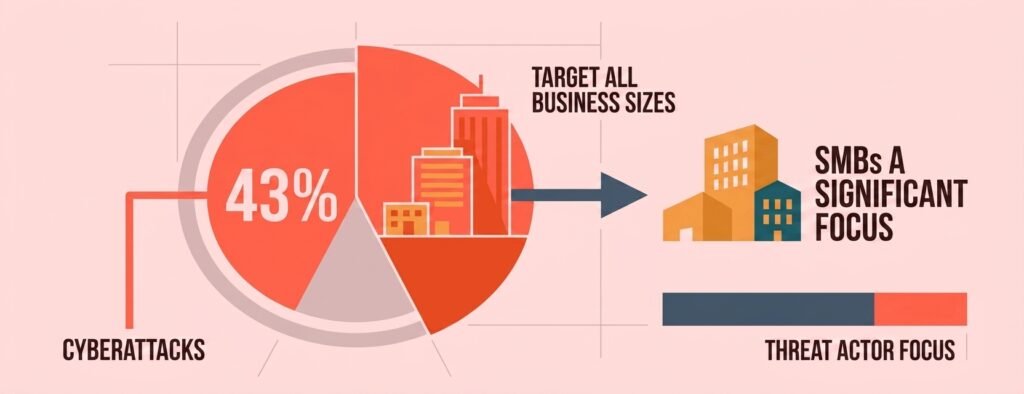
Cyberattacks are not just a big-company problem. 43% of all cyberattacks specifically target small businesses (a figure originating from Accenture’s Cybercrime study, still the most widely cited industry benchmark), and the shift to remote work has made things measurably worse. The risk compounds quickly: in IBM’s 2021 Cost of a Data Breach Report, breaches where remote work was a contributing factor cost businesses nearly $1 million more on average than breaches without that factor – one of several data points showing that distributed work environments raise breach costs when security controls haven’t kept pace. This is another statistic any remote team security checklist for small business has to account for: insider threats have risen 58% since remote work became widespread, with 63% of businesses reporting data breaches linked directly to remote environments. In 2025, 88% of breaches affecting small and midsize businesses involved ransomware – a rate more than double that of large organizations.
These numbers exist because remote teams introduce risks that older security tools were never built to handle. Home Wi-Fi networks, personal devices, and shared household internet connections create openings that attackers actively exploit. For the specific router and network fixes that close this gap, see our home Wi-Fi security checklist for remote workers. A quick way to check whether a network has obvious vulnerabilities is to use a free tool like TechEd Shield’s Wi-Fi Security Checker, which flags common issues in minutes without requiring any technical expertise.
Why Your VPN Is No Longer Enough
Any remote team security checklist for small business has to start with the VPN question. For years, a Virtual Private Network (VPN) was the go-to answer for remote access. Encrypt the connection, tunnel it back to the office – done. But the way attackers operate today has changed completely, and VPNs have not kept up.
How AiTM Phishing and MFA Fatigue Bypass Legacy Defenses
Two attack methods now routinely defeat VPNs and even basic multi-factor authentication (MFA). The first is Adversary-in-the-Middle (AiTM) phishing. Attackers set up a fake login page that acts as a live middleman between the employee and the real service. When someone enters their password and MFA code, the attacker captures both in real time – including the authenticated session token – and walks straight into the account. Standard MFA codes are useless here because the attack happens after authentication succeeds.
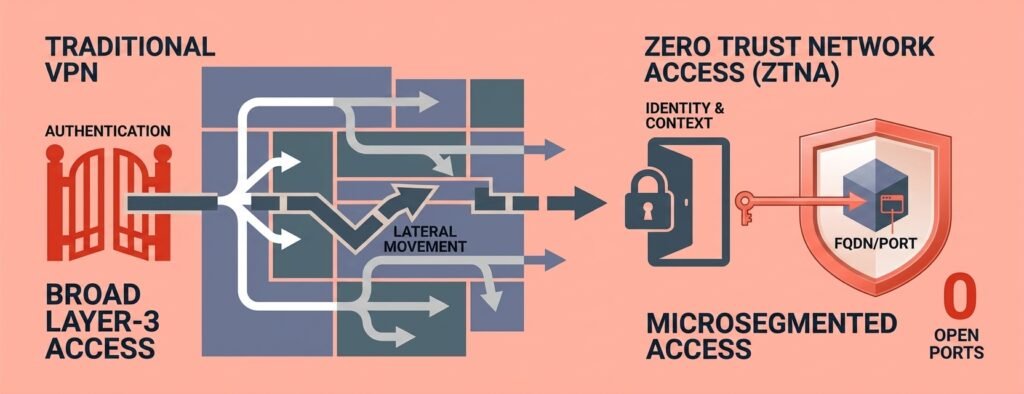
The second is MFA fatigue, also called prompt bombing. An attacker who already has a password repeatedly sends push notification approval requests to the employee’s phone until frustration or confusion causes them to accidentally approve one. Neither attack requires breaking through a firewall – they exploit human behavior and legacy authentication design. Once inside, a VPN makes things worse by granting broad access to entire internal networks after a single compromised login. If you’re still deciding whether your business needs a firewall, a VPN, or both, see our firewall or VPN for small business breakdown first.
What Zero Trust Architecture Actually Means for a Small Business
Zero Trust is one of the core principles behind any remote team security checklist for small business defined by the NIST SP 800-207 framework, it replaces the idea of a trusted perimeter with a simple rule: never trust, always verify. Every access request is evaluated continuously based on who the user is, what device they are on, and whether both meet security requirements at that exact moment. For a small business, this does not mean buying an enterprise security stack. It means shifting away from assuming anyone inside the network is automatically trusted, and instead requiring proof every time, for every app – our Zero-Trust security guide for small businesses with no IT team walks through exactly how to start. Organizations with mature Zero Trust deployments report an 80% drop in successful breaches and an average of $1.76 million lower breach costs. Cimpress, a company supporting small businesses globally, maintained full business continuity during a rapid shift to 100% remote work by adopting a Zero Trust, cloud-based security model – with no downtime reported.
Step 1: Lock Down Identity With Phishing-Resistant MFA
Step one of this remote team security checklist for small business is identity. Identity is now the primary perimeter – if an attacker can get into an account, the rest of the defenses often do not matter. The fix is phishing-resistant MFA – not the SMS code variety, but the kind that cryptographically verifies both the user and the login destination.
FIDO2 vs. SMS Codes: Why the Difference Matters
SMS-based one-time codes are vulnerable to SIM-swapping, cellular interception, and AiTM phishing. They provide a second factor, but not a secure one. FIDO2/WebAuthn – the standard behind hardware security keys like YubiKeys and platform passkeys like Windows Hello – works differently. The cryptographic private key never leaves the device, and authentication is bound to the specific website’s domain. A fake phishing site cannot complete the authentication because the domain does not match. An AiTM proxy captures nothing useful. Cyber insurers now treat phishing-resistant MFA as a mandatory baseline for policy issuance, and PCI DSS 4.0 (Requirement 8.4.2) enforces strong multi-factor authentication for any environment handling payment data, with phishing-resistant MFA increasingly defined as a key component for stronger security.
How to Enable It Without an IT Team
For businesses using Microsoft 365, enabling FIDO2 passkeys takes a few clicks in the Microsoft Entra admin center (entra.microsoft.com): go to Protection > Authentication methods > Policies, select Passkey (FIDO2), toggle to Enabled, and set scope to all users. For the full rollout sequence beyond this single setting, see our 7-step guide to setting up SSO and MFA for small business. Employees can self-register authenticators at mysignins.microsoft.com. For account recovery, a Temporary Access Pass (TAP) – a time-limited, single-use code – replaces the need to fall back on insecure SMS during onboarding.
Step 2: Secure Every Remote Device From One Place
Device security is another core piece of any remote team security checklist for small business. A remote device connecting to business accounts over an unsecured home network – with outdated software and no threat monitoring – is an open door. Centralized device management closes it.
EDR vs. Basic Antivirus: What You Actually Need
Basic antivirus reacts to known malware signatures. Endpoint Detection and Response (EDR) monitors behavior in real time, isolates compromised devices automatically, and provides visibility into what happened and how. Three platforms stand out for small teams:
- Microsoft Defender for Business (~$3/user/month, or included in Microsoft 365 Business Premium): Best for businesses already on Microsoft 365. Integrates directly with Intune device management – when a threat is detected, the device is automatically flagged non-compliant and blocked from business apps.
- CrowdStrike Falcon Go (~$59.99/device/year): Lightweight and fast to deploy with no MDM setup required. Ideal for teams that need protection without complex configuration, and strong at blocking USB-based threats.
- SentinelOne Singularity Core (~$69/endpoint/year): Works even when a device is offline. Includes a 1-Click Rollback feature that restores files encrypted by ransomware using local volume snapshots – a meaningful advantage when recovery speed matters.
Full-Disk Encryption and Automated Patching
Every business device should have full-disk encryption enabled – BitLocker for Windows with recovery keys stored in Entra ID, FileVault for macOS. If a laptop is stolen, the data on it is unreadable. Pair this with automated patching via Windows Update for Business, with critical security updates typically configured to apply within 72 hours to 14 days of release. Most breaches exploit vulnerabilities that already have a patch available.
Step 3: Replace Your VPN With Zero Trust Network Access
ZTNA is the VPN replacement any remote team security checklist for small business should include. It replaces the broad tunnel of a VPN with application-specific, permission-controlled access. Users only reach the exact tools they need – nothing more.
ZTNA vs. VPN: The Key Differences
Feature Traditional VPN ZTNA Access Scope Entire internal network subnet Specific application only Network Visibility Internal systems exposed to scanning Infrastructure hidden from internet Device Posture Rarely checked after login Verified continuously, per session Trust Model Implicit after login Continuous verification required
A Phased Migration Roadmap for Small Teams
Migrating off a VPN does not have to happen overnight. A practical five-phase approach works well for small teams:
- Days 1-15: Audit every internal app currently accessed over VPN. Categorize by type: web apps, SSH/RDP tools, and legacy desktop clients.
- Days 16-30: Connect the ZTNA platform – options include Cloudflare Access, Entra Private Access, or Zscaler Private Access – to the business identity provider and configure phishing-resistant MFA at login. If your team is also mid-migration to the cloud generally, see our 12-step cloud security checklist for small business migration.
- Days 31-45: Deploy lightweight ZTNA connectors inside the internal network. These initiate outbound-only encrypted tunnels, so no inbound ports need to be opened.
- Days 46-60: Build role-based access rules. Finance staff access only the finance app. Developers access only their repositories and staging environments. Default-deny everything else.
- Days 61-90: Pilot with a small group, migrate by app tier, then decommission the VPN entirely.
Step 4: Protect Your Data – At Rest, In Transit, In Use
Data protection rounds out a solid remote team security checklist for small business. Remote work scatters data across home devices, cloud drives, email inboxes, and video call recordings. Controlling where it goes requires three layers of protection:
- At rest: Full-disk encryption on all endpoints. Sensitive documents should carry classification labels that keep files encrypted even if copied or forwarded – tools like Microsoft Purview handle this automatically.
- In transit: Enforce TLS 1.2 or TLS 1.3 across all business applications and block legacy protocols entirely. Never allow unencrypted connections to internal systems.
- In use: Deploy Data Loss Prevention (DLP) policies that block employees from copying business data into personal cloud drives, personal email, or unapproved AI tools. Restrict clipboard access and file downloads during unmanaged browser sessions.
What Cyber Insurers Now Require Before Covering You
Insurance requirements are another reason to follow a remote team security checklist for small business closely. The cyber insurance market has tightened dramatically. Carriers in 2025-2026 treat the following not as recommendations, but as hard prerequisites for issuing or renewing a policy:
- Phishing-resistant MFA on all remote logins, cloud app portals, and admin accounts
- EDR deployed on 100% of endpoints – basic antivirus no longer qualifies
- Automated patching with documented SLA windows (e.g., critical patches applied within 72 hours to 14 days)
- Privileged access controls, including restrictions on standing admin accounts
Failing to meet these requirements does not just result in a rejected claim – many insurers will decline to offer coverage at all. See does cyber insurance require a pen test or vulnerability scan for the full picture of what carriers verify before writing a policy. Checking these boxes is a business continuity requirement, not just a security best practice.
Where Does Your Team Actually Stand?
You’ve just read what insurers require and what actually stops modern attacks. Before you get to the priority list below, take 60 seconds to check your own setup against the four controls that matter most. No email required — just an honest self-assessment.
Remote Team Security Readiness Checker
Check every control your business already has in place.
However you scored, the point isn't to feel good or bad about a number — it's to know exactly which control to fix first. If you're "At Risk" or "Getting There," the priority order below tells you exactly where to start. If you're already "Insurance-Ready," the same list is your maintenance checklist for the next renewal cycle.
Fix These Controls First and You'll Be Safer Than Most Small Businesses
This remote team security checklist for small business exists because most small businesses are not breached by sophisticated custom malware. They are breached because a password was weak, MFA was not enabled, a device was not patched, or someone clicked a convincing phishing email. Fix those gaps and the risk profile changes dramatically. Here is the priority order:
- Enable phishing-resistant MFA (FIDO2 passkeys or hardware keys) on all accounts
- Deploy EDR on every business device and enable full-disk encryption
- Migrate remote access from VPN to a ZTNA solution
- Enforce data protection policies covering at-rest, in-transit, and in-use scenarios
- Verify controls align with current cyber insurance requirements before the next renewal
None of these steps require a dedicated IT team or a technical background to get started. They require a clear system, prioritized action, and consistency. Do these well, and the business is protected against the overwhelming majority of attacks targeting small teams today.
For ongoing guidance building out a remote team security checklist for small business without an IT department, TechEd Shield provides plain-language cybersecurity education and practical tools built specifically for business owners managing security on their own.