

Key Takeaways
- Hackers overwhelmingly target login credentials – not software – making identity protection the single highest-ROI security move for small businesses in 2026.
- Standard MFA methods like SMS codes and basic push notifications can still be bypassed; phishing-resistant options like passkeys and FIDO2 hardware keys are now the recommended standard from CISA and NIST.
- SSO and phishing-resistant MFA can help small businesses qualify for better cyber insurance rates – many insurers now require stronger authentication controls.
- A structured 7-step rollout lets small businesses implement strong identity security without an IT team or technical background.
- The free-tier trap with identity platforms is a real risk – free plans often lack the conditional access controls that actually stop breaches.
SSO and MFA for small business often gets pushed aside because most owners assume hackers are after big corporations. The reality is very different. Credential theft is automated, indiscriminate, and relentless – and small businesses are frequent targets precisely because their login security tends to be weaker. The good news? A structured approach to Single Sign-On (SSO) and Multi-Factor Authentication (MFA) can dramatically reduce that risk, often using tools already included in existing software subscriptions.
Hackers Target Logins, Not Software
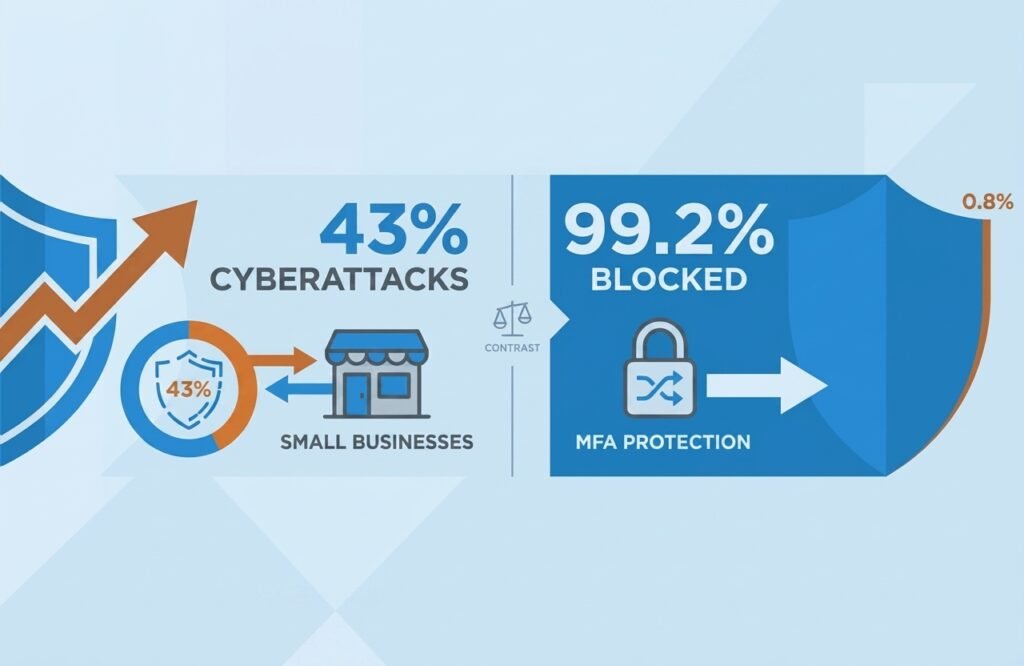
This is exactly why SSO and MFA for small business matters so much: attackers today rarely exploit complex software vulnerabilities. Instead, they go after the easiest entry point available – stolen or tricked login credentials. 43% of all cyberattacks target small businesses, and the majority trace back to compromised credentials rather than sophisticated exploits. Automated phishing kits, credential stuffing tools, and adversary-in-the-middle (AiTM) proxy attacks can compromise accounts at scale – and they work even against businesses using basic multi-factor authentication.
SMS one-time codes and simple push notifications – the kind most businesses still use – can be relayed in real time by tools like Evilginx. An employee clicks a convincing fake login page, enters their credentials and MFA code, and an attacker captures both instantly. For law firms specifically, incomplete MFA rollout carries a second risk beyond the breach itself — see our MFA gaps: is your law firm’s cyber claim at risk? guide for how insurers respond. The login goes through, no alert fires, and the breach begins.
For small businesses managing everything without a dedicated IT team, centralizing access through SSO and enforcing phishing-resistant MFA is the most effective step available. Still deciding which to prioritize? See our SSO vs MFA for small business: which to roll out first in 2026 before starting the steps below. TechEd Shield covers this and other high-impact, plain-English security actions – their free password tools page is a practical starting point for businesses still building their security baseline.
Pick the Right Identity Platform First
Every step of setting up SSO and MFA for small business depends on choosing a solid Identity Provider (IdP) – the central platform that manages who can log in, to what, and under what conditions. The right choice depends on what tools a business already uses, not on which platform has the longest feature list.
Top 5 SSO Providers Compared for Small Teams
For teams under 50 people, the best options balance cost, simplicity, and the features that actually matter for security:
- Microsoft Entra ID (via Microsoft 365 Business Premium) – Best for businesses already on Microsoft 365. Includes Conditional Access, endpoint management via Intune, and full MFA controls. Template policies simplify setup considerably.
- JumpCloud – Ideal for mixed-OS environments (macOS, Windows, Linux). It replaces the need for a local Active Directory server and includes device management in one console.
- Google Workspace (with Cloud Identity) – Best for Google-native teams. Native passkey support, very low setup friction, and clean OIDC integration. Device compliance enforcement is limited outside Chrome-based endpoints.
- OneLogin (Advanced/Professional) – An extensive catalog of pre-built app connectors. Straightforward to configure, though it lacks built-in endpoint management. Pricing and packaging are optimized for organizations of 50+ users, so cost-per-user can be less favorable for very small teams.
- Cisco Duo (Essentials/Advantage/Premier) – The top tier adds VPN-less zero-trust access. Excellent for adding strong MFA quickly on top of an existing directory, though it functions as an authentication layer rather than a full cloud directory.
| Provider | Best For | Starting Price | Standout Feature | Watch-Out |
|---|---|---|---|---|
| Microsoft Entra ID | Businesses already on Microsoft 365 | $22/user/month (bundled) | Conditional Access + Intune endpoint management in one bundle | Only cost-effective if already paying for Microsoft 365 Business Premium |
| JumpCloud | Mixed-OS environments (macOS/Windows/Linux) | Free up to 10 users, then ~$9/user/month | Replaces local Active Directory server | Full feature set (SSO + device identity) runs $11-$15/user/month |
| Google Workspace (Cloud Identity) | Google-native teams | Included with Workspace | Native passkey support, low setup friction | Device compliance enforcement limited outside Chrome-based endpoints |
| OneLogin | Businesses needing many pre-built app connectors | $4-$8/user/month | Extensive app connector catalog, straightforward setup | No built-in endpoint management; pricing favors orgs of 50+ users |
| Cisco Duo | Adding strong MFA fast on top of an existing directory | Free up to 10 users, then $3-$9/user/month | Top tier adds VPN-less zero-trust access | Authentication layer only — not a full cloud directory |
The Free-Tier Trap to Avoid
Free versions of platforms like Entra ID Free or basic Google Workspace skip one critical capability: Conditional Access. Without it, there is no way to require device compliance, block logins from suspicious locations, or trigger step-up verification based on risk signals. For any business handling customer data or financial accounts, a paid tier with Conditional Access is a necessary investment.
Clean Your Directory Before You Build On It
Rolling out SSO and MFA for small business on a messy user directory does not fix security problems – it automates them. Old accounts, shared logins, and forgotten contractor profiles are among the most common entry points attackers use.
Remove Stale Accounts and Shared Logins
Before enabling single sign-on, audit every active user account. Disable accounts that have been inactive long enough to no longer reflect active staff – many organizations use 30 to 90 days as their threshold, depending on internal policy and any applicable compliance requirements. Convert shared logins (like sales@company.com) into delegated mailboxes or group distribution lists – shared credentials make it impossible to enforce individual MFA or maintain a clean audit trail.
Automate Onboarding and Offboarding with SCIM
Manual offboarding is a liability. System for Cross-domain Identity Management (SCIM) automates provisioning across every connected app – when a new hire is added or an employee leaves the central directory, access is updated everywhere automatically. If an HR platform is already in use, connecting it as the authoritative source means onboarding and offboarding flow into the identity system without manual steps.
Connect All Your Apps to One Login
This step is where SSO and MFA for small business really pays off: federating business applications into one login system eliminates password fatigue, centralizes access control, and creates a single place to cut off access when someone leaves.
SAML vs. OIDC: Which Protocol to Use
SAML 2.0 is the established standard for enterprise SaaS apps – it uses XML-based signed assertions and is supported by most major platforms. OIDC (OpenID Connect) is a lightweight identity layer built on OAuth 2.0, widely used for modern SaaS tools, mobile apps, and multi-tenant integrations. For most small businesses, the choice is usually made by the app itself – check whether the SSO integration page lists SAML or OIDC, and match accordingly. Prioritize federating the most critical apps first: cloud suites, CRM platforms, finance tools, and any app holding customer data.
Handling the SSO Tax Problem
Some SaaS vendors charge higher-tier prices to unlock SAML/OIDC SSO – a well-known frustration called the SSO Tax. For business-critical apps storing sensitive data, the upgrade is worth it. For lower-risk utility apps, the practical workaround is a business password manager (Bitwarden, 1Password, or Keeper) connected to the central IdP via SSO, so staff use their single login to access the vault, which then manages unique passwords for apps that do not support federation. See our breakdown of the best password managers for small businesses in 2026 for how these platforms compare on SSO support specifically.
Why Standard MFA Still Gets You Hacked
A common mistake in SSO and MFA for small business setups: having MFA turned on is no longer enough. SMS codes can be intercepted via SIM-swapping or SS7 network attacks. Basic push notifications are vulnerable to MFA fatigue – attackers send repeated approval requests until a tired employee taps Allow. These are documented, widely used attack methods, not edge cases.
Phishing-Resistant MFA Methods Ranked
- FIDO2 Hardware Security Keys (YubiKey, Google Titan Key) – Gold standard. Cryptographically bound to the legitimate login domain, so a fake site cannot trigger a valid authentication. Mandatory for admins, finance staff, and executives.
- Platform Passkeys (Windows Hello, Apple Touch ID/Face ID) – Hardware-backed biometrics built into laptops and phones. The same cryptographic domain-binding as a hardware key, with zero extra friction for employees. The right default for the general workforce.
- TOTP Authenticator Apps (Google Authenticator, Authy) – Better than SMS, but still relayable in real time by AiTM proxy attacks. Acceptable only as a temporary fallback for legacy systems.
- SMS / Voice OTP – Classified by NIST as a “restricted authenticator” (SP 800-63B), permitted only under added conditions like a documented risk assessment and a migration plan. Best practice is to phase it out entirely once passkeys are in place.
Passkeys and FIDO2 keys are phishing-resistant because the device generates a cryptographic signature mathematically tied to the exact login domain in the browser. A convincing fake login page at a different URL simply will not match – authentication fails before any credential is exposed. Many password managers now generate and sync these passkeys directly — see how password managers close the password-reuse gap credential stuffing exploits for the piece this connects to.
Low-Friction Rollout Plan for Your Team
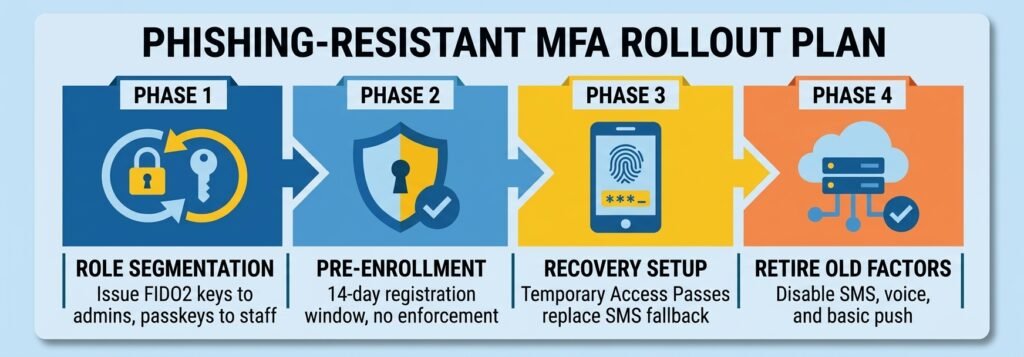
The biggest barrier to adoption is usually fear of locking employees out. A four-phase rollout removes that barrier:
- Role segmentation: Issue FIDO2 hardware keys to admins and executives. Enable platform passkeys (Windows Hello / Touch ID) for general staff.
- 14-day pre-enrollment window: Prompt users to register during normal sign-ins, with a short walkthrough video. No hard enforcement yet.
- Recovery architecture: Configure Temporary Access Passes (TAP) – time-limited, single-use codes issued by verified admins – as the recovery method. This removes the need for SMS or email fallbacks that reintroduce phishing risk.
- Retire phishable factors: Once enrollment is complete, disable SMS, voice, and basic push in the identity platform authentication policy.
Set Rules That Block Risky Access Automatically
Essential Baseline Policies Every Small Business Needs
Access rules are a core layer of SSO and MFA for small business. Conditional Access policies evaluate every login attempt in real time and decide whether to allow, block, or challenge it. Four baseline policies cover the vast majority of risk for a small business:
- Require phishing-resistant MFA for all admin accounts – No exceptions, no device exemptions.
- Block access from unmanaged personal devices – Devices must be enrolled in the corporate MDM (Intune or JumpCloud) before accessing file storage or sensitive apps.
- Geofencing – Block authentication from countries where the business has no employees or operations.
- Block legacy authentication protocols – POP3, IMAP4, and older SMTP connections bypass MFA entirely. A single Conditional Access rule blocks them org-wide.
One setup step that is often missed: create two emergency break-glass admin accounts with long, randomly generated passphrases (30+ characters), stored offline, and excluded from standard Conditional Access rules. Configure real-time alerts to fire immediately if either account is ever used.
Ditch the VPN – Use Zero Trust Access Instead
Rounding out SSO and MFA for small business often means retiring the VPN. Traditional VPNs grant broad network access the moment a connection is established. If a device or credential is compromised, an attacker can move laterally across internal systems. Zero Trust Network Access (ZTNA) solves this by enforcing identity verification and device compliance on a per-application basis, before any access is granted — see our Zero-Trust security guide for small businesses with no IT team for the full identity-first framework this fits into.
Tools like Microsoft Entra Application Proxy and Cloudflare Access use lightweight connectors installed inside the internal network. These connectors create outbound-only encrypted tunnels to the cloud identity service – no inbound firewall ports need to be opened, and internal IP addresses are never exposed to the internet. When someone tries to reach an internal app remotely, the ZTNA gateway checks their identity, verifies their passkey MFA, validates device compliance, and proxies only that specific application. For small businesses still running on-premises tools or legacy software, this is the practical replacement for aging VPN hardware. Remote teams specifically should see our remote team security checklist for small businesses for the full five-step priority order, including EDR and data protection layered on top of this.
Monitor Logins Without Expensive Security Tools
Monitoring is the final piece of SSO and MFA for small business. Security monitoring does not require a dedicated team or expensive software. Microsoft Entra ID, JumpCloud, and Google Workspace all include built-in audit logs and alert configurations that cover the events that matter most.
Key Alert Types That Catch Real Threats
- Impossible travel: A login from Chicago followed 20 minutes later by one from Frankfurt is physically impossible – flag it immediately.
- New MFA device registered: Unauthorized passkey or phone number additions often signal a second stage of account takeover.
- Privilege escalation: Any addition to Global Administrator, Domain Admin, or Billing Manager groups should trigger an instant alert.
- Break-glass account usage: Any login from an emergency account is an incident – treat it as one.
Monthly, Quarterly, and Annual Review Checklist
- Monthly: Confirm all departed employees and contractors are fully deprovisioned across all systems.
- Quarterly: Review privileged role assignments and revoke any temporary admin rights no longer needed.
- Annually: Audit SAML signing certificates, SCIM connections, and break-glass account recovery procedures. Rotate long-lived credentials.
SSO + Phishing-Resistant MFA Is One of Your Highest-ROI Security Moves
Most security investments are expensive, complex, and slow to show results. SSO and MFA for small business is different. They directly address the most common breach method – credential theft – while simultaneously reducing password fatigue, streamlining employee access, and satisfying the authentication requirements that cyber insurers increasingly mandate. See does cyber insurance require a pen test or vulnerability scan for how directly MFA status now factors into claim denials. This is the full structure of SSO and MFA for small business: pick the right platform, clean up the directory, federate the apps, deploy passkeys, set smart access rules, replace the VPN, and monitor what matters. Seven steps, and none of them require a dedicated IT team – though having some technical support available during initial setup can help things go smoothly.
Where does your business actually stand? You’ve just read the seven steps. Before you close the tab, check off what’s already in place — the tracker below gives you an instant read on your identity security posture and flags the highest-priority gap to tackle first.
Your SSO & MFA Readiness Score
Check off each step your business has completed.
0 of 7 steps complete
Whatever your score, the goal isn’t 100% overnight — it’s knowing which gap to close first. If phishing-resistant MFA and Conditional Access aren’t checked yet, start there: they close off the two attack paths hackers use most.
TechEd Shield helps small business owners implement SSO and MFA for small business the right way. Take the free cyber insurance readiness check to see how your identity security setup measures up against the controls insurers commonly ask about, and which gaps could put a claim at risk.
A note on pricing: Prices correct at time of writing. Always check current pricing before purchasing.