

Key Takeaways
- PCI DSS only protects the part of your store that directly handles payment card data – the rest of your site is largely on its own.
- Nine serious threats, including account takeovers, DDoS attacks, and cloud misconfigurations, fall completely outside PCI DSS coverage and can shut down or compromise your store.
- A significant share of small businesses that suffer a major cyberattack close within months – compliance alone won’t prevent that outcome.
- Most of the practical fixes covered here don’t require a dedicated IT team or technical expertise to put in place.
- TechEd Shield helps small business owners understand and close exactly these kinds of gaps with clear, non-technical guidance.
Getting PCI DSS certification feels like a major milestone. You’ve done the paperwork, passed the assessments, and your checkout process meets the standard. That’s genuinely important – but it covers far less of your store than most people assume.
PCI DSS Protects Your Cardholder Environment – Not Your Entire Store
PCI DSS is built around one very specific goal: protecting payment card data wherever it’s stored, processed, or transmitted. The standard was never designed to secure your whole e-commerce operation – just the slice of it that touches card numbers and verification codes.
For most small online stores, that scope is surprisingly narrow. If you use a hosted payment gateway like Stripe or Square – where the customer enters card details in an embedded frame or gets redirected off your site entirely – your payment card environment may consist of just a few systems. The rest of your store: customer accounts, product pages, order databases, cloud storage – sits outside that protected zone. TechEd Shield focuses specifically on helping small business owners understand and close exactly these kinds of blind spots, without needing a background in IT security.
Where PCI DSS Scope Ends
The Cardholder Data Environment Boundary Explained
The Cardholder Data Environment (CDE) is the technical term for every system that stores, processes, or transmits raw card data. PCI DSS applies its full set of requirements – encryption, access controls, logging, patching – to the CDE and any systems directly connected to it.
Everything outside that boundary is considered out of scope. That includes your customer login portal, product catalog, CMS, marketing integrations, and any cloud storage used for order history or customer records. These systems may hold sensitive information, but if they don’t touch raw card data, compliance auditors aren’t looking at them.
How Segmentation Creates Hidden Gaps
To keep their compliance footprint small, most merchants use network segmentation – separating the payment environment from the rest of the store with firewalls and access rules. This is smart, but it creates an unintended side effect: security attention concentrates almost entirely on the segmented payment zone, while the surrounding infrastructure goes relatively unmonitored.
Attackers know this. A compromised customer account, an exposed cloud bucket, or a vulnerable admin panel doesn’t need to touch card data to cause serious damage.
The Real Cost of What Compliance Doesn’t Cover
The financial exposure here is real. Cyberattack costs for small businesses vary widely across sources – Verizon’s 2025 DBIR places many SMB incidents in the $120,000 to $1.24 million range, while IBM’s 2023 Cost of a Data Breach Report puts the average at $3.31 million for businesses with fewer than 500 employees — a figure still widely cited in 2024-2026 sources. Non-compliance with PCI DSS itself carries fines of $5,000 to $100,000 per month – but being compliant doesn’t prevent the attacks that compliance doesn’t cover. And even full compliance won’t guarantee your cyber insurer pays out — see why PCI-DSS card brand assessments routinely get denied by standard cyber policies for how that gap plays out at claim time.
That’s the core problem with treating certification as a finish line. The risks below don’t care about your audit status — the same pattern shows up in 9 cyber risks small accounting firms miss that the IRS won’t bail them out for, just with a different compliance framework standing in for PCI DSS.
9 Risks That Fall Outside PCI DSS Coverage
1. Account Takeover on Customer Portals
Attackers use large databases of usernames and passwords leaked from unrelated breaches – old forum accounts, retail loyalty programs – and run them automatically against your customer login page. This is called credential stuffing, and it works because many people reuse the same passwords across multiple sites.
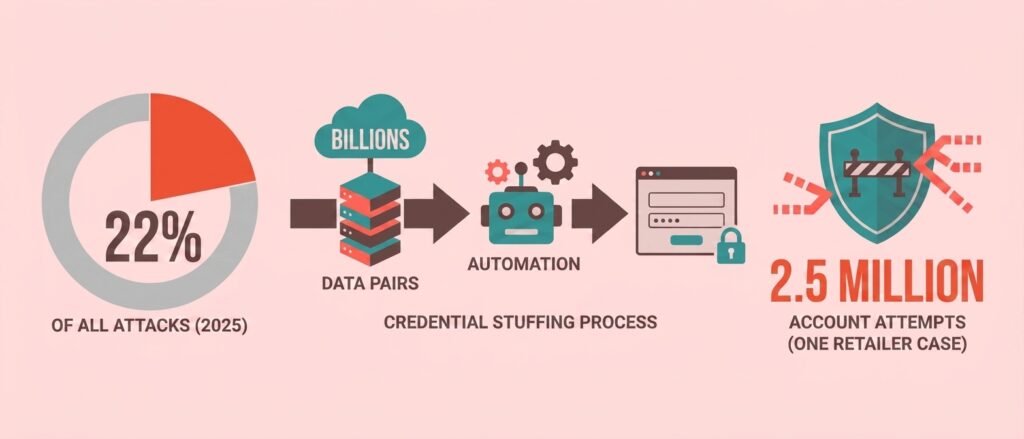
PCI DSS Requirement 8.4.2 now mandates MFA for all access into the Cardholder Data Environment (CDE) – not just admin access, as under the older v3.2.1 standard. But because most customer login portals sit outside the CDE entirely (see segmentation, above), this requirement typically doesn’t reach them, meaning your customers’ accounts can legally lack MFA and still keep you fully compliant.
When an account is taken over, attackers can change shipping addresses, drain loyalty balances, use saved payment methods for fraudulent orders, and access personal information. Consumer research has repeatedly found similar results – a Vercara survey found 70% of consumers would stop shopping with a brand after a security incident. The fix: enable MFA for customer accounts, and use a tool that checks passwords against known breach databases at login and registration.
2. API Business Logic Abuse
Modern e-commerce stores – especially those built on headless or decoupled platforms – rely heavily on APIs to manage carts, process discounts, and update inventory. The problem here isn’t a technical flaw; attackers study how your business logic works and then bend the rules.
A well-documented 2018 case involving a USPS API illustrates the scale: a business logic flaw allowed attackers to view or modify other users’ delivery information simply by manipulating account parameters in API requests – exposing roughly 60 million user records. The request itself was technically valid, which is why automated security tools missed it entirely.
Common e-commerce examples include changing a product’s price in the cart request before checkout, applying discount codes multiple times, or bypassing steps in a multi-stage checkout flow. Standard PCI-required vulnerability scans don’t catch these because the requests return normal HTTP 200 responses — the kind of gap that’s easy to miss if you’re relying on a scan alone instead of understanding what insurers and auditors actually expect from a pen test vs. a scan.
Enforcing strict server-side validation for all prices, discounts, and cart parameters is the core mitigation.
3. DDoS Attacks and Full-Store Downtime
A Distributed Denial of Service (DDoS) attack floods your store’s servers with fake traffic until real customers can’t get through. PCI DSS is built around the confidentiality and integrity of payment data – not availability. A merchant can be fully compliant and still have their store taken offline for hours or days with zero recourse under the standard.
During peak seasons – Black Friday, holiday sales – even a brief outage translates to immediate, unrecoverable revenue loss and lasting damage to search rankings as crawlers fail to reach key pages. Routing store traffic through a cloud-based Content Delivery Network (CDN) with built-in DDoS mitigation (Cloudflare is a widely used option for small businesses) is the most accessible starting point. It’s also worth checking whether your cyber insurance policy actually covers a payment processor or CDN going down, since standard business interruption coverage is narrower than most merchants assume.
4. Cloud Misconfigurations Exposing Customer Data
Most small e-commerce operations store customer data – shipping addresses, purchase history, email lists – in cloud storage or databases that sit entirely outside the CDE. Because this data doesn’t contain raw card numbers, it’s out of scope for PCI audits. That also means no qualified security assessor is checking whether your cloud storage bucket is accidentally set to public.
Industry estimates – commonly attributed to Gartner – put the share of cloud security failures caused by customer-side misconfiguration, rather than platform vulnerabilities, as high as 99%. Exposing non-payment customer data still violates privacy regulations like GDPR and CCPA. GDPR penalties can reach 4% of global annual revenue, while CCPA carries separate penalties of up to $7,988 per intentional violation (inflation-adjusted 2025 figure; the statutory base is $7,500). Regularly auditing cloud storage permissions and using a Cloud Security Posture Management (CSPM) tool – many offer free tiers – catches these misconfigurations before they become breaches.
5. Carding and Automated Card-Testing Fraud
Carding attacks – also called card-testing or bin attacks – involve automated bots running thousands of small test transactions through your checkout to figure out which stolen card numbers are still active. The attacker isn’t trying to buy anything useful from your store; they’re using it as a testing ground.
PCI DSS secures the environment where card data is stored and transmitted, but it doesn’t assess whether the transaction requests hitting your checkout are legitimate. A fully compliant store can process thousands of fraudulent authorization attempts without triggering any compliance violation. The direct costs are immediate: authorization fees apply to every attempt, successful ones trigger chargebacks, and if your fraud ratio climbs too high, card networks can suspend your processing privileges. Adding CAPTCHA at checkout and enabling 3D Secure (3DS) authentication significantly raises the cost of running these attacks.
6. SEO Spam and Index Hijacking
If an attacker gains access to your site’s CMS or file directory – through an outdated plugin, weak admin credentials, or a misconfigured server – they can inject thousands of hidden spam links or create fake product pages that are invisible to human visitors but fully visible to search engine crawlers. Your store becomes a host for their content.
Because SEO spam has no interaction with payment card data, it’s completely ignored by PCI compliance assessments. The impact is real: search engines detect the injected content, your domain authority drops, your legitimate product pages lose ranking, and in serious cases browsers display security warnings to visitors. Recovery can take months. File Integrity Monitoring (FIM) – which alerts you when core website files are changed – is the primary defense, and tools like Sucuri or Wordfence offer small-business-friendly versions.
7. Third-Party Script Supply Chain Vulnerabilities
E-commerce platforms regularly load third-party JavaScript files in the user’s browser to handle analytics, live chat, and social media integrations. When attackers compromise the external servers hosting these scripts, they can inject malicious payloads into otherwise trusted code.
PCI DSS Requirements 6.4.3 and 11.6.1 address script integrity checks – but only for scripts running on payment pages. Any third-party script on adjacent pages, such as homepages, product catalogs, or cart views, remains completely outside the scope of compliance audits — a gap that has already produced real claim disputes for Shopify merchants relying on unmonitored third-party scripts.
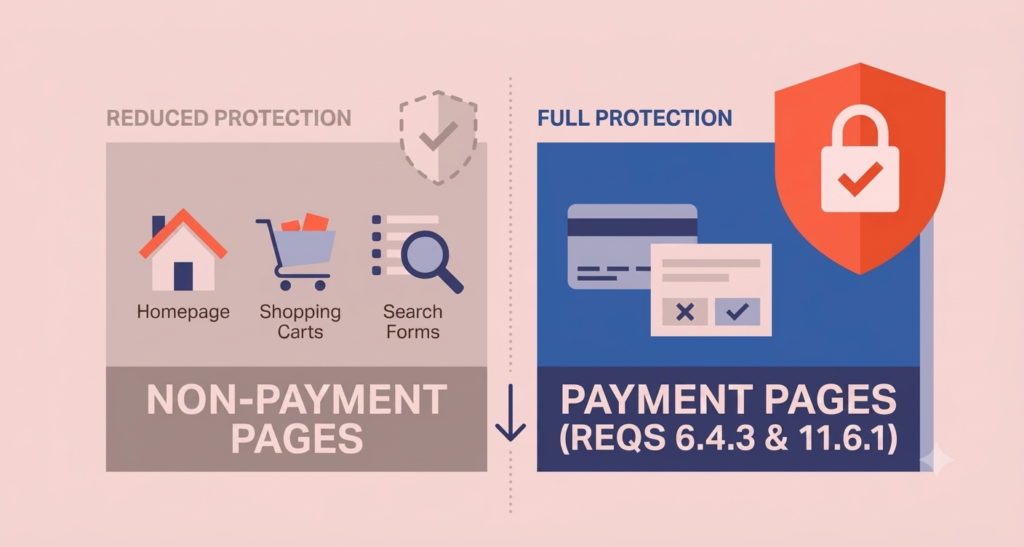
Attackers can use these scripts to harvest customer personal information or manipulate checkout page redirects. A strict, site-wide Content Security Policy (CSP) combined with Subresource Integrity (SRI) hashes for all third-party scripts is the core technical defense.
8. Ransomware via Non-Payment Systems
Ransomware attacks in e-commerce typically begin with a compromise of a non-critical endpoint – an employee’s workstation or a vulnerable back-office server. Once inside, attackers move laterally to compromise broader systems and deploy encryption payloads across back-office infrastructure and backups.
This threat remains unaddressed by compliance certifications because network segmentation – used to protect the payment environment – often causes security teams to focus exclusively on the isolated payment zone, leaving adjacent corporate networks, inventory systems, and customer support environments undermonitored. Adopting a Zero Trust approach with strict access controls, paired with offline or write-protected cloud backups and endpoint detection tools, significantly reduces exposure.
9. AI Tool Misuse and Shadow AI Data Leakage
Many e-commerce sites now use AI tools – chatbots, product recommendation engines, automated admin scripts. Attackers can manipulate these systems to trigger data leaks, intercept unmonitored API connections between AI agents, or extract credentials from training logs.
Passing your PCI DSS audit tells you one thing: your checkout is compliant. It doesn’t tell you whether the other nine risks below are quietly sitting open on your store right now. Answer the nine questions below honestly — no signup, no data leaves your browser — and see how many blind spots you’re currently carrying.
However many boxes you checked, the fix isn’t a bigger compliance budget — it’s a short list of specific, mostly free changes: MFA on customer accounts, a CDN with DDoS protection, a cloud storage audit, CAPTCHA at checkout. None of it requires a security team. It just requires knowing where to look, which is exactly the gap this article — and TechEd Shield — exists to close.
Traditional compliance frameworks don’t address the distinct risks introduced by AI. The standards regulate secure coding, patching, and data encryption, but they don’t assess model misuse, prompt injection, or shadow AI tools deployed by developers or marketing teams without formal review. Unvetted AI tools can accidentally transmit customer data to external systems, violating privacy regulations. Cataloging all AI-associated APIs and applying data loss prevention filters to their inputs and outputs is the recommended starting point.
Practical Steps to Close These Gaps Without an IT Team
High-Impact Fixes to Prioritize First
Not all of these risks need to be addressed at once. Start with the actions that eliminate the largest exposure for the least effort:
- Enable MFA on all admin accounts and customer portals – most e-commerce platforms (Shopify, WooCommerce, BigCommerce) support this natively.
- Audit your cloud storage permissions – log into your cloud provider (AWS, Google Cloud, or similar), check that no storage buckets are set to public, and review who has access to customer databases.
- Add CAPTCHA to checkout and login pages – Google’s reCAPTCHA v3 is free and stops most automated carding and credential stuffing bots.
- Enable 3D Secure on your payment gateway – most major gateways offer this as a toggle in their dashboard settings.
Accessible Tools That Work for Small Businesses
Several tools address these gaps without requiring technical expertise to set up:
- Cloudflare (free and paid tiers) – provides DDoS mitigation, WAF rules, and rate limiting for your entire store, not just the checkout.
- Sucuri or Wordfence – website security plugins with file integrity monitoring and malware scanning, built for non-technical users.
- Have I Been Pwned API – can be integrated (or checked manually) to flag customer accounts using known-breached passwords.
- Your cloud provider’s built-in security hub – AWS Security Hub, Google Security Command Center, and Azure Defender all include misconfiguration alerts at low or no cost for basic tiers.
Compliance Is the Starting Line – Real Security Goes Further
PCI DSS certification is worth having. It enforces real controls around the most sensitive part of your transaction flow and reduces your liability if a card-data breach occurs. But the nine risks above exist in the parts of your store that compliance was never designed to reach.
The businesses that avoid serious incidents aren’t necessarily the ones with the most advanced security stacks – they’re the ones that know where their actual gaps are and take a few focused steps to close them. You don’t need an IT team to do that. You need a clear picture of the risks and a short list of actions that actually matter.
For small business owners looking to build that clear picture without wading through technical documentation, start with our Free Cybersecurity Health Check — a plain-English snapshot of your biggest gaps, built specifically for businesses running without a dedicated security team.