

Key Takeaways
- Insurers focus more on how backups are configured, tested and kept separate from everyday systems than on whether a business calls its setup a backup service or managed backup
- A backup job that runs without errors is not proof of recovery; insurers expect dated restore-test records showing data actually comes back
- Keeping backup credentials separate from everyday administrator logins helps stop a single stolen password from reaching backup copies too
- A free readiness check can show where a business already matches what insurers expect before a renewal questionnaire arrives
- Many renewal forms ask about storage locations, copy types and restore testing, so it helps to know exactly what records answer those questions before writing anything down
Renewing a cyber insurance policy often starts with a single, deceptively simple question: how are backups handled? Owner-managers sometimes answer with a product name, a provider, or a label, backup service vs managed backup, assuming the name settles it. Insurers rarely care about the label. They care about what is actually in place, whether it would survive an attack, and whether the paperwork can prove it.
The Label Isn’t What Insurers Check
A business that calls its setup a “backup service” and one that calls it “managed backup” can end up in very different positions at renewal, but not because of the name on the invoice. The real difference comes down to who configures the system, who watches it day to day, and who tests whether it actually works when something goes wrong. A self-managed backup service leaves all of that on the business’s own shoulders. A managed backup and disaster recovery arrangement hands some of that responsibility to a provider, but only to the extent the agreement actually says so.
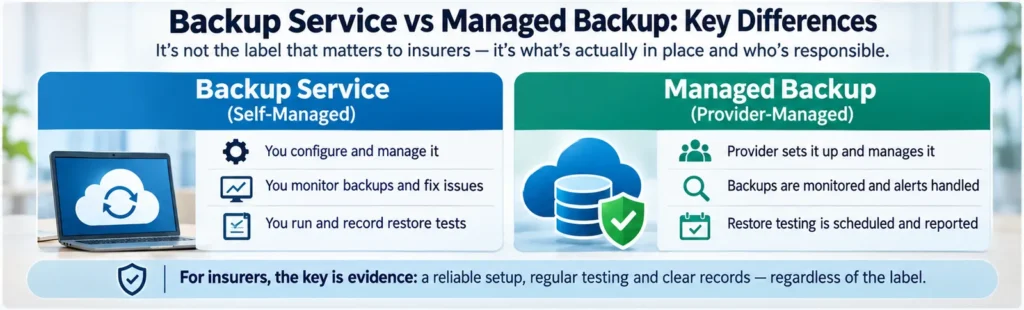
This distinction matters because underwriters have grown far more specific about backup questions. An answer like “yes, we have backups” used to be enough. Now, insurers increasingly expect to see how those backups are isolated, how often they are tested, and what evidence exists to back up the claim, which is the same ground covered in our guide to what insurers want from a small business application. For a first look at where a business currently stands against those expectations, the Cyber Insurance Readiness Check provides a quick, no-pressure way to see which boxes are already ticked and which still need attention before a renewal form lands in the inbox.
Getting the label right on an invoice changes nothing if the underlying setup has gaps. A smarter approach starts with checking the actual configuration, not the marketing name attached to it. The same logic applies to certificates, which is why Cyber Essentials vs cyber insurance is worth reading before a renewal.
What Renewal Forms Actually Ask
Renewal and application forms vary between insurers, so there is no single checklist that covers every policy. That said, certain questions come up again and again, and they tend to probe the same handful of areas: how many copies of data exist, where they are stored, whether one copy sits beyond the reach of everyday credentials, and when the business last proved it could actually recover.
Copies, Storage Types and an Off-Site Location
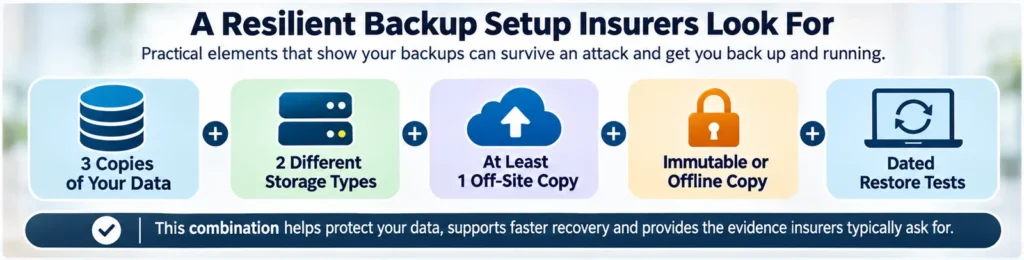
A well-established approach to backup planning keeps three copies of data spread across two different storage types, with at least one copy kept off-site. This pattern gives a business some protection against hardware failure, a local disaster, or a single point of failure wiping out everything at once. Insurers asking about backup frequency and location are often testing whether this basic structure exists, rather than expecting anything elaborate. A form might ask whether critical data is backed up at least weekly and stored away from the main premises and network; dated records of recovery tests then back up whatever answer is given.
Why an Immutable or Offline Copy Matters
Having copies in different places helps against fire, flood or hardware failure, but it does little against an attacker who has already broken into the network. Ransomware gangs routinely search out and try to destroy or alter backup copies before triggering encryption, because a business that can restore its own data has far less reason to pay a ransom. An immutable copy is one that cannot be changed or deleted during a set retention period, even by someone with administrator rights. An offline or air-gapped copy achieves something similar by being physically disconnected from the network. Either approach only counts for something if it has actually been switched on and applied to the data that matters, rather than sitting unused as an optional feature inside the backup software.
Proving Restores Work, Not Just Backups Run
A backup job that completes without errors tells a business almost nothing about whether the data inside it can be restored. Corrupted files, incomplete system states, and incompatible configurations can all hide behind a cheerful “backup successful” message. What insurers increasingly want to see is proof of an actual restore test: a dated record showing that data was pulled back, checked, and confirmed usable, along with how long that process took. Without that evidence, a business is relying on hope rather than demonstrated recovery capability, and hope rarely satisfies an underwriter reviewing a claim after an incident.
Self-Managed Setups: Where Gaps Hide
Running backups in-house without dedicated IT support is common among small businesses, and it can work perfectly well, provided the gaps that tend to creep into these setups are kept in check. The trouble is that these gaps are often invisible until the worst possible moment: the middle of a ransomware attack, when the business discovers its last usable backup is months old.
Silent Job Failures and Shared Credentials
Backup software often relies on tokens, scheduled jobs, or storage allocations that can quietly stop working without anyone noticing. An expired access token, a full storage drive, or a network setting changed during a routine update can all cause a backup job to fail silently in the background. Without someone actively checking logs or receiving alerts, weeks or months can pass before anyone realises backups have not actually been running. This is one of the more common and most dangerous gaps in self-managed setups, precisely because everything looks fine from the outside until it is tested.
Why Backup Access Needs Separating From Everyday Admin
Many self-managed backup systems are installed on the same network, and sometimes the same server, as everyday business systems, using the same administrator accounts for convenience. That convenience becomes a serious liability the moment an attacker gets hold of a staff member’s login details. If backup access uses the same credentials as everyday admin work, a single compromised password can give an intruder the keys to delete or alter the backup copies along with everything else. Keeping backup credentials separate, ideally on accounts that are not part of the everyday admin structure, means a stolen password does not automatically open the door to the business’s recovery option.
What a Managed Provider Should Cover
Handing backup responsibilities to a managed provider can close many of the gaps described above, but only when the service genuinely includes the right elements. A managed arrangement can bring ongoing monitoring that catches failed jobs quickly, routine maintenance that keeps the system current, scheduled restore testing that proves recovery actually works, and documentation an insurer can review without a long back-and-forth.
Checking the Service Scope and Agreement
None of those benefits can be assumed just because a provider is involved. The specific scope of the service and the wording of the agreement determine what is actually covered, so it pays to check rather than assume. Useful questions to raise with a provider include:
- Does the service include regular restore testing, and how often does that testing happen?
- Will the provider supply dated records or reports confirming tests took place and what they found?
- Are backup credentials and infrastructure kept separate from the business’s everyday network and admin accounts?
- Does the agreement specify who is responsible for noticing and fixing a failed backup job?
- Can the provider produce documentation in a format suitable for an insurance application or renewal, such as configuration details or access-control records?
A provider that handles these points well takes a genuine load off a business with no dedicated IT team, though the true cost of managed security vs in-house IT is worth weighing first. One that cannot answer these questions clearly may be offering little more than the storage itself, leaving the actual monitoring and testing responsibilities right back with the business, whatever the service is called.
Building Your Underwriting Evidence File
Whichever setup a business uses, self-managed or provider-supported, having a ready collection of evidence makes the underwriting process far smoother and protects against disputes if a claim is ever filed.
Records That Support Your Application Answers
A useful evidence file generally includes a handful of core documents, gathered once and updated as things change:
- Backup configuration records showing what data is covered, how often it runs, and how long copies are retained
- Dated restore-test logs recording when a test took place, what was recovered, and how long it took
- Access-control details showing who can reach the backup system and how that access is separated from everyday admin accounts
- Network diagrams or similar documentation showing how backup infrastructure sits apart from the main production network
Keeping these records organised and current means an application or renewal questionnaire can be answered with confidence, drawing on actual evidence rather than a best guess made under time pressure.
Before you fill in a renewal questionnaire, it helps to know which of your backup answers you could support with paper. The eight questions below cover the areas this article has just walked through: copies and location, immutable or offline storage, restore tests, failure alerts, separate logins, responsibility, and records. Choose “Not sure” whenever you can’t point to proof. An insurer will treat it the same way.
Backup Evidence Check
Answer eight questions about your current setup. Choose “Not sure” when you can’t point to proof, because an insurer will treat it the same way.
Every “No” or “Not sure” above marks a spot where an answer on a renewal form would rest on assumption. Fix the biggest gap first, collect the records into one evidence file, then complete the questionnaire. For a wider look at how your business lines up with what insurers expect, take the free Cyber Insurance Readiness Check.
The Risk of Answering Before Checking
Answering an insurer’s questions about backup controls without first confirming what is actually in place creates real risk. Answers that sound reassuring but do not reflect reality can cause problems well beyond a rejected application; they can also complicate a claim later, if an insurer reviews what was actually in place against what was declared, which is exactly how many of the policy exclusions that deny small business claims get triggered. The safer order of operations is straightforward: check the setup first, gather the evidence, and only then complete the questionnaire. Fixing the highest-impact gaps before applying, rather than during a claims investigation, puts a business in a far stronger position either way.
Checking the Setup Beats Checking the Label
Whether a business calls its arrangement a backup service or managed backup matters far less than whether the copies are properly isolated, the restores have actually been tested, and the evidence exists to back up every answer on the application. A managed provider can take real weight off a business with no in-house IT support, but only when its scope genuinely covers monitoring, testing and documentation, and only when the business itself has checked that this is true rather than assumed it. For a practical next step, reviewing the current setup against what insurers typically expect from backup and recovery controls before the next renewal form arrives can save a great deal of stress later on.