

Key Takeaways
- For small businesses, MFA should come before SSO – it’s cheaper, faster to deploy, and blocks the most common way hackers break in: stolen or reused passwords.
- 96% of cyber insurers now require MFA, and 82% of denied cyber insurance claims in 2024 involved organizations that didn’t have MFA fully implemented – making this a financial necessity, not just a security preference.
- SSO without MFA is actually riskier than using neither – it creates one master key to everything, with no backup lock on the door.
- Not all MFA is equal in 2026 – SMS codes are increasingly bypassed, and passkeys or security keys are the new standard worth knowing about.
- TechEd Shield breaks down exactly this kind of security decision for small business owners who don’t have an IT team to rely on.
SSO vs MFA for small business is a question a lot of owners get stuck on, and you’re not alone. These two tools get lumped together in a lot of tech conversations, but they solve very different problems. For a small business running lean, getting the order right can mean the difference between real protection and a false sense of security.
Nearly Half of All Cyberattacks Target Small Businesses – and Stolen Passwords Are the Front Door
The stakes behind the SSO vs MFA for small business decision start with the numbers: 43% of all cyberattacks are aimed at small businesses, according to research first published in 2019 — still the most-cited figure in the industry, and more recent data suggests the share may be even higher. A single major incident can be enough to end a small business — one industry survey found 40% of small businesses that suffered a $100K+ attack said it would end their business, and the average breach cost for businesses under 500 employees is now $3.31 million. This isn’t about hackers going after small fish – it’s about small businesses being easier targets because most don’t have strong defenses in place.
The most common way attackers get in? A stolen or reused password. Someone on the team reuses a password from an old account, that account gets leaked in a data breach, and suddenly an attacker has the keys to the business email, cloud storage, or payment tools. Before deciding which solution to deploy, it helps to understand what each one actually does – and where the foundation of good password hygiene fits into the bigger picture.
MFA and SSO Solve Different Problems
The SSO vs MFA for small business decision comes down to one image: MFA is the lock on the door. SSO is the master key that opens every door. Both are useful – but installing a master key system before there are working locks is backwards.
MFA: Proves Who’s Logging In
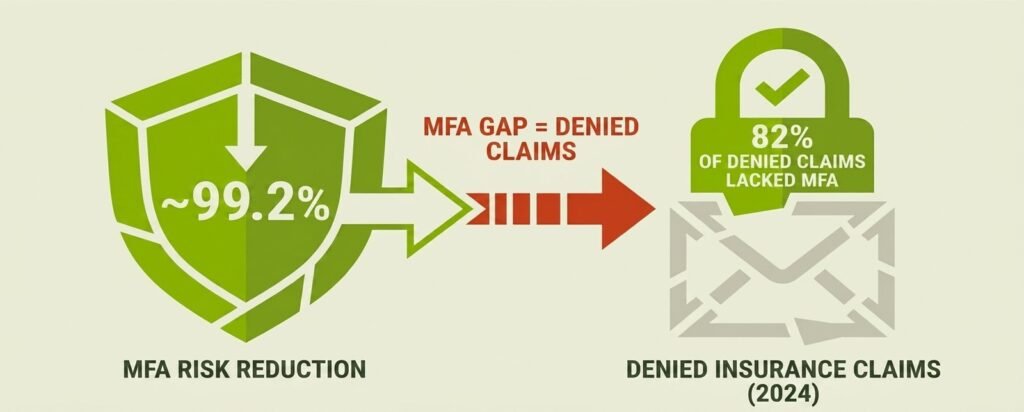
The first half of the SSO vs MFA for small business equation is simple: Multi-Factor Authentication answers one question – is this really the person who owns this account? It requires a second proof of identity beyond just a password – a code from an app, a fingerprint, a physical security key. Even if a hacker has someone’s password, they still can’t get in without that second factor. MFA is estimated to block over 99% of automated credential attacks Microsoft’s own research puts the figure at 99.2%, making it one of the highest-impact, lowest-cost security steps a small business can take.
SSO: One Login for Everything
Single Sign-On answers a different question: Can someone log in once and access all their tools without juggling 15 different passwords? SSO routes everything through one central identity provider, so employees authenticate once and move freely between apps. Law firms face an added ethical dimension on top of this — see our 7 ways law firms can prevent client data breaches for how this maps to ABA Rule 1.6. It’s a genuine quality-of-life improvement – and it also makes offboarding cleaner, since disabling one account cuts access everywhere at once.
Why SSO Without MFA Is Riskier Than Neither
This is the part most people miss. If SSO is deployed without MFA protecting that central login, one stolen password now unlocks every single app the employee uses. A hacker doesn’t get into one tool – they get into all of them at once. SSO raises the stakes of a breach, which is exactly why MFA needs to come first. SSO’s real security value only shows up when it’s layered on top of MFA, not used instead of it.
MFA Costs Almost Nothing to Start
Cost is usually the first objection that comes up in the SSO vs MFA for small business conversation – and it’s a fair one. But MFA is the rare security tool where the price is often close to zero to get going.
You Probably Already Have It
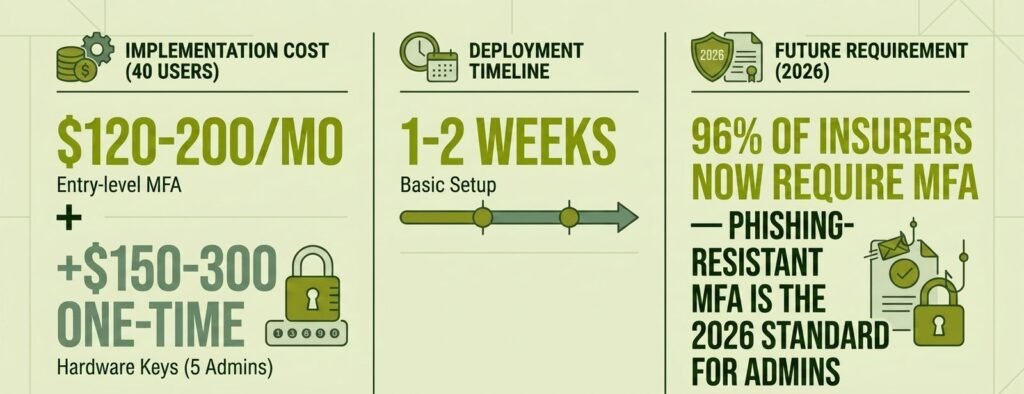
If the business runs on Microsoft 365 or Google Workspace, MFA is already included in the license. Turning it on is a settings change, not a purchase. If you’re mid-migration to the cloud, MFA is step four of our 12-step cloud security checklist for small business migration. Free authenticator apps like Microsoft Authenticator or Google Authenticator handle the second-factor piece at no extra cost. For a 40-person business using these tools, basic MFA can be running in one to two weeks with minimal technical setup. If a dedicated third-party tool is needed, basic options typically run around $120-$200 per month at entry level, though costs can rise depending on the platform and features required.
SSO’s Hidden “Tax” Per App
SSO carries costs that aren’t always obvious upfront. Entry-level SSO platforms for small businesses run roughly $2-$10 per user per month – but that’s just the identity provider. Several password managers now bundle SSO into their business tiers too — see our breakdown of the best password managers for small businesses in 2026 for which platforms include it standard versus behind an enterprise paywall. The real surprise is what some SaaS vendors charge once connected to an external SSO system. In documented cases, a single tool’s annual cost jumped from $9,600 to $43,200 after SSO was enabled, due to vendor-side SSO surcharges. For a business running 15-20 SaaS tools, this “SSO tax” can dwarf the platform license itself – and it’s worth checking every vendor’s pricing before committing.
Cyber Insurers Now Treat MFA as Non-Negotiable
This is where the SSO vs MFA for small business decision stops being just about preference. 96% of cyber insurers now require MFA as a condition of coverage in 2026. Cyber insurance applications have effectively become technical audits – and if MFA isn’t enforced across all access points, claims can be denied outright. To put that in concrete terms: 82% of denied cyber insurance claims in 2024 involved organizations that didn’t have MFA fully implemented. This same figure shows up in what insurers verify before writing a policy at all — see does cyber insurance require a pen test or vulnerability scan. Skipping MFA isn’t just a security gap – it’s a liability that could leave a business uninsured after a breach.
| Criteria | MFA | SSO |
|---|---|---|
| What it answers | Is this really the person who owns this account? | Can someone log in once and access all their tools? |
| Effectiveness / risk reduction | Blocks over 99% of automated credential attacks (Microsoft: 99.2%) | No inherent risk reduction — consolidates access into one login |
| Risk if deployed alone / first | Lower risk on its own — blocks the most common attack vector | Higher risk than neither tool — one stolen password unlocks every connected app |
| Typical cost | Often included with Microsoft 365 / Google Workspace; third-party tools ~$120-$200/month entry level | $2-$10 per user/month entry level, plus potential per-vendor SSO surcharges (one documented case: $9,600 → $43,200/year) |
| Deployment time | Basic rollout in 1-2 weeks for a ~40-person business | Not specified in article; layered on after MFA is fully deployed |
| Cyber insurance status (2026) | Required by 96% of cyber insurers; 82% of 2024 denied claims involved incomplete MFA | Not a standalone insurance requirement in the article |
Not All MFA Is Equal in 2026
Turning on MFA settles half of the SSO vs MFA for small business question. But the type of MFA used matters more than it did even a year ago.
Why SMS Codes Are No Longer Enough
Text-message verification codes were once considered solid protection. In 2026, they’re increasingly being bypassed. Attackers use device-code phishing and session-token theft to get around login-time MFA entirely – meaning they never need to intercept the code at all. The FBI has issued warnings — including a May 2026 advisory on the “Kali365” phishing-as-a-service kit — about tools purpose-built to steal session tokens and bypass MFA, including SMS-based codes, at scale.
Passkeys and Security Keys: The New Standard
The 2026 gold standard is phishing-resistant MFA – specifically, FIDO2/WebAuthn credentials, which include passkeys and hardware security keys like YubiKeys. CPA firms face a regulatory mandate for exactly this standard — see our password managers for CPA firms: FTC Safeguards & MFA compliance guide. These methods are cryptographically tied to specific devices and websites, so they can’t be intercepted or replicated by a fake login page. Passkeys stored on a phone or in a password manager work well for general staff, while physical hardware security keys (at roughly $25-$60 each) are the right call for admin accounts and anyone handling finances.
Your Rollout Order: A Simple 5-Phase Plan
Rolling out the right side of the SSO vs MFA for small business plan isn’t about perfection on day one – it’s getting meaningful protection in place fast, then building from there.
Phase 1-2: Lock Down Admin and Email First
Start with the accounts that, if compromised, do the most damage: admin accounts, email, VPN access, and finance tools. These are where real-world breaches actually begin. Use phishing-resistant MFA (passkeys or security keys) for admins and finance staff from day one. Healthcare clinics face an even stricter version of this requirement across every EHR access point — see our HIPAA cybersecurity for small clinics: no-IT-staff buyer’s guide. At the same time, set up a documented account-recovery process – what happens when someone loses their phone or key. This needs to exist before the first lockout call comes in, not after.
In weeks three and four, extend MFA to all remaining staff and every SaaS tool that supports it. Run a short training session focused not just on how to approve an MFA prompt, but why an unexpected one is a warning sign – not something to automatically tap through.
Phase 3-5: Evaluate and Add SSO
Once MFA is running organization-wide, SSO becomes the logical next layer. Start by checking what’s already included in existing licenses – Microsoft Entra ID is included with Microsoft 365 Business Premium, and Google Workspace has built-in SSO. Both are worth evaluating before paying for a third-party platform. If broader app coverage is needed, SMB-focused platforms like OneLogin or Duo offer bundled SSO and MFA starting around $2-$8 per user per month; JumpCloud’s SSO-capable tiers start higher, around $9-$13 per user per month.
When rolling out SSO, connect apps in priority order – email and productivity first, then finance and HR systems, then the rest. Enforce MFA at the SSO login itself. Set short session lifetimes where possible, since session-token theft is increasingly how attackers bypass MFA entirely. Finish with a steady-state rhythm of quarterly access reviews and immediate account deprovisioning through the SSO platform whenever someone leaves – that last step alone makes SSO worth the investment long-term.
Where does your business actually stand on rollout?
The 5-phase plan above is the roadmap — but most small business owners are somewhere in the middle of it, not at the starting line. Use the tracker below to mark off what’s already in place and see exactly which phase to tackle next.
Your MFA → SSO Rollout Tracker
Check off what’s already done. We’ll tell you which phase to tackle next.
However far along you are, the sequence still matters more than the speed. Admin and finance accounts locked down with phishing-resistant MFA, a recovery process documented, then SSO layered on top once MFA is running everywhere — that order is what keeps a breach from becoming a business-ending event, and what keeps a cyber insurance claim from getting denied.
Handling Employee Pushback Without Losing Momentum
Every SSO vs MFA for small business rollout runs into some resistance to MFA – nobody wants an extra step added to their daily workflow. The key is not letting that resistance stall the rollout entirely.
A few things that measurably reduce friction:
- Let employees choose their MFA method from a short approved list – giving people a sense of ownership makes them more likely to follow through.
- Explain the “why” in personal terms – MFA protects personal accounts too, not just business ones. That tends to land differently than a company-policy mandate.
- Roll it out in stages, starting with admins rather than the whole company at once. This limits the volume of helpdesk issues in week one and lets early adopters become informal helpers.
- Train staff to treat an unexpected MFA prompt as a red flag, not a nuisance. This single mindset shift is one of the most effective defenses against push-bombing attacks, where attackers spam approval requests hoping someone gets frustrated enough to tap “yes.”
If budget allows, adaptive MFA – which only steps up authentication when a login looks unusual – reduces prompt fatigue without reducing security. Worth knowing about as the setup matures.
MFA First. SSO Next. Both Eventually – Just in the Right Order.
The answer to the SSO vs MFA for small business question isn’t really “one or the other.” Both are worth having. But for a small business working with limited time, money, and no dedicated IT support, the sequence matters enormously.
Settling the SSO vs MFA for small business question starts with MFA: it closes the most common and most dangerous gap – stolen passwords – in one to two weeks, at near-zero cost, and satisfies what cyber insurers now require as a baseline. SSO then turns that foundation into a cleaner, more manageable system: one login to rule them all, with MFA standing guard at the gate. Rushing SSO before MFA is in place doesn’t simplify things – it just creates a bigger target.
Get MFA running first. Then bring SSO in as the efficiency layer it’s designed to be. Ready to implement? See our 7-step guide to setting up SSO and MFA for small business for the actual rollout mechanics. That order isn’t just logical – in 2026, it’s the one that keeps a small business covered, insured, and one step ahead of the most common attacks.
TechEd Shield helps small business owners navigate the SSO vs MFA for small business decision and others like it, with clear, jargon-free guidance built for people running their business without an IT team. Take the free cyber insurance readiness check to see whether MFA is already fully in place or still a gap insurers could flag, and which gaps could slow an application or put a claim at risk. It takes about 3 minutes, with no technical knowledge needed.