

Key Takeaways
- Most small medical office WiFi setups are already a HIPAA violation – the good news is that fixing this does not require an IT department.
- HIPAA requires five specific technical safeguards for any network that touches patient data, and each one has a practical, hardware-level solution.
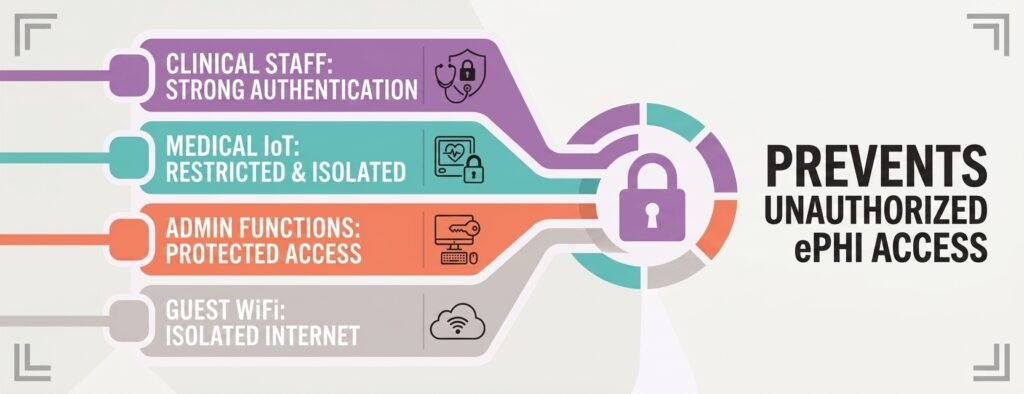
- Splitting your network into four separate segments – clinical, medical devices, admin, and guest – is one of the most important steps you can take right now.
- Hardware from Aruba Instant On, Cisco Meraki, and Ubiquiti UniFi each offer compliant setups designed for offices without technical staff, at very different price points.
- Audit logs must be kept for a minimum of six years – and whether a WiFi vendor needs to sign a Business Associate Agreement depends on more than most office managers realize.
Your Office WiFi Is Probably a HIPAA Violation Right Now
HIPAA-compliant WiFi for medical offices starts with a hard look at what most practices actually have: a router the internet provider dropped off, one password written on a sticky note near the front desk, and every device in the building – staff laptops, patient check-in tablets, the waiting room TV, and wireless medical equipment – all sharing the same connection. That is not a minor oversight. Under HIPAA’s Security Rule, it is a textbook compliance failure.
This is exactly why HIPAA-compliant WiFi for medical offices matters: when electronic Protected Health Information (ePHI) – anything from a patient’s name linked to their appointment to real-time data from a connected medical device – travels across a flat, unsegmented network, it is legally exposed. Practice size does not matter, and neither does whether a breach has ever occurred. The HHS Office for Civil Rights (OCR) evaluates risk, not just outcomes.
HIPAA does not demand a six-figure IT infrastructure overhaul. The law requires reasonable and appropriate safeguards – and hardware ecosystems exist specifically to deliver those for small offices. Running a quick WiFi security check is a smart first step to understand what your network is currently exposing before making any decisions about hardware or configuration. Take the free Cybersecurity Health Check as a smart first step to understand what your network is currently exposing before making any decisions about hardware or configuration.
What HIPAA Actually Requires from Your Network
Building HIPAA-compliant WiFi for medical offices starts with 45 CFR § 164.312, which sets out the technical requirements for any system that creates, stores, or transmits ePHI. For a wireless network, those requirements translate into five clear categories (the specific implementation method under “Integrity” is officially addressable, giving practices some flexibility in how they satisfy it — see below).
The 5 Required Technical Safeguards
- Access Control (§ 164.312(a)(1)): Only authorized users and devices should be able to reach systems containing patient data. In practice, this means role-based access, separate network segments, and individual login credentials – not a shared password.
- Audit Controls (§ 164.312(b)): Hardware and software must record activity on systems containing ePHI. Every connection event, failed login, and device association needs to be logged and stored for a minimum of six years.
- Integrity Controls (§ 164.312(c)(1)): Patient data must be protected from unauthorized alteration while moving across your network. Modern encryption protocols like WPA3-Enterprise handle this at the hardware level.
- Person/Entity Authentication (§ 164.312(d)): Every person accessing the clinical network must be individually verified. Shared passwords fail this requirement outright.
- Transmission Security (§ 164.312(e)(1)): Data moving across your network must be encrypted end-to-end. AES-256 encryption via WPA3 or WPA2-Enterprise with AES-CCMP meets this standard.
Addressable Standards: Flexible, Not Ignorable
Beyond the five required safeguards, HIPAA includes addressable specifications – such as automatic session logoff after a period of inactivity. Addressable does not mean optional. A practice must either implement the control as written, or formally document why an equivalent alternative was used instead. Ignoring addressable standards without documentation is itself a compliance failure.
Do You Need a BAA from Your WiFi Provider?
Whether a vendor needs a BAA is one of the most misunderstood questions around HIPAA-compliant WiFi for medical offices, and getting it wrong creates real legal exposure.
The Conduit Exception Explained Simply
Under 45 CFR § 160.103, entities that simply move encrypted data from point A to point B – without accessing, storing, or analyzing the content – qualify as conduits. Internet service providers and basic unmanaged routers typically fall into this category. Because they do not hold decryption keys and do not retain identifiable data, no Business Associate Agreement (BAA) is required.
When a Vendor Becomes a Business Associate
The line shifts the moment a vendor’s platform stores or analyzes data that can be tied to individual users or patients. Cloud-managed networking platforms – where access logs, device associations, and authentication events are retained on the vendor’s servers – can push a hardware vendor out of conduit territory and into Business Associate status. Cisco Meraki explicitly offers BAAs for healthcare clients using its cloud dashboard. Dental practices face the identical vendor-BAA question — see our HIPAA-compliant WiFi for dental offices: secure setup guide for how Fortinet and on-premises options compare. Ubiquiti UniFi, by contrast, runs its controller software locally on a physical gateway inside your office, meaning no patient metadata leaves the building – keeping it firmly within the conduit exception.
Hardware Built for Offices Without IT Staff
Three hardware ecosystems consistently deliver HIPAA-compliant WiFi for medical offices while remaining manageable for non-technical staff. These same three platforms show up in our broader 7 business WiFi security tools to stop small business breaches, evaluated outside the healthcare-specific requirements covered here. Each makes different trade-offs on cost, complexity, and features.
Aruba Instant On: App-Based Setup, No IT Needed
Aruba Instant On is the most approachable option for offices that want enterprise-grade security without a steep learning curve. The entire system is managed through a mobile app or web portal – no controller software, no command line, no subscription license. A typical deployment pairs an Aruba Instant On 1930 PoE Switch with AP22 Wi-Fi 6 access points, covering a standard clinic layout. Network segmentation, guest isolation, and WPA3 encryption are all configured through guided workflows within the app. Automated firmware updates install during off-hours, so security patches apply without anyone needing to schedule or approve them.
Cisco Meraki: Advanced Threat Management Built In
Cisco Meraki is the premium choice for practices that want deeper security automation. A Meraki MX Security Gateway – paired with MS-series PoE switches and MR-series Wi-Fi 6 access points – brings built-in Intrusion Detection and Prevention (IDS/IPS via Snort), application-layer filtering, and centralized logging to an office with no dedicated IT staff. The dashboard is designed for non-technical administrators, and Cisco formally offers BAAs for healthcare clients, covering the cloud management and logging stack. The trade-off is cost: Meraki requires active per-device subscription licenses to maintain management functionality, making it the highest recurring-cost option of the three.
Ubiquiti UniFi: No Recurring License Fees
Ubiquiti UniFi offers a strong balance of advanced control and low ongoing cost. A UniFi Cloud Gateway Max paired with a UniFi Lite 8 PoE switch and U6 Pro or U6 Plus access points creates a fully self-contained, enterprise-grade network. Because the controller runs locally, all logs and access data stay inside the practice. The management interface makes VLAN creation, guest portal setup, and client isolation straightforward even for non-IT staff, with no recurring license fees for the core platform.
How to Segment Your Network for HIPAA
| Hardware | Setup Method | Recurring Cost | BAA / Data Location | Best For |
|---|---|---|---|---|
| Aruba Instant On | Mobile app / web portal, no controller software | No subscription license | Not specified as offering a BAA in the article | Offices wanting the simplest possible setup |
| Cisco Meraki | Cloud dashboard, built for non-technical admins | Highest of the three — active per-device subscription licenses required | Cisco formally offers BAAs; data managed in the cloud | Practices wanting built-in IDS/IPS and threat management |
| Ubiquiti UniFi | Controller runs locally on an in-office gateway | No recurring license fee for the core platform | No cloud BAA needed — logs stay on-site, conduit exception applies | Practices wanting lowest ongoing cost and full data control |
Segmentation is the single most impactful step toward HIPAA-compliant WiFi for medical offices that a small practice can take. This wireless segmentation is one piece of the broader five-tool stack HIPAA expects — see our HIPAA cybersecurity for small clinics: no-IT-staff buyer’s guide. Virtual Local Area Networks (VLANs) separate traffic into isolated groups, so a compromised device on the guest network cannot reach clinical systems – even if they share the same physical building and infrastructure.
Clinical, Medical Devices, Administrative, and Guest
A compliant small practice needs four distinct segments:
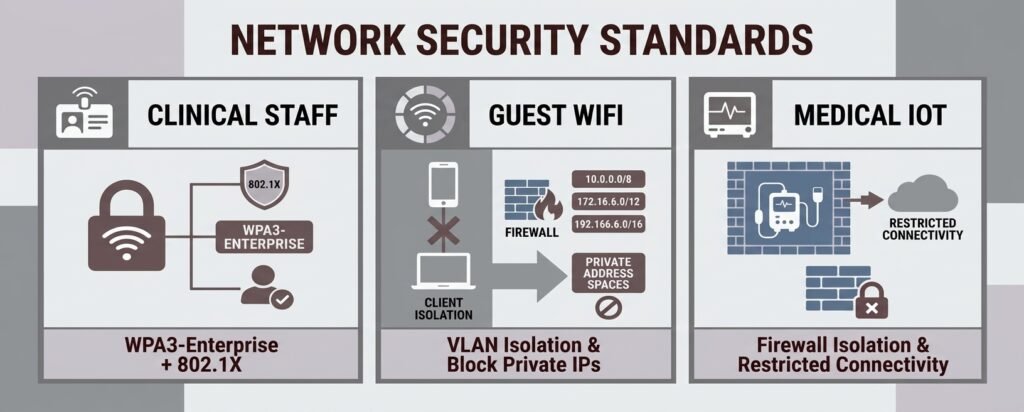
- Clinical Staff (VLAN 10): Staff laptops, EHR workstations, and prescription printers. Protected by WPA3-Enterprise with 802.1X/RADIUS authentication. Full access to EHR systems and approved cloud portals.
- Medical Devices (VLAN 20): Wireless diagnostic equipment, monitors, and IoT health devices. Hidden SSID, strict firewall rules, zero internet access – outbound traffic limited to designated telemetry receivers only. Legacy devices that cannot support WPA3 go here on WPA2-Enterprise with AES-CCMP, with TKIP permanently disabled.
- Admin / Patient Check-In (VLAN 30): Front-desk terminals and check-in tablets. Isolated from clinical and medical device segments, with access limited to check-in software and VoIP systems only.
- Guest WiFi (VLAN 40): Patient and visitor devices in the waiting room. Internet access only – firewall rules explicitly block all traffic to private internal address ranges (10.0.0.0/8, 172.16.0.0/12, 192.168.0.0/16). Client isolation prevents guest devices from communicating with each other.
Why Shared Passwords Put You at Risk
Shared passwords are one of the fastest ways to fail at HIPAA-compliant WiFi for medical offices. A single shared WiFi password for clinical staff is a direct violation of HIPAA’s Person/Entity Authentication requirement. When everyone uses the same credential, there is no way to tie network access to a specific individual, no way to revoke one person’s access when they leave, and no audit trail that holds up to OCR scrutiny. The fix is 802.1X RADIUS authentication, where each employee logs in with their own credentials. When someone leaves the practice, disabling their account cuts their access instantly – no password reset, no disruption to anyone else.
Audit Logs, Physical Locks, and Ongoing Upkeep
Maintaining HIPAA-compliant WiFi for medical offices doesn’t stop at setup – a well-segmented network still needs consistent maintenance to stay compliant. Every access point and gateway must capture device association events, user identities, assigned IP addresses, connection timestamps, and failed authentication attempts – streamed to either a cloud console or encrypted local storage. Best practice — consistent with the six-year documentation retention standard under 45 CFR § 164.316(b)(2) — is to retain these logs for at least six years, since OCR audits can request evidence of ongoing monitoring alongside your written security policies. Consumer-grade routers typically overwrite logs within days, which is an automatic compliance failure.
Physical security matters just as much. All switches, gateways, and modems should be housed in a locked cabinet inside a restricted room. Access points should be ceiling-mounted and out of reach. Every unused Ethernet port on patch panels and wall drops should be disabled in the management console – an attacker who physically plugs into an open wall port bypasses WiFi encryption entirely. For ongoing upkeep, set firmware updates to install automatically during off-hours, maintain a formal offboarding procedure that deactivates directory accounts on an employee’s last day, and run a quarterly review of connected device MAC addresses against your authorized device list.
What This Costs and What to Ask Any IT Provider
Planning-Level Budget Ranges by Setup Type
Budgeting for HIPAA-compliant WiFi for medical offices varies by practice size. HIPAA does not prescribe a specific dollar amount – HHS explicitly says smaller providers should weigh their size and capabilities when selecting safeguards. Real-world planning ranges for a small practice look roughly like this:
Deployment Type Upfront Cost Recurring Cost DIY / Self-Managed ~$800-$1,500 ~$0-$100/month Professionally Installed ~$1,500-$3,000 ~$0-$300/month Fully MSP-Managed ~$1,500-$4,000+ ~$750-$1,500+/month
These are planning benchmarks, not quotes. Cabling, configuration, risk assessment documentation, and ongoing security monitoring all affect the final number. MSPs often have minimum monthly fees that can exceed simple per-user calculations for very small practices.
Key Questions to Ask Before Signing Anything
Hiring the right vendor for HIPAA-compliant WiFi for medical offices doesn’t require understanding VLAN tagging yourself. Ask questions that force the vendor to demonstrate their controls:
- Do you work regularly with HIPAA-covered medical practices, and can you provide references?
- Will you sign a Business Associate Agreement if your work involves access to our patient systems?
- Exactly what data from our network will you be able to access or store?
- Will you separate our guest WiFi from our clinical and EHR network using VLANs?
- Can you demonstrate after installation that a guest device cannot reach our EHR computers?
- How do employees authenticate to the clinical network – do they each have individual accounts?
- What happens to a former employee’s WiFi access the day they leave?
- How long are security logs retained, and can we access them if needed?
- What is your documented response time for a security incident?
- What is included in the monthly fee, and what costs extra?
One important note: HHS does not recognize self-certification or generic third-party HIPAA certifications as a substitute for a properly executed BAA and documented security controls. If a vendor claims to be HIPAA certified as their only credential, keep looking.
Compliant WiFi Is Simpler Than HIPAA Makes It Sound
HIPAA’s language is dense, but building HIPAA-compliant WiFi for medical offices is straightforward: separate your networks, encrypt your clinical traffic, give every staff member their own login, lock up your hardware, and keep your logs. The right hardware – whether that is the app-driven simplicity of Aruba Instant On, the threat-management depth of Cisco Meraki, or the zero-license flexibility of Ubiquiti UniFi – handles most of the heavy lifting automatically. The biggest risk for most small practices is not complexity. It is inaction.
Now that you’ve seen how Aruba Instant On, Cisco Meraki, and Ubiquiti UniFi stack up, here’s a fast way to turn that comparison into an actual decision. Answer three questions about your practice and get a starting-point recommendation.
Which HIPAA WiFi Setup Fits Your Practice?
Answer 3 quick questions to get a starting-point hardware match.
1. What’s your on-site IT support like?
2. What’s a realistic monthly budget for ongoing network management?
3. What matters most to you?
This tool gives you a starting point, not a final answer — the right call still depends on your specific device count, building layout, and how your practice weighs upfront cost against ongoing management time. Use the questions list earlier in this article when you’re ready to talk to a vendor or IT provider.
TechEd Shield helps medical offices set up HIPAA-compliant WiFi for medical offices and cut through cybersecurity complexity with clear, practical guidance, If a full hardware upgrade isn’t in this quarter’s budget, our small business WiFi security checklist: 8 fixes that matter covers what to fix on existing equipment first.