

Key Takeaways
- 43% of UK businesses experienced a cyber breach or attack in the past year – and businesses without an IT team are disproportionately at risk.
- Phishing is the entry point in the vast majority of UK SME attacks, making email protection and staff awareness non-negotiable priorities.
- Standard IT support and dedicated cybersecurity are fundamentally different services – confusing the two leaves critical gaps in your defences.
- Cyber Essentials certification is a UK government-backed scheme that addresses roughly 80% of common attacks and includes free cyber insurance for businesses under £20M turnover.
- You will find a practical breakdown of what a provider must actually do for a business with no internal IT – and how to spot hidden costs before signing a contract.
Running a UK small business without an IT team does not mean cybersecurity is someone else’s problem. The responsibility falls entirely on you – and the stakes are higher than most business owners realise. This guide cuts through the technical jargon to explain what you actually need and how to choose between cyber security companies for UK SMEs — what to look for in a provider, and what questions to ask before committing.
43% of UK Businesses Were Breached Last Year – Without an IT Team, You’re Especially Exposed
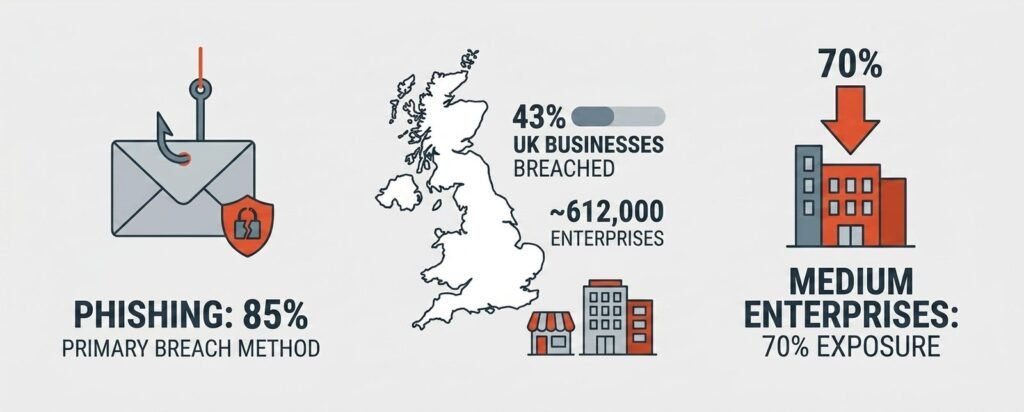
According to the Department for Science, Innovation and Technology (DSIT) Cyber Security Breaches Survey, 43% of UK businesses identified a cyber breach or attack in the last 12 months. For medium-sized businesses, that figure climbs to 70%.
The financial damage from a serious incident rarely stops at the initial disruption. System outages, lost orders, staff downtime, forensic investigation fees, and reputational damage can stack up fast. For a business without a dedicated technical person on hand, recovering from even a mid-level incident becomes exponentially harder – and more expensive.
What makes the zero-IT scenario particularly risky is the response gap. A significantly lower percentage of micro and small UK businesses than larger counterparts have a written incident management plan in place, with only 22% of all businesses having one. Without a plan, meeting the legal requirement to notify the Information Commissioner’s Office (ICO) within 72 hours of a personal data breach becomes a serious challenge. Providers like TechEd Shield focus specifically on helping non-technical business owners build that layer of protection – translating complex requirements into clear, manageable steps.
Why Standard IT Support Won’t Protect You
There is a common and costly assumption that an IT support company and a cybersecurity company are the same thing. They are not – and mixing them up can leave your business exposed in ways that are not obvious until something goes wrong.
MSP vs. MSSP: A Critical Difference
A Managed Service Provider (MSP) keeps your technology running. They fix printers, reset passwords, set up email accounts, and maintain your network. Their job is operational uptime. A Managed Security Service Provider (MSSP) does something entirely different. They monitor your systems for threats around the clock, detect suspicious behaviour, and respond to active attacks. They run a Security Operations Centre (SOC) staffed by trained analysts whose only focus is identifying and stopping threats – not fixing software glitches. For businesses with no internal IT, the practical difference is enormous. An MSP might install basic antivirus software, but they will not be watching for an active intrusion at 11pm on a Friday. An MSSP will be.
The Conflict of Interest You’re Probably Paying For
There is also a structural problem with asking an MSP to handle your security audit. If they configured your systems, they have a natural interest in reporting those configurations as secure. Asking a provider to mark their own homework is a genuine governance risk – and one that most small business owners do not realise they are paying for. A dedicated MSSP operates independently. Their job is to find weaknesses, not to protect the reputation of whoever set things up.
Phishing Is the Entry Point for 85% of UK SME Attacks
The DSIT survey found that 85% of UK businesses that identified a cyberattack reported phishing as the primary method. Phishing – fraudulent emails designed to trick someone into handing over credentials or clicking a malicious link – is by far the most common way attackers get in. Modern phishing emails are no longer easy to spot. AI tools now generate highly convincing, grammatically flawless messages that mimic suppliers, banks, or even senior colleagues. Built-in spam filters often are not enough. Microsoft Defender for Office 365, for example, uses machine learning to evaluate links and attachments in real time – a meaningful upgrade over default spam filtering for businesses already on Microsoft 365. Alongside technical tools, regular phishing simulations give staff realistic practice and instant feedback, making them one of the most effective ways to reduce human risk over time.
Five Things a Provider Must Do for a Zero-IT Business
A business with no internal IT cannot share responsibility with a provider. The provider must own the outcome entirely. There are five capabilities that any credible provider must deliver – not optionally, but as standard.
24/7 Active Threat Containment, Not Just Alerts
Attackers deliberately time ransomware deployments for Friday nights, weekends, and bank holidays – when they know no one is watching. A provider that simply emails an alert to a non-technical director at 2am has not protected your business. They have documented the attack. What is needed is a SOC with pre-authorised authority to act: isolate a compromised device, cut off an active cloud session, quarantine a malicious process – and then send a plain-English summary once the threat is contained. That is the difference between active Managed Detection and Response (MDR) and passive monitoring.
Automated Patching Across Every Device
Unpatched software is one of the most common ways attackers gain access. Every laptop, phone, and tablet connected to your business systems needs to receive security updates automatically – without relying on employees to click install later and forget about it. Automated patching is one of the twelve steps in our cloud security checklist for small business migration, and it’s usually the one businesses skip first. A competent provider uses Mobile Device Management (MDM) to push updates across every enrolled device, enforce full-disk encryption, manage local admin rights, and configure device-lock timeouts – all without requiring any action from staff.
Cloud Email Protection and Identity Defence
Beyond phishing filters, providers must configure email authentication standards – specifically DMARC (in strict rejection mode), SPF, and DKIM. These technical settings prevent criminals from sending emails that appear to come from your domain, protecting both your customers and your reputation. At the identity level, multi-factor authentication (MFA) must be enforced across Microsoft 365 or Google Workspace – not just suggested, and correctly configured to avoid the coverage gaps that quietly undo it. Conditional access policies that restrict logins from unusual locations add another meaningful layer of protection.
You have just read what a provider must do for a business with no internal IT. Now flip the question around: how much of it do you actually have in place right now? The quick self-check below walks through the same eight controls we look for when we review a small business’s setup. Answer honestly — “Not sure” is a perfectly valid answer, and often the most revealing one.
Is Your Business Actually Protected? A 60-Second Scorecard
Answer eight questions about your current setup. If you don’t have a provider yet, answer for what you have in place today. There are no wrong answers — only gaps worth knowing about.
Whatever your score, the value is in the list of gaps it hands you. Those are not abstract weaknesses — they are the exact clauses to raise before you sign anything, and the exact things a good provider should be able to explain in plain English. A high score is worth verifying in practice; a low score is worth acting on this month rather than next quarter. Keep reading for what UK compliance actually requires, what this should cost, and the hidden fees that quietly turn a “cheap” contract into an expensive one.
Cyber Essentials: What UK Compliance Actually Requires
Cyber Essentials is a UK government-backed certification scheme managed by the National Cyber Security Centre (NCSC) and delivered by the IASME Consortium. It is designed to protect organisations against approximately 80% of common internet-borne cyber attacks by enforcing five core technical controls: boundary firewalls, secure configuration, user access control, malware protection, and security update management. For many UK SMEs, it is not just a good idea – it is becoming a commercial requirement. Public sector contracts, NHS supplier agreements, and enterprise buyers are increasingly mandating Cyber Essentials as a condition of doing business.
Free Cyber Insurance for Businesses Under £20M Turnover
One of the most overlooked benefits of achieving Cyber Essentials is the insurance that comes with it. UK-based organisations with an annual turnover under £20 million automatically receive a free cyber liability insurance policy upon certification, typically covering up to £25,000. For a small business without existing cyber cover, that alone can justify the cost of the audit.
The Patching Rule Most SMEs Fail
Under the current Cyber Essentials standard (version 3.3), all high-risk and critical security patches – those with a CVSS score of 7.0 or above – must be applied within 14 calendar days of release. Missing this window causes an automatic assessment failure. For a business managing devices manually, this is a near-impossible standard to maintain consistently. For a business with automated MDM patching in place, it is handled without lifting a finger.
What UK Cybersecurity Actually Costs
Pricing varies significantly depending on what you are buying – and from whom. Understanding the three main models makes it easier to compare proposals fairly.
Three Pricing Models Explained Simply
- Per-user per-month: A flat monthly rate per employee, covering all their devices and accounts. The clearest model for businesses without an IT team. Typically £15-£35 per user for essential compliance and hygiene; £40-£120 per user for full 24/7 SOC and MDR coverage.
- Per-endpoint per-month: Billed per device rather than per person. Practical for asset-heavy businesses, but costs can vary if staff use multiple devices. If you’re weighing a managed subscription against building the capability in-house, our on-premise vs cloud security cost comparison breaks down the five-year numbers.
- Tiered fixed retainers: A set monthly fee covering a defined number of endpoints with bundled incident response hours. Entry-level 24/7 SOC packages often start around £900 per month.
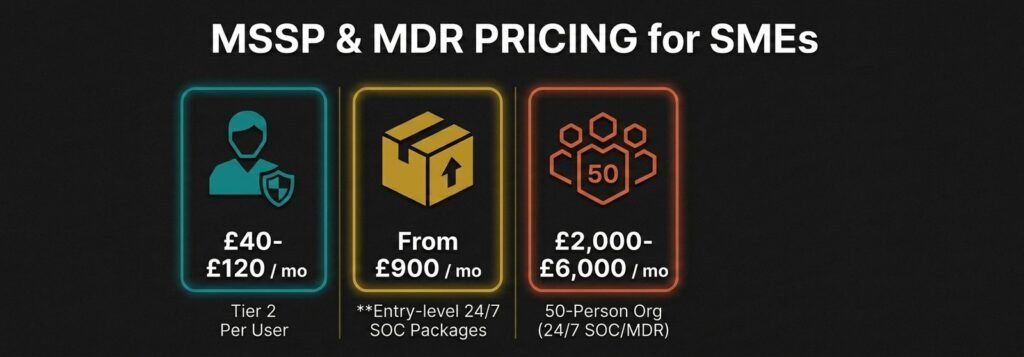
One-off onboarding and environment hardening – covering initial audits, MDM setup, and Microsoft 365 security configuration – typically runs £1,500-£5,000 depending on business size and complexity.
| Pricing model | How you’re billed | Typical cost | Best suited to |
|---|---|---|---|
| Per-user per-month | Flat monthly rate per employee, covering all their devices and accounts | £15–£35/user (essential compliance & hygiene) £40–£120/user (full 24/7 SOC & MDR) |
Businesses without an IT team — the clearest model to budget |
| Per-endpoint per-month | Billed per device rather than per person | Varies with device count (rises if staff use multiple devices) | Asset-heavy businesses |
| Tiered fixed retainer | Set monthly fee for a defined number of endpoints, with bundled incident response hours | Entry-level 24/7 SOC often starts around £900/month | Businesses wanting predictable, bundled coverage |
Plus a one-off onboarding & environment hardening fee — typically £1,500–£5,000 depending on business size and complexity.
Hidden Fees to Spot Before Signing
- SIEM log ingestion overages: Some platforms bill based on daily data volume. Uncapped, this can add £3,000-£10,000 per year. Always ask for a fixed-fee ingestion guarantee.
- Out-of-scope incident response: Low monthly fees can hide hourly rates of £250-£450 the moment a real incident requires hands-on containment. Confirm that initial triage and isolation are included in the base subscription.
- SLA fine print: A 15-minute response often means an automated ticket is opened – not that an analyst is actively investigating. Ask for a contractual Mean Time to Contain (MTTC) for high-severity incidents.
How to Vet a Provider Without Technical Knowledge
You do not need to understand the technical details to ask the right questions. The key is knowing which accreditations are genuine proof of capability and which are marketing gloss.
Accreditations That Actually Matter (CREST, IASME)
- CREST-accredited SOC: The Council of Registered Ethical Security Testers (CREST) audits SOC facilities, data workflows, and response playbooks against government-backed benchmarks. Individual analyst certifications such as CRSA or CCSA confirm that staff have passed rigorous technical examinations.
- IASME Certification Body status: Providers holding official IASME Consortium status can assess and issue Cyber Essentials and Cyber Essentials Plus certifications directly, streamlining your compliance process.
- ISO/IEC 27001 certification: Confirms the provider manages customer data within an independently audited Information Security Management System – worth verifying that the certificate covers their managed security operations specifically.
Data Residency and UK GDPR: What to Ask
When a provider monitors your systems, large volumes of log data, identity records, and email metadata flow into their platforms. UK law does not impose a blanket data residency requirement, but it strictly regulates international transfers of personal data. Ask prospective providers directly where their SIEM platform and SOC facilities are located. If data is routed to support centres in non-adequate jurisdictions, your business carries the compliance risk. Confirm that all primary data processing remains within the UK or an adequacy-approved jurisdiction.
A Cyber Attack Costs UK SMEs Up to £100,000 – The Right Provider Pays for Itself
The average cost of a significant cyber attack across UK businesses is estimated at £195,000. For SMEs without backups or cyber insurance in place, costs commonly fall between £35,000 and £100,000. Operational downtime is consistently the largest single cost driver – UK SMEs report average losses of nearly £31,000 for every day they are forced to close following a cyber attack.
Against those numbers, a fully managed 24/7 security service at £40-£120 per user per month is a risk transfer, not an overhead. For a 10-person business paying £600-£1,200 per month, a single avoided incident covers years of protection costs. The right provider does not just respond to attacks. They prevent the downtime, the recovery costs, the ICO notifications, and the customer trust damage that follow.
For plain-English guidance on protecting your business without needing a technical background, TechEd Shield provides cybersecurity education and practical tools built specifically for UK small business owners running without an IT team. Not sure where your own setup stands? Take the free Cybersecurity Health Check to see which of the five provider checks above your business would fail today.