

Key Takeaways
- Multi-factor authentication (MFA) reduces the risk of account compromise by more than 99% – but only when configured correctly.
- SMS-based MFA is actively discouraged by CISA and remains one of the easiest methods for attackers to bypass.
- The 2024 Snowflake breach showed how missing MFA enforcement on even a single account can lead to massive data loss.
- Your help desk can accidentally undo all your MFA work if staff are not trained to verify identity before resetting credentials.
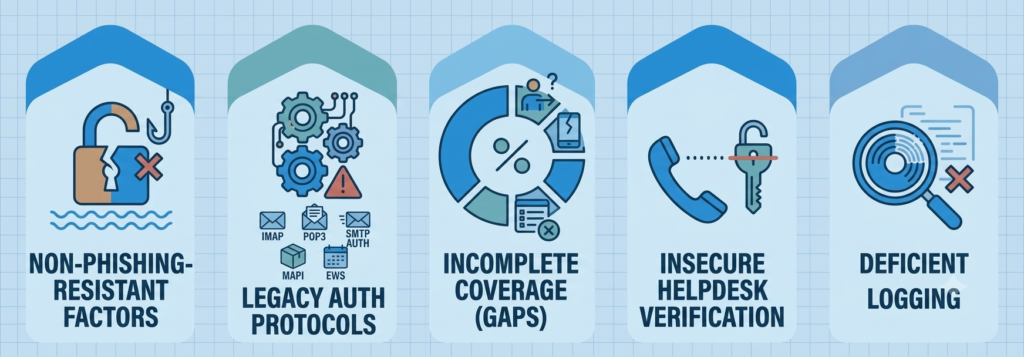
- This post breaks down all five mistakes – and exactly what to do about each one.
MFA is one of the smartest moves a small business can make. Simple, widely available, and proven to reduce account takeovers dramatically – yet turning it on is not the same as setting it up right. That gap is where MFA setup mistakes creep in: five common configuration errors that quietly leave businesses exposed, and most owners do not find out until something goes wrong.
MFA Stops Over 99.9% of Identity-Based Attacks – Until You Set It Up Wrong
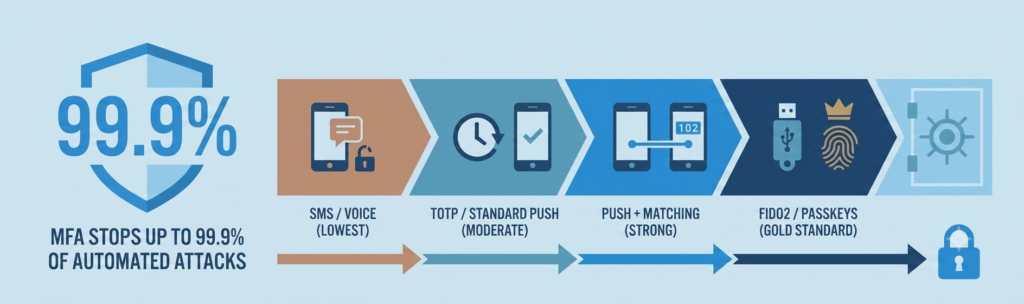
According to Microsoft’s research, MFA reduces the risk of account compromise by more than 99%. That is an extraordinary level of protection for something that takes minutes to enable. Yet credential-based attacks remain one of the leading causes of small business breaches – a clear sign that having MFA enabled and having it working are two very different things.
The gap is rarely a software flaw. Attackers today do not look for technical exploits – they look for the easiest door left open. The five mistakes below are the ones they find most often. TechEd Shield breaks down each one in plain language so any business owner can understand what is at risk and what to fix first.
How Exposed Is Your Business, Really?
You know MFA is enabled. But five specific gaps are what actually let attackers through — and most businesses have at least one without knowing it. Answer the five questions below honestly. It takes 60 seconds, and it will tell you exactly where to start fixing things.
MFA Vulnerability Self-Assessment
Check every box that applies to your business, then tap “Check My Exposure.”
However you scored, the good news is the same: every gap above has a fix that takes minutes, not a dedicated IT team. Read on for exactly what to change, in the order that closes the biggest holes first.
Mistake #1: Weak MFA Factors Are Easy to Crack
Not all MFA methods are created equal. Choosing the wrong one is like installing a deadbolt and leaving a window open.
SMS: Fundamentally Insecure and CISA-Discouraged
SMS verification codes feel secure because they arrive on your phone. But they rely on the phone network, which has known weaknesses. Attackers can execute a SIM swap, convincing a mobile carrier to transfer your number to their device, or intercept codes using flaws in the SS7 routing protocol that connects phone networks globally. The Cybersecurity and Infrastructure Security Agency (CISA) has explicitly recommended avoiding SMS-based authentication for these reasons.
Push Notifications: Stronger Than SMS, Still Exploitable
Standard push notifications are a step up from SMS, but they are vulnerable to a technique called MFA fatigue (also known as push bombing). An attacker who already has your password uses an automated script to send repeated approval requests to your phone. The goal is to annoy or confuse the user into tapping Approve just to make it stop.
The Uber Breach: A Push Notification Gone Wrong
In 2022, attackers bombarded an Uber contractor with repeated push notifications for over an hour. When the contractor did not respond, the attacker reached out via WhatsApp, claiming to be from Uber IT support. The contractor eventually approved a prompt – and the attacker was in. This was not a software vulnerability. It was a configuration and awareness failure.
The Upgrade That Actually Protects You
The most secure option available today is a FIDO2 hardware security key (such as a YubiKey). These keys are phishing-resistant because authentication is cryptographically tied to the specific website – a fake login page cannot complete the handshake. CISA recommends them for administrators and anyone with access to sensitive systems. If hardware keys are not immediately practical, enabling number matching on push notifications is a strong interim step – it requires the user to type a code displayed on-screen into the app, making silent approval impossible. MFA is only one layer, though – see how MFA fits into a wider small business security toolkit for the other tools that close the gaps it leaves open.
Mistake #2: Ghost Logins That Bypass MFA Entirely
This is one of the least understood gaps in MFA coverage – and one of the most dangerous.
How Old Email Protocols Sneak Past Your Defenses
Modern logins redirect users through a secure portal where MFA is triggered. Older email protocols – like IMAP, POP3, and SMTP AUTH – do not support that redirect. They accept a username and password directly, with no MFA step, even if MFA is fully enabled on your account. Attackers use automated scanners to find mail servers still accepting these legacy connections, then use stolen or guessed passwords to log straight into inboxes.
A related issue is what is sometimes called a ghost login – where a local mailbox password exists alongside a modern Single Sign-On (SSO) setup. The SSO login requires MFA. The old direct-login path does not. The attacker uses the path you forgot was still open.
The Fix: Block Legacy Protocols First
In Microsoft 365, go to Settings > Org settings > Modern Authentication and disable IMAP, POP3, and SMTP AUTH. A Conditional Access policy in Microsoft Entra ID can then block any connection attempt using these older methods – acting as a safety net even if a setting is accidentally left on. Google Workspace addressed this at the platform level when it shut down basic authentication for IMAP, POP, and SMTP, requiring OAuth 2.0 for all connections – administrators should confirm their tenant settings reflect this change.
Mistake #3: MFA Gaps Let Attackers Walk Right In
Enabling MFA for most accounts is not the same as enabling it for all accounts. Gaps are where breaches happen.
No MFA Enforcement: How the Snowflake Breach Happened
In 2024, attackers linked to the ShinyHunters group obtained stolen credentials for Snowflake customer accounts. Those accounts did not have mandatory MFA enforced. Attackers logged in directly using usernames and passwords purchased from infostealer malware logs – no hacking required. A business password manager that generates unique credentials per account and flags reused or breached passwords closes exactly this kind of gap — see our comparison of the best password managers for small businesses in 2026 for options that fit different team sizes.
Companies including Advance Auto Parts and Ticketmaster had data exfiltrated over more than 40 days before detection.
Who Is Still Unprotected in Your Business?
The most common unprotected accounts in small businesses include:
- New employee accounts provisioned before MFA enrollment is completed
- Service accounts used by software integrations, often excluded from MFA policies
- Executive accounts granted exceptions for convenience
- Shadow SaaS apps – tools employees sign up for using a work email, outside the company’s main identity system
From April 2026, the UK’s Cyber Essentials certification (v3.3) mandates MFA for all cloud services and remote access – no exceptions. For the full picture of what Cyber Essentials requires and what it costs to get certified, see our guide to choosing a cyber security company for UK SMEs without an IT team. If a third-party application charges extra to enable MFA, the organization must pay for the upgrade or face automatic certification failure. Whether or not Cyber Essentials applies directly to a given business, the principle holds: coverage gaps are exactly what attackers look for.
Mistake #4: Your Help Desk Can Undo All Your MFA Work
Technical controls are only as strong as the human processes around them. The help desk is often the weakest link.
How Scammers Trick Support Staff Into Handing Over Access
When someone is locked out of their account, the help desk becomes the fallback – and that is exactly when social engineering works best. Attackers gather personal details about an employee from public social media profiles, data breach dumps, and company websites – the same reconnaissance techniques covered in our 2026 guide to the social engineering tactics employees now face. They then call the help desk, impersonate the employee, and claim to be locked out or traveling without their phone.
If the support team verifies identity using static information – date of birth, employee ID, or a manager’s name – the attacker can easily provide correct answers. The technician resets the password and registers a new MFA device. The attacker now has full access, and the legitimate employee has no idea.
Verification Steps That Actually Confirm Identity
Knowledge-based questions should never be the sole verification method for credential resets. More reliable alternatives include:
- Video call verification – confirm the caller matches the HR photo on file or shows a government-issued ID
- Temporary Access Passes (TAP) in Microsoft Entra ID – time-limited, one-use cryptographic codes issued through a secure, out-of-band channel rather than over the phone
- Manager authorization – for admin or high-privilege accounts, require a second confirmation from the account holder’s direct manager before any MFA reset is processed
Mistake #5: If You Are Not Watching Your Logs, Attacks Go Unnoticed
MFA is not a set-it-and-forget-it control. The alerts it generates are some of the most valuable early warning signals available – but only if someone is reading them.
What Ignored Login Alerts Look Like in Practice
When an MFA push notification is denied, it means the user’s password has already been validated by the attacker. That denial is a signal that someone unauthorized is actively trying to get in. Multiple denials in a short window for the same account are a strong indicator that a push bombing attack is in progress – and without monitoring, no one knows.
A successful login from an IP address in a country the user has never visited, seconds after a normal domestic login, points to session hijacking via a phishing proxy. Without log monitoring, these signals go unseen, and an attacker can maintain access for weeks. Reviewing sign-in and audit logs regularly – flagging repeated MFA denials, logins from unusual locations, and unauthorized changes to MFA registration settings – turns raw data into actionable warnings before real damage occurs. Log monitoring is just one of seven areas a proper review covers – see what a small business security audit checks beyond MFA for the full list.
MFA Only Works When It Is Set Up Correctly – Start Here
MFA is genuinely one of the most effective protections a small business can have. But the five mistakes above – weak authentication methods, legacy protocol gaps, incomplete coverage, insecure help desk procedures, and no log monitoring – each chip away at that protection in ways that are not visible until it is too late.
None of these fixes require a dedicated IT team. They require clear steps, applied in the right order — the same is true for pairing MFA with a proper password manager; see our guide to the best open-source password managers for small business for budget-friendly options. Start with the highest-risk gaps first: disable SMS as an MFA method, block legacy email protocols, and make sure every active account is actually covered by your MFA policy. Then address help desk verification procedures and set up basic log monitoring to close the loop. Not sure where your business actually stands? Take the free Cybersecurity Health Check to see which of these gaps applies to you.