

Key Takeaways
- Most small businesses need both a firewall and a VPN working together, not one instead of the other, because each defends against different types of attacks
- 73% of small businesses reported a cyberattack in 2023, with ransomware behind the vast majority of SMB breach incidents, and a significant share of breached SMBs face lasting financial damage as a result
- Firewalls guard the network’s edge while VPNs encrypt data as it travels, so relying on just one leaves a clear gap for attackers to exploit
- Office-based, fully remote, and hybrid teams each need a different mix of firewall and VPN protection – the right setup depends on how the business actually works
- A simple free check can reveal whether a business Wi-Fi network is already exposed
Firewall or VPN for small business is a question a lot of owners get wrong by assuming one alone is enough to keep the business safe online. In reality, these two tools do very different jobs, and picking only one can leave serious gaps that scammers are only too happy to find.
73% of SMBs Hit by Cyberattacks in 2023
A widely cited 2019 Accenture study found that 43% of cyberattacks target small businesses – a concentration more recent data suggests has only grown.
A related finding puts the number even higher for actual incidents: 73% of SMB owners and leaders reported experiencing a cyberattack or data breach in the past 12 months, according to the ITRC’s 2023 Business Impact Report.
Ransomware was involved in 88% of those small business breaches, compared with 39% for larger organisations, a gap that shows just how attractive smaller, less-defended networks have become to criminals.
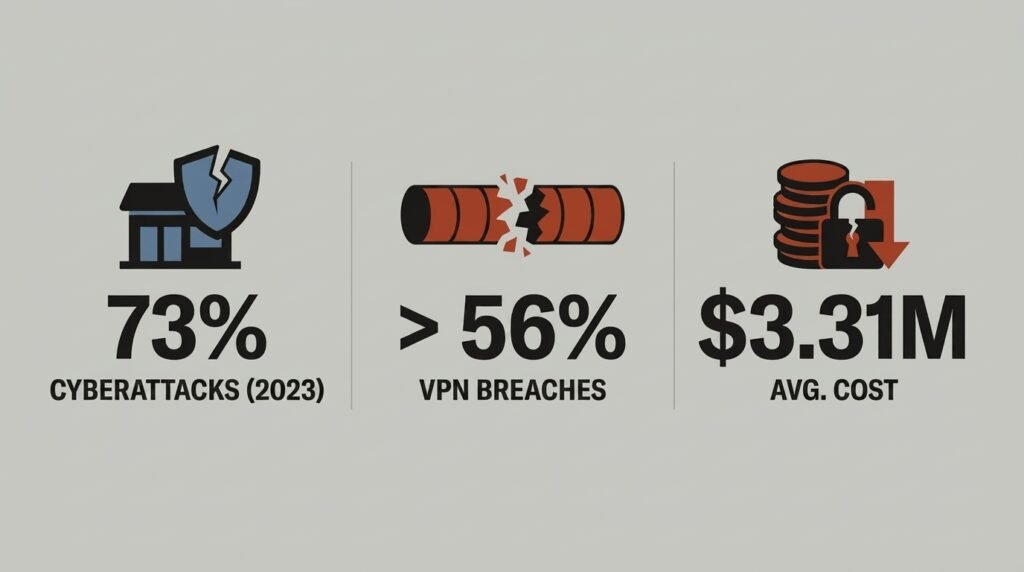
The fallout brings real financial and operational risk on top of the disruption itself. IBM’s Cost of a Data Breach Report puts the average cost of a full data breach for a business under 500 employees at $3.31 million, and Verizon’s 2025 DBIR found 19% of breached SMBs face bankruptcy as a result. Yet many small businesses still operate with little to no dedicated cybersecurity budget. TechEd Shield provides a free way to check whether a business Wi-Fi network already has weaknesses worth fixing, which is a sensible first step before deciding what other protection is needed.
What Firewalls and VPNs Actually Do
Answering the firewall or VPN for small business question starts with understanding that these tools sit at different points in a business’s digital setup. One acts like a gatekeeper at the front door; the other acts like an armoured van for anything travelling outside the building. Understanding that difference is the key to choosing the right protection.
Firewalls Guard Your Network’s Edge
A firewall watches traffic coming in and out of a business network and blocks anything that looks unauthorised. Modern Next-Generation Firewalls (NGFWs) go further than older models, inspecting traffic deeply enough to spot suspicious apps, hidden malware, and unusual behaviour rather than just checking basic addresses and ports. This makes them especially good at stopping outside intruders, blocking ransomware before it lands, and preventing an infected guest device from spreading trouble across the rest of the network.
VPNs Encrypt Data on the Move
A VPN takes a different approach. Rather than guarding a fixed boundary, it wraps data in an encrypted tunnel as it travels across the internet, scrambling the contents so nobody snooping on public Wi-Fi can read it. It also masks the device’s real IP address, adding a layer of privacy on top of the encryption. This makes VPNs a necessary tool for anyone logging into business systems from a coffee shop, airport, or home network that is not properly secured.
Why Choosing Just One Leaves Gaps
This is the core problem with treating firewall or VPN for small business as an either/or choice: a firewall alone cannot protect an employee’s data the moment it leaves the building over public Wi-Fi. A VPN alone cannot inspect incoming traffic for hidden malware or stop an infected device from moving sideways across the network once it is inside. Relying on just one tool means leaving half the business exposed.
Legacy VPNs’ Implicit Trust Risk
The firewall or VPN for small business decision gets more complicated with legacy VPN risk. Older VPN setups carry their own risk – once someone logs in, a legacy VPN often grants broad access to the whole internal network, no questions asked. If a password gets stolen or an employee’s laptop picks up malware, whoever is behind that connection inherits the same wide access. Exposed VPN gateways sitting on the open internet also need constant patching, and unpatched flaws are a common way attackers slip in unnoticed. This is another reason the firewall or VPN for small business question isn’t just theoretical: Zscaler’s 2024 VPN Risk Report found that 56% of organizations of all sizes experienced a cyberattack exploiting VPN vulnerabilities in the past year, underscoring how widespread the risk of relying on VPNs alone has become. Pairing a VPN with proper multi-factor authentication, and moving toward more restrictive Zero Trust-style access, closes much of this gap.
Weighing Firewall and VPN Costs
Cost is often the deciding factor in the firewall or VPN for small business decision, and the numbers work differently depending on team size. Industry pricing data puts entry-level hardware firewalls for around 5 to 10 users between $300 and $1,000 for the appliance itself, plus an annual subscription for ongoing threat protection. Cloud-based Zero Trust Network Access (ZTNA) platforms, by contrast, charge $5 to $20 per user per month depending on tier and bundle, with no hardware to buy or maintain.
The Scale Crossover Point Explained
Analysts note that for micro-teams of roughly 5 to 15 people, cloud VPNs and ZTNA platforms tend to be the more cost-effective route, since there is no upfront hardware spend and pricing scales gently with headcount. Once a business grows past around 30 to 50 employees, though, the maths flips: paying per user every month starts to add up faster than the fixed annual licence fee of an on-premise NGFW appliance. Businesses expecting steady growth are wise to think a few years ahead rather than pricing only for today’s team size.
Matching Protection to Your Setup
There’s no single answer to the firewall or VPN for small business question – the right mix depends heavily on how and where a team actually works. There is no single answer that fits every business – the setup should match the way people log in and where company data physically travels.
Not sure which of the three setups below actually describes your business? Tap your team’s working style and get a straight answer on whether you need a firewall, a VPN, or both — before you read on.
Your result is a starting point, not a final answer — team setups change, and so does the right mix of protection. Whatever you picked, the sections below walk through exactly why that combination works, and what to prioritize first.
Office-Based Teams
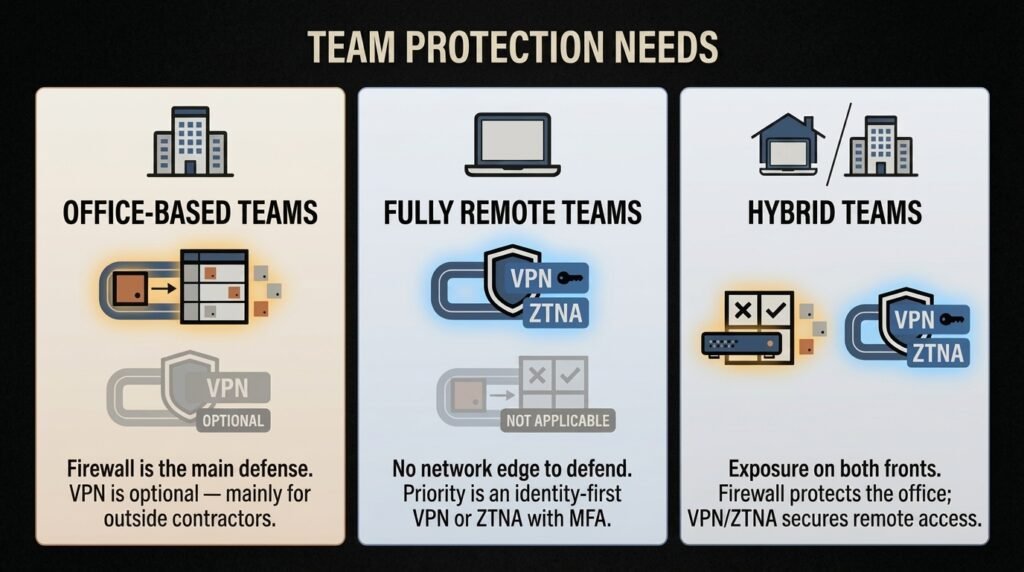
Businesses running entirely from a physical office, with local servers, workstations, and in-house Wi-Fi, need a firewall as their main line of defence. It protects the local network from inbound scanning, drive-by malware, and rogue devices connecting to the office Wi-Fi. A VPN becomes optional here, useful mainly if outside contractors occasionally need remote access to internal files.
Fully Remote Teams
Teams working entirely from laptops and cloud tools such as email, shared drives, and video calls have no physical network edge to defend, so a hardware firewall offers little benefit. Instead, the priority shifts to an identity-first VPN or ZTNA solution paired with device checks and multi-factor authentication, protecting connections made over home Wi-Fi and public networks. For the full migration plan off a legacy VPN, see our remote team security checklist for small businesses.
Hybrid Teams
Businesses combining a physical office with remote or client-site staff face exposure on both fronts. This calls for an integrated approach: a firewall to protect the office's local infrastructure, alongside a VPN or ZTNA solution to give remote staff secure, encrypted access to internal systems without leaving open ports exposed to the public internet. If remote staff are connecting from home, see our home Wi-Fi security checklist for remote workers for the full-tunnel vs. split-tunnel configuration question that comes up next.
| Criteria | Firewall | VPN |
|---|---|---|
| What It Protects | The network's edge — inspects traffic in and out, blocks unauthorized access, stops infected devices from spreading internally | Data in transit — encrypts information as it crosses the internet and masks the device's IP address |
| Best Suited For | Office-based teams with local servers and in-house Wi-Fi | Fully remote teams working from cloud tools and home/public networks |
| Entry-Level Cost | $300–$1,000 hardware (5–10 users) + annual subscription | $5–$20 per user, per month (cloud VPN/ZTNA) |
| Key Risk If Used Alone | Can't protect data once it leaves the building over public Wi-Fi | Can't inspect incoming traffic for malware or stop it spreading internally |
| Hybrid Teams | Need both, working together — firewall for the office, VPN/ZTNA for remote or client-site access | |
Industry Analysis Recommends Layering Both Defences
The honest answer to firewall or VPN for small business is usually both: most small businesses handling remote staff, multiple locations, or sensitive customer data ultimately need both working together, rather than treating them as competing options. A firewall governs what is allowed to cross the network's edge, while a VPN protects the data travelling to and from that edge, and each covers a blind spot the other cannot see.
For the firewall or VPN for small business decision, starting simple matters more than starting perfectly. Reviewing how the team actually works, checking existing Wi-Fi security, and closing the most obvious gaps first will do far more good than chasing an elaborate setup from day one. For a quick starting point, try TechEd Shield's free Wi-Fi security check to see how exposed a business network currently is. If a firewall is the right call for your office setup, see our 7 business WiFi security tools to stop small business breaches for specific platform picks.