


Key Takeaways
- Most small business WiFi networks are vulnerable because of a handful of fixable mistakes – not a lack of expensive technology.
- Common “security” tactics like hiding your network name and filtering device addresses provide almost zero real protection.
- Separating guest, IoT, and business traffic onto different network segments is one of the highest-impact changes a small business can make.
- WPA3 encryption, client isolation, and disabling UPnP and WPS close the most commonly exploited gaps – and none of them require an IT degree.
- Later in this guide, the specific router settings to switch off right now are covered – most owners have never touched them.
A small business WiFi security checklist is exactly what’s missing when there’s no dedicated IT team – WiFi security often gets pushed to the back burner. That’s exactly the gap that attackers count on. The good news: most of the risk comes from a short list of fixable problems, and fixing them doesn’t require technical expertise – just a clear checklist and the willingness to spend an hour on your router settings.
Your WiFi Is an Open Door – Here’s the Proof
A small business WiFi security checklist matters because small and medium-sized businesses are frequently targeted by cyberattacks, often because they have fewer security resources compared to larger companies – not because attackers find them less valuable. In fact, the opposite is true: 43% of all cyberattacks target small businesses, a figure that has held up as the industry benchmark since it was first reported in 2019, and Verizon’s 2025 Data Breach Investigations Report puts real bankruptcy risk after a cyberattack at around 19% for small businesses. Payment data, customer records, and business credentials all sit on networks that are typically flat, unmonitored, and protected by a single shared password.
A flat network means every device – the office laptop, the smart thermostat, a customer’s phone on guest WiFi – sits in the same digital room. If one device gets compromised, an attacker can move freely to everything else. No walls, no checkpoints. That’s the real open door.
TechEd Shield’s free WiFi security checker is a practical starting point for business owners who want to see exactly where their network stands before working through the fixes below. The checklist covers the eight changes that close the most common gaps.

The Myths Keeping Your Network Vulnerable
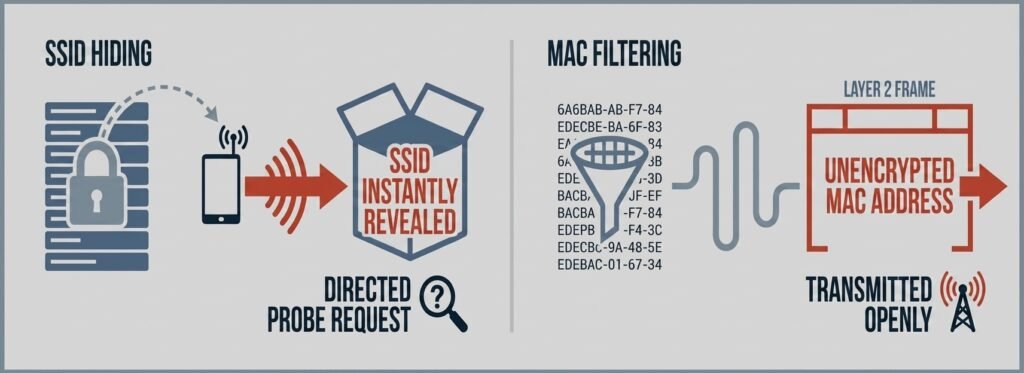
Before working through a small business WiFi security checklist, two popular “security” tactics need to be retired. Both feel like they should work. Neither actually does.
Why Hiding Your Network Name Backfires
The first myth this small business WiFi security checklist has to bust: hiding your WiFi network name (SSID) seems like a reasonable way to stay off the radar. The problem is that it doesn’t hide anything from someone who wants to find it. When a device tries to connect to a hidden network, it broadcasts the network name in plain text – making it visible to anyone running basic network monitoring software. Worse, your own devices will actively broadcast that hidden network name everywhere they go, looking for it. Attackers use this to set up fake “evil twin” networks that mimic yours and intercept traffic. Broadcasting your SSID normally and protecting it with strong encryption is more secure, not less.
Why MAC Filtering Is Security Theater
MAC address filtering keeps a whitelist of approved devices and blocks everything else. It sounds logical, but WiFi transmits MAC addresses in plain text over the air. An attacker can see the approved addresses in seconds using free tools, then copy one of them to their own device. The filter gets bypassed in minutes. Strong authentication through WPA3 – covered below – does the actual job that MAC filtering claims to do.
Segment Your Network Before Someone Else Does
Segmentation is the single biggest structural item on any small business WiFi security checklist. Retail stores face a specific, high-stakes version of this — see our guide to securing guest WiFi vs. POS on your retail network. Medical offices face a stricter, legally mandated version of this same requirement — see our HIPAA-compliant WiFi for medical offices without an IT team. Instead of one shared network, create separate lanes for different types of traffic. Business devices go on one, guests go on another, and smart devices (printers, cameras, thermostats) go on a third.
Keep Guests, IoT, and Business Traffic Separate
This is done using VLANs (Virtual Local Area Networks) – a standard feature on business-grade routers and access points from brands like Ubiquiti UniFi, Cisco Meraki, and Aruba Instant On. Each VLAN gets its own subnet and its own firewall rules that block traffic from crossing into the others.
The practical effect: if a customer’s infected phone connects to guest WiFi, it cannot reach the business network or any device on it. A compromised IoT device can’t pivot to the machine running payroll. This dramatically reduces the damage any single compromised device can do – security professionals call this shrinking the “blast radius.” This dramatically reduces the damage any single compromised device can do – security professionals call this shrinking the “blast radius.” If your business needs dedicated WIPS scanning or certificate-based onboarding beyond basic VLANs, see our 7 business WiFi security tools to stop small business breaches.
How Segmentation Helps Meet PCI DSS, HIPAA, and GDPR Standards
Segmentation goes beyond good practice – it’s required under several regulatory standards. PCI DSS v4.0 doesn’t strictly mandate wireless segmentation, but if you accept card payments, an unsegmented wireless network puts your entire network in scope for the assessment. Segmenting the wireless network away from the systems that touch payment data is the standard way businesses reduce that scope and audit burden. This is one piece of a larger PCI picture — see 9 ecommerce security risks PCI compliance leaves unprotected for the gaps segmentation alone doesn’t close. Without segmentation, the entire network falls under compliance scope, which significantly increases audit complexity. Businesses handling health information or European customer data face similar requirements under HIPAA and GDPR. Clinics face this at a stricter standard, with medical devices on their own isolated VLAN — see our HIPAA cybersecurity for small clinics: no-IT-staff buyer’s guide. Proper VLAN setup is one of the most direct ways to reduce that compliance burden.
Upgrade to WPA3 – Your Password Isn’t Enough
Encryption is a core piece of any small business WiFi security checklist – a strong password on a weak protocol is still a weak network, and the standard your router uses matters as much as the password itself.
What WPA2 Leaves Exposed
WPA2-Personal – still the default on most small business routers – has a well-documented vulnerability. When a device connects, it performs a four-step handshake that can be captured wirelessly. An attacker doesn’t need to crack it in real time; they save the capture and run it through password-cracking software offline, at their own pace, against millions of guesses per second. No rate limiting, no lockouts. A “complex” password can fall in hours. WPA2 also lacks forward secrecy – anyone who obtains the password can decrypt traffic that was recorded before they even had it.
WPA3 Personal vs. Enterprise: Which One You Need
WPA3-Personal replaces the vulnerable four-step handshake with a method called SAE (Simultaneous Authentication of Equals), which doesn’t expose crackable data during connection. It also enforces Protected Management Frames by default, blocking a common technique used to forcibly disconnect devices and harvest reconnection data. For most small businesses with a single shared password, WPA3-Personal is a major upgrade.
WPA3-Enterprise goes further. Each user authenticates individually through a RADIUS server, gets their own unique encryption key, and losing one person’s credentials doesn’t expose anyone else’s traffic. It’s the right choice once managing a single shared password becomes a liability – multiple staff with turnover, contractors, or anyone handling sensitive customer data. There’s no fixed employee count where this becomes necessary; it’s a judgment call based on how often people join or leave and what’s at stake if the password leaks. Most business-grade access points support both modes – the setting is usually a single dropdown in the router’s admin panel.
Lock Down Your Guest WiFi With Client Isolation
Client isolation is another item every small business WiFi security checklist should include. Creating a separate guest network is a good start, but without client isolation enabled, devices on that network can still communicate with each other. A malicious actor on guest WiFi could scan for other connected devices, attempt to intercept traffic, or target unpatched software on nearby machines.
Client isolation fixes this by restricting each device on the guest network to talking only with the internet gateway – not with any other device on the network. On Ubiquiti UniFi, it’s a toggle called “Client Device Isolation” under the network’s WiFi settings. On Cisco Meraki, it appears under Access Control for the SSID. On Aruba Instant On, selecting the “Guest” network type enables it automatically. (Exact menu paths shift between firmware versions – check your device’s current admin panel if you don’t see it where expected). It’s a one-click change that closes a real gap.
One important note: client isolation set at the access point level only covers wireless-to-wireless traffic on that same access point. For full coverage across multiple access points or wired guest ports, switch-level port isolation should also be enabled on the connecting hardware.
Three Router Settings to Disable Right Now
Router settings are where a small business WiFi security checklist earns its keep. Most small business routers ship with several features enabled by default that serve convenience but create real risk. Two of them are particularly dangerous.
UPnP: The Backdoor You Didn’t Know Was Open
Universal Plug and Play (UPnP) lets devices on a network automatically open ports in the router’s firewall – without asking. It was designed to make things like gaming consoles and smart TVs work with less setup. The problem is that malware uses the exact same mechanism. A compromised device can use UPnP to quietly punch a hole through the firewall and establish a connection to an attacker’s server. Disabling UPnP in the router’s settings closes that automatic door. It won’t break anything a typical business depends on. This applies at home too — see our home Wi-Fi security checklist for remote workers for the equivalent controls on a home router.
WPS: A PIN That Takes Hours to Crack
Wi-Fi Protected Setup (WPS) was designed to let devices connect by pressing a button or entering an eight-digit PIN. The PIN method has a structural flaw: the router validates the PIN in two halves, which reduces the number of combinations an attacker needs to try from 100 million down to roughly 11,000. Automated tools can cycle through those possibilities in as little as 2-10 hours on vulnerable routers – and even faster with newer offline attacks like Pixie Dust – retrieving the full WiFi password regardless of its complexity. WPS should be disabled in the router’s wireless settings, including the physical push-button option if one exists.
A third setting worth checking: remote management. If the router’s admin interface is accessible from the public internet, it’s exposed to automated credential attacks and known software vulnerabilities. Disable WAN-facing management and handle admin access locally, or through a VPN if remote access is genuinely needed.
Firmware, Passwords, and the Fixes Most Owners Skip
The last stop on any small business WiFi security checklist is maintenance – the most overlooked task on any network is firmware updates. Router manufacturers regularly release updates that patch security vulnerabilities – some of them critical. A router running firmware from two years ago may have known, publicly documented exploits sitting wide open. Most modern business-grade routers support automatic firmware updates; enabling that setting takes about thirty seconds.
The router’s admin password deserves equal attention. Default credentials like admin / admin are the first thing attackers try, and they’re still active on a large number of routers. Change the admin username if the router allows it, and set a long, unique password stored in a password manager – not written on a sticky note on the router itself.
Before you read another word, take sixty seconds to score your own network. Click each item below as you confirm it on your own router. Most business owners are surprised by how many boxes stay unchecked — and now you’ll know exactly which sections below to prioritize.
However you scored, the fixes below take about an hour combined — no IT background required. Work through the sections that match your unchecked items first, then circle back and get that number to 8/8.
Do the Basics Well – You’ll Be Safer Than Most Businesses
None of the items on this small business WiFi security checklist require a background in networking. They require about an hour, access to a router’s admin panel, and a willingness to change a few settings from their defaults. Segmented networks, WPA3, client isolation, disabled UPnP and WPS, updated firmware, and a strong admin password – that combination puts a small business ahead of the vast majority of comparable operations.
The goal isn’t a perfect, impenetrable network. It’s closing the gaps that attackers actually use. Most breaches don’t involve sophisticated techniques – they exploit settings that were never changed from the factory default. Do the basics well, and the biggest threats are handled.
For small business owners looking to build on this small business WiFi security checklist, TechEd Shield offers practical, jargon-free cybersecurity guidance built specifically for businesses running without an IT team. Take the free Cybersecurity Health Check to see which of these eight fixes your network actually needs first.