

Key Takeaways
- Data breaches cost US small businesses far more than most owners expect – and 51% currently have no security measures in place.
- Open-source password managers offer verifiable security and zero vendor lock-in, making them a smart fit for small teams on tight budgets.
- Zero-knowledge encryption means even if a provider’s servers are breached, attackers get nothing useful – your data stays encrypted on your device.
- Choosing between self-hosted and cloud deployment involves hidden trade-offs beyond software cost, including maintenance time and IT labor.
- The seven tools below range from completely free to under $7/user/month – at least one will fit your team size and technical comfort level.
Running a small business without an IT team does not mean running it unprotected. Password management is one of the simplest, highest-impact security steps any business can take – and in 2026, open source password managers for small business are more capable than ever.
Most Small Businesses Have No Protection – And the Cost of a Breach Is Steep
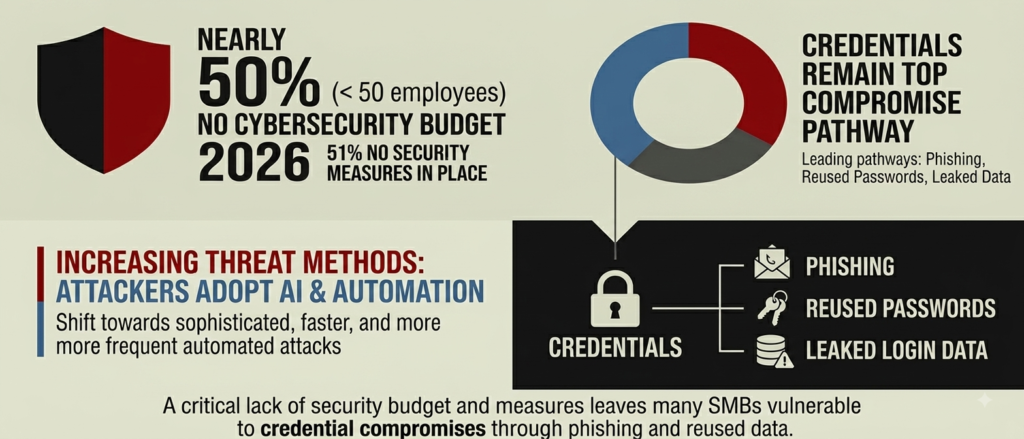
Small businesses are being hit harder than most owners realize. In 2026, nearly half of businesses with fewer than 50 employees operate with no cybersecurity budget at all, and 51% have no security measures in place whatsoever. That is not a minor oversight – it is an open door.
The numbers are sobering. Data breach costs for US small and medium-sized businesses range from $120,000 to over $1 million depending on the incident, with some reports placing the average above $250,000 for businesses with fewer than 500 employees. Credentials – usernames and passwords – remain the most common entry point for these attacks, whether through phishing, reused passwords, or leaked login data.
The good news is that fixing the password problem does not require an IT department or a large budget. A solid password manager eliminates the risky habits – spreadsheets, reused passwords, shared sticky notes – that make most small businesses easy targets. For anyone unsure where to start, TechEd Shield’s free password generator and strength checker is a practical first step before committing to any tool.
Why Open-Source Beats Proprietary for SMBs
Proprietary password managers ask users to simply trust that their security works. Open-source tools go further – they prove it. If a proprietary option is still on your shortlist, see our full comparison of the best password managers for small businesses for how the trade-offs stack up.
Publicly Auditable Code, Verifiable Security
When source code is publicly available, independent researchers, security firms, and developers worldwide can inspect it for vulnerabilities. Tools like Bitwarden and Passbolt have been reviewed by third-party auditors – not just by their own teams. That means the security claims are verifiable, not just marketing. For a small business owner without technical expertise, that external accountability matters enormously.
No Vendor Lock-In, Full Deployment Choice
Proprietary tools can change pricing, discontinue plans, or shut down entirely – leaving businesses scrambling. Open-source solutions give full control over where data lives, how it is accessed, and what happens next. Whether hosted on a cloud server or a machine in the back office, the business owns the setup. That flexibility also means no forced upgrades or sudden subscription hikes.
How Zero-Knowledge Encryption Actually Works
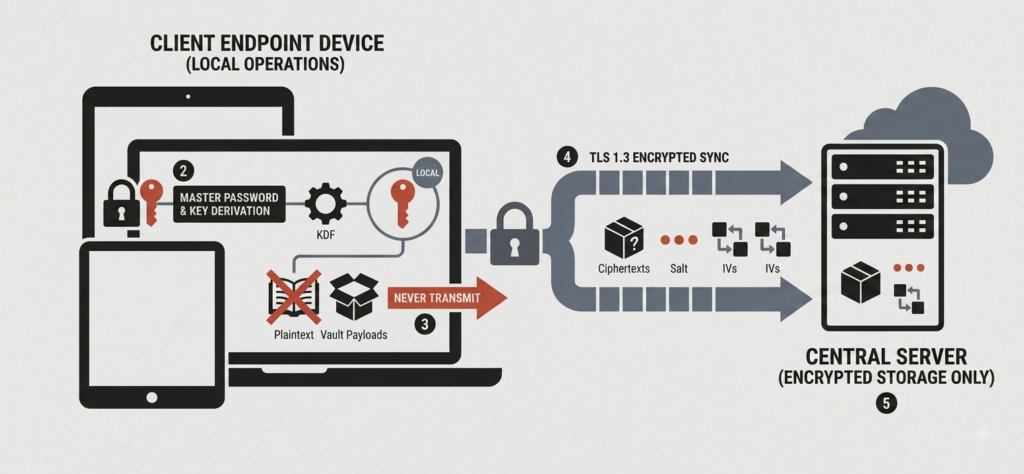
When a password is saved, the app encrypts it on the device – before it ever touches the internet. The password manager’s servers only ever receive an unreadable encrypted blob. The key to decrypt it never leaves the device. So even if the provider’s servers are breached, attackers walk away with scrambled data they cannot read without the master password, which was never stored anywhere but locally.
Most of the tools below use AES-256 encryption combined with memory-hard key derivation functions like Argon2id – the same standards recommended by modern cryptography guidelines. The practical result: even a sophisticated attack on the server yields nothing actionable.
Self-Hosted vs. Cloud: What It Really Costs
This is where many small business owners make a costly assumption – that free software means free deployment. The reality is more nuanced.
Cloud: Predictable Fees, Provider-Managed Infrastructure
Managed cloud plans typically run $2 to $6 per user per month, billed annually. For a 10-person team, that is $240 to $720 per year. What that fee covers is significant: automatic backups, security patches applied by the vendor, uptime monitoring, and often SOC 2 or ISO 27001 compliance certifications baked in. No server to manage, no certificates to renew manually. For businesses without any dedicated IT staff, this is almost always the right starting point.
Self-Hosting: Free Software, Hidden Labor Costs
Self-hosting means the software license costs nothing, but the operational work does. Maintaining a self-hosted password manager typically requires 4 to 10 hours of qualified IT labor per month – covering OS patches, database maintenance, SSL certificate renewals, and backup testing. At market rates, that translates to $300 to $1,000 per month in real labor cost, often far exceeding what a cloud plan would have cost. Self-hosting suits businesses with specific data residency requirements or existing technical staff – not most small teams operating without dedicated IT support.
Reading about seven tools is one thing. Knowing which one belongs in your back office is another. Answer four quick questions below and you’ll get a specific starting point — matched to your team size, your technical comfort, and what you actually care about — before you read the full breakdown of each option.
Password Manager Match Finder
Answer four questions. Get the open-source tool that actually fits your team.
A guide, not gospel. The best password manager is the one your whole team will actually use.
Whatever the finder landed on, treat it as your shortlist of one, not a verdict. The full rundown below explains exactly why each tool earns its spot — and where it falls down. Read the section for your match, then skim its runner-up. If both still feel right after that, you’ve done more due diligence than most businesses ever do before handing their logins to a tool.
The 7 Best Open-Source Password Managers
Bitwarden: Best All-Around for Small Teams
Bitwarden is the most accessible entry point for small businesses. Its managed cloud setup is straightforward, and the browser extensions and mobile apps are polished enough that non-technical staff adopt them quickly. Encryption uses AES-256-CBC with HMAC-SHA256, with Argon2id key derivation available. The Teams Plan runs $4.00/user/month (billed annually) and includes shared collections, event logs, and directory sync. An Enterprise Plan at $6.00/user/month adds SAML/OIDC SSO and SCIM provisioning for teams that need tighter access control. For businesses that want full data control, Bitwarden also supports official self-hosting via Docker.
Passbolt: Best for Privacy-First Collaboration
Passbolt is built specifically for teams that need fine-grained control over who sees which credential. Unlike most tools, it uses OpenPGP public-key cryptography – each shared item is encrypted individually with the recipient’s public key, meaning a compromised account does not expose the entire vault. The Community Edition is free for unlimited users and installs on Linux quickly via official package managers. Pro plans start at 45 euros/month per 10-user block (roughly 4.50 euros/user/month), adding SSO, LDAP sync, and vendor support. The one trade-off: OpenPGP key management adds some operational overhead if users lose their local private key files.
Psono: Best Free Enterprise Features Under 10 Users
Psono is the strongest option for very small teams that want enterprise-grade features without paying for them. Its Enterprise Edition is completely free for up to 10 users – including SAML/OIDC SSO, LDAP integration, and full audit logging. Beyond 10 users, self-hosted pricing starts at approximately 2 euros/user/month for teams of 25 or more. The interface is functional but leans technical, so it suits businesses with at least one tech-comfortable team member.
Vaultwarden: Best for Zero-Budget Self-Hosting
Vaultwarden is a community-built reimplementation of the Bitwarden server API, written in Rust and designed to run on minimal hardware – under 50 MB of RAM, deployable via a single Docker container with a straightforward setup process. It is 100% free with no user limits and no feature paywalls, and it uses the same official Bitwarden client apps that users already know. The catch: no native SAML SSO or SCIM provisioning, and all server maintenance – SSL, backups, reverse proxy – falls on the business. Best suited for technically capable owners who want zero ongoing software costs and full data control.
Proton Pass for Business: Best for Swiss-Hosted Privacy
For businesses handling sensitive client data or operating under strict privacy requirements, Proton Pass for Business stores everything on Swiss infrastructure under Swiss data protection law and GDPR. Encryption uses AES-256-GCM with Argon2id key derivation, and the Secure Remote Password authentication protocol ensures password hashes never cross the network. The Pass Essentials plan starts at $1.99/user/month; the Professional plan at $4.49/user/month (billed annually) adds SAML SSO, SCIM provisioning, and dark web monitoring. A built-in email alias feature powered by SimpleLogin lets employees use disposable addresses, reducing phishing exposure. No self-hosting option exists – it is cloud-only.
Infisical: Best for Dev-Heavy Small Teams
Infisical goes beyond password management into full secrets management – handling API keys, environment variables, and developer credentials alongside regular business passwords. It is purpose-built for teams where developers are regularly deploying code. Features include dynamic secret generation, automated credential rotation, and native Kubernetes and CI/CD integrations. The Community Edition is free for self-hosted deployments, and the cloud free tier covers up to 5 identities. Paid plans run approximately $18/identity/month – where an identity covers both human users and machine accounts such as CI pipelines – making it overkill for teams without active software development workflows.
TeamPass: Best Lightweight On-Premise Option
TeamPass is a no-frills, self-hosted password manager built on a standard LAMP/LEMP web stack. It is completely free under GPL-3.0, supports unlimited users, and uses hierarchical folder structures with granular permissions – Read, Write, Edit, No Access – per user or group. Native LDAP integration handles Active Directory sync for businesses already running Windows infrastructure. The trade-offs are real: no native mobile apps, and browser autofill extensions require a commercial license. It is a strong fit for businesses with an existing server and a preference for simple tools – not for teams expecting a polished consumer-style experience.
Before the decision checklist, here’s how all seven line up at a glance.
| Tool | Best for | Encryption / model | Free tier | Paid pricing | Deployment |
|---|---|---|---|---|---|
| Bitwarden | All-around for small teams | AES-256-CBC + HMAC-SHA256, Argon2id available | Free personal plan | Teams $4/user/mo · Enterprise $6/user/mo | Cloud or self-host (Docker) |
| Passbolt | Privacy-first collaboration | OpenPGP public-key (per-item encryption) | Community Edition free, unlimited users | Pro from €45/mo per 10-user block (~€4.50/user/mo) | Cloud or self-host (Linux) |
| Psono | Free enterprise features under 10 users | Zero-knowledge; SSO, LDAP, audit logging | Enterprise Edition free up to 10 users | ~€2/user/mo for teams of 25+ | Self-hosted |
| Vaultwarden | Zero-budget self-hosting | Bitwarden-compatible; uses official Bitwarden apps | 100% free, no user limits, no paywalls | — | Self-hosted (single Docker container) |
| Proton Pass for Business | Swiss-hosted privacy | AES-256-GCM + Argon2id, SRP auth | — | Essentials $1.99/user/mo · Professional $4.49/user/mo | Cloud only (Swiss infrastructure) |
| Infisical | Dev-heavy small teams (secrets management) | Secrets management: API keys, env vars, rotation | Community Edition free (self-host) · cloud free up to 5 identities | ~$18/identity/mo | Cloud or self-host |
| TeamPass | Lightweight on-premise | LAMP/LEMP stack; granular permissions, LDAP/AD sync | Free (GPL-3.0), unlimited users | Autofill extensions require commercial license | Self-hosted (on-premise) |
How to Pick the Right One Without IT Support
Most small business owners do not need to evaluate cryptographic standards – they need a tool their team will actually use. Here is a simple checklist to guide the decision.
Ease-of-Use Checklist for Non-Technical Owners
- Team size under 10? Psono’s free Enterprise tier or Bitwarden’s free personal plan covers the basics at zero cost.
- No technical staff available? Stick to cloud-hosted options: Bitwarden Teams, Proton Pass Essentials, or Passbolt Cloud. Avoid self-hosting entirely.
- Sharing passwords between employees? Bitwarden Collections, Passbolt item-level sharing, or Proton Pass shared vaults all handle this cleanly.
- Need to meet privacy regulations? Proton Pass (Swiss law, GDPR) or Passbolt Cloud (European data centers) are the strongest choices.
- Developers on the team managing code or APIs? Infisical handles both employee passwords and developer secrets in one place.
- Extremely tight budget with some tech comfort? Vaultwarden or TeamPass – both free and self-hosted – get the job done.
The most important factor is not which tool has the most features – it is which one the whole team will actually adopt and use consistently. A perfect password manager that nobody uses provides zero protection.
A Password Manager Is the Simplest Win in Business Security
Most small businesses can dramatically cut their risk by fixing a handful of straightforward issues – and weak, reused, or shared passwords are at the top of that list, right alongside the common MFA setup mistakes that undo even a good password manager. For the full picture — passwords, MFA, patching, and backups together — see how small businesses with no IT staff lock out hackers in 7 steps.
A password manager does not require technical knowledge, a dedicated IT team, or a large budget. The seven tools covered here range from entirely free to under $7/user/month, and any one of them eliminates the most common ways scammers get into business accounts. Security does not have to be complicated – do the basics well, and a business is already better protected than the majority of its peers.
For practical, jargon-free guidance on securing a small business from the ground up, take TechEd Shield’s free Cybersecurity Health Check — a plain-English snapshot built specifically for non-technical business owners.
A note on pricing: Prices correct at time of writing. Always check current pricing before purchasing.