

Key Takeaways
- CPA firms are classified as financial institutions under the Gramm-Leach-Bliley Act (GLBA), making FTC Safeguards Rule compliance legally mandatory – not optional.
- The FTC Safeguards Rule requires multi-factor authentication (MFA) for every system that touches client data, and SMS-based codes may not meet the bar regulators expect.
- Password managers are a direct compliance tool – they enforce access controls, support MFA, enable automated offboarding, and produce the audit logs your Written Information Security Plan (WISP) demands.
- Even small CPA firms with fewer than 5,000 individual consumers are still required to implement encryption, MFA, and access controls under the Safeguards Rule.
- Zero-knowledge architecture is the technical detail that separates a compliant password manager from one that creates new liability – more on that below.
Password managers for CPA firms are no longer optional – running a CPA firm means sitting on an enormous amount of sensitive client data, tax returns, bank account details, Social Security numbers, and financial statements. That data has a target on it. And since 2023, the federal government has made it very clear: protecting that data is not just good practice, it is the law. That exposure isn’t unique to regulated industries, either — reused passwords are one of the most common ways any small business gets breached, compliance obligations aside.
CPA Firms Can Face Six-Figure Penalties Under the FTC Safeguards Rule
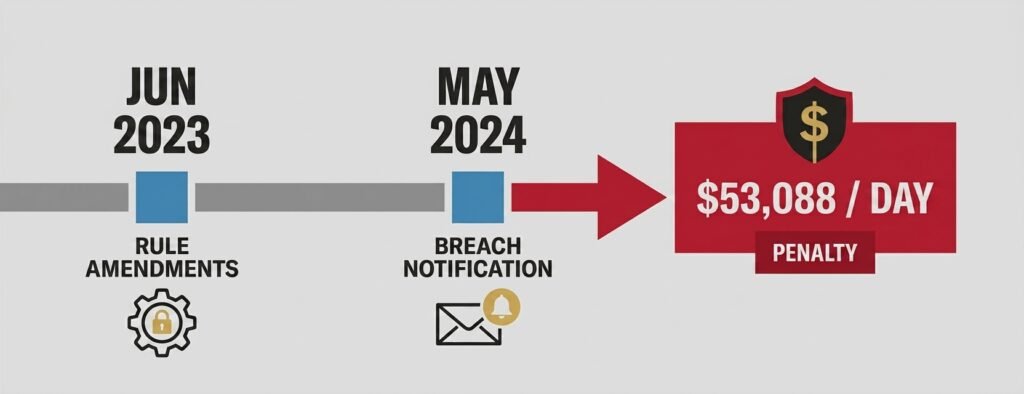
Password managers for CPA firms exist because the FTC Safeguards Rule (16 CFR Part 314) carries real teeth. Non-compliance can result in civil penalties of up to $53,088 per violation, with each day of an ongoing violation potentially counted separately — an amount adjusted annually for inflation — plus enforcement actions from both the FTC and state attorneys general. This same regulatory exposure directly shapes what carriers charge — see how much cyber insurance actually costs for accounting firms, and why a mismatch between certified and actual MFA coverage is the leading cause of denied claims. Beyond the FTC, the IRS layers on additional consequences: a lack of robust security infrastructure – of the kind the Safeguards Rule requires – can put a firm’s Electronic Filing Identification Number (EFIN) at risk of suspension, effectively shutting down e-filing operations during tax season.
These are not hypothetical risks. The 2023 amendments to the Safeguards Rule added an explicit breach notification mandate (effective May 2024), requiring covered firms to report unauthorized access involving 500 or more consumers to the FTC within 30 days. That timeline is unforgiving, and the only way to meet it is to have the logging infrastructure in place before an incident occurs.
Why GLBA Classifies CPA Firms as Financial Institutions
This is exactly why password managers for CPA firms matter so much: many CPAs are surprised to learn their firm is legally a financial institution. Under the Gramm-Leach-Bliley Act (GLBA), any entity engaged in tax preparation or financial advisory services falls squarely within that definition. That classification brings the full weight of the FTC Safeguards Rule down on accounting practices of every size. IRS Publication 4557 (Safeguarding Taxpayer Data) reinforces these requirements as conditions for maintaining an active Preparer Tax Identification Number (PTIN) and Authorized IRS e-File Provider status. IRS Publication 5708 (Creating a Written Information Security Plan) provides the guidance needed to build a key component of meeting those requirements – the WISP itself.
A CPA firm’s compliance obligations span two overlapping regulatory frameworks simultaneously, and credential security sits at the center of both. Tools like the free password strength checker from TechEd Shield offer a quick starting point for assessing whether existing password practices would survive regulatory scrutiny.
FTC Safeguards Rule: What’s Actually Required
Password managers for CPA firms map directly onto the Safeguards Rule’s nine mandatory program areas covering a range of specific control elements. For credential governance, three provisions carry the most direct weight.
Access Controls and Least Privilege (§ 314.4(c)(1))
Firms must limit access to customer information strictly to personnel with a legitimate business need – and review that access periodically. In practice, this means no shared logins, no everyone-has-the-admin-password setups, and documented justification for who can access what. A password manager with Role-Based Access Controls (RBAC) turns this from a policy into an enforced technical reality.
Mandatory MFA for All NPI Access (§ 314.4(c)(5))
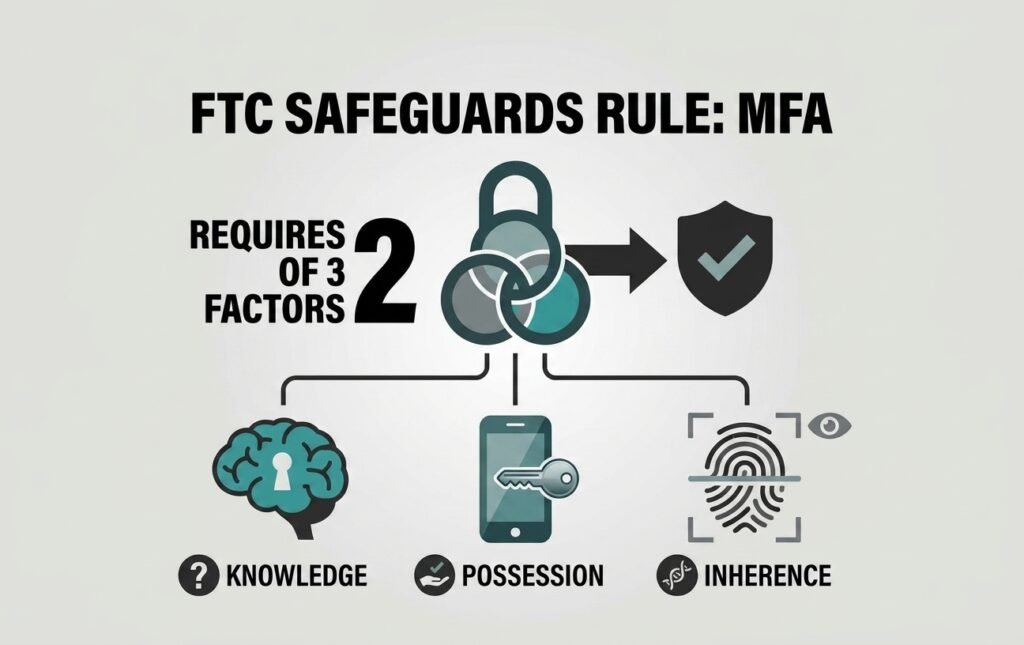
Multi-factor authentication is not suggested under the Safeguards Rule – it is required for any system that accesses, stores, or transmits non-public personal information (NPI). Compliant MFA requires at least two of the following factor types: something the user knows (a passphrase), something they have (a hardware key or authenticator app), or something they are (biometrics). For the right order to roll MFA out before adding SSO on top, see SSO vs MFA for small business: which to roll out first in 2026. This applies to tax software, cloud storage, email platforms, and the password manager itself.
Encryption, Audit Logging, and Secure Disposal
Customer information must be encrypted both in transit and at rest (§ 314.4(c)(3)). Audit logs of authorized user activity must be maintained with mechanisms to detect unauthorized access (§ 314.4(c)(8)). Customer data must also be securely disposed of once it is no longer needed, unless a legal retention requirement applies (§ 314.4(c)(6)) – a nuance that matters for tax records subject to IRS retention schedules. An enterprise password manager that integrates with a SIEM and exports tamper-evident logs addresses all three in a single deployment.
The FTC Favors Phishing-Resistant MFA – Here’s Why It Matters
Choosing among password managers for CPA firms means understanding that not all MFA is created equal, and regulatory guidance is increasingly specific about which methods hold up under scrutiny.
| MFA Method | Assurance Level | Key Vulnerability | NIST SP 800-63B (Rev. 4) Classification |
|---|---|---|---|
| FIDO2/WebAuthn hardware keys | Highest | None documented — cryptographically bound to origin domain, immune to AitM replay | Highest assurance level identified |
| TOTP authenticator apps (RFC 6238) | Middle | Susceptible to real-time phishing proxies | Not classified as restricted |
| SMS / voice-call codes | Baseline (technically compliant only) | SIM-swapping, SS7 exploits, social engineering interception | “Restricted authenticator”; CISA advises against use as 2nd factor |
FIDO2 Hardware Keys: The Highest-Assurance Option
FIDO2/WebAuthn hardware security keys – such as YubiKeys – represent the gold standard. Authentication is cryptographically bound to the specific origin domain, which means even a convincing phishing site cannot capture and replay a valid credential. Adversary-in-the-middle (AiTM) attacks, which have successfully bypassed app-based MFA codes in large-scale phishing campaigns documented by Microsoft Threat Intelligence, are neutralized entirely. NIST Special Publication 800-63B – widely accepted guidance that aligns with the spirit and intent of the Safeguards Rule’s MFA requirements – identifies this category as the highest assurance level available.
SMS-Based MFA: A Documented Weak Link
SMS and voice-call authentication remain technically compliant at the baseline level, but NIST SP 800-63B (Rev. 4) formally classifies PSTN-based delivery — including SMS — as a “restricted authenticator,” a designation reserved for methods with well-documented vulnerabilities such as SIM-swapping attacks, SS7 signaling exploits, and social engineering interception. CISA’s December 2024 mobile communications guidance goes further, explicitly advising against using SMS as a second authentication factor. A firm relying on text message codes for access to tax software or client portals is meeting the letter of the rule while leaving a significant gap in actual security.
Software-based TOTP authenticator apps (conforming to RFC 6238) sit in a reasonable middle tier – effective against automated credential stuffing, but still susceptible to real-time phishing proxies. For a CPA firm handling high-value client data, FIDO2 hardware keys are worth the modest added cost.
How Password Managers Support Your WISP Requirements
Password managers for CPA firms are one of the core enforcement tools behind a WISP. Every covered firm must maintain a Written Information Security Plan overseen by a designated Qualified Individual (QI). That WISP is a living operational system, and the password manager is one of its core enforcement mechanisms.
Role-Based Access Controls for Staff and Seasonal Preparers
The best password managers for CPA firms map directly to a least-privilege hierarchy. A practical structure for a tax practice looks like this:
- Firm Administrator / Qualified Individual: Full administrative access, including audit log exports, policy enforcement, and SCIM directory oversight.
- Senior CPAs and Partners: Read/write access to active client portals and financial platforms, with export permissions restricted.
- Seasonal Tax Preparers: Read-only or auto-fill access to specific active-season folders only – plaintext passwords are never displayed, clipboard copying is disabled, and sharing rights are fully revoked.
This structure operationalizes § 314.4(c)(1) directly. A seasonal preparer who leaves in April takes nothing with them that could compromise a client account in May.
Automated Offboarding via SCIM Integration
One of the most persistent vulnerabilities in CPA firms is the former employee who still has active credentials months after leaving. Enterprise password managers that integrate with identity providers like Microsoft Entra ID or Okta via System for Cross-domain Identity Management (SCIM) close this gap automatically. When an employee is deactivated in the directory, SCIM immediately revokes their vault access and invalidates active device tokens – no manual checklist required, no forgotten accounts lingering in tax software.
Zero-Knowledge Architecture: The Compliance Differentiator
Not all password managers for CPA firms are built the same – to genuinely reduce compliance risk rather than create new liability, architecture matters as much as feature list. Zero-knowledge architecture means that encryption and decryption happen exclusively on the user’s local device. EU businesses face an added jurisdictional layer on top of this — see our GDPR password managers for small business: EU hosting and data residency guide. Plaintext passwords never travel across the network and are never accessible to the vendor’s servers, their employees, or anyone with a subpoena targeting the vendor’s infrastructure.
At the cryptographic level, this is enforced through Key Derivation Functions (KDFs). Modern implementations use Argon2id (standardized in RFC 9106), a memory-hard algorithm that requires significant RAM for every derivation attempt – neutralizing the GPU-based offline cracking that let attackers continue draining accounts from stolen vault backups years after the 2022 LastPass breach. Older standards like PBKDF2 remain acceptable when iteration counts are high (Bitwarden defaults to 600,000 rounds; Keeper Security uses 1,000,000), but Argon2id raises the computational floor significantly.
For firms evaluating specific platforms: 1Password combines the master password with a locally generated 128-bit Secret Key, meaning an exfiltrated server database lacks the cryptographic input needed for offline attacks. For a full side-by-side comparison across seven platforms outside the compliance lens, see our breakdown of the best password managers for small businesses in 2026. Bitwarden offers full open-source auditability and a self-hosted deployment option for firms with strict data-sovereignty requirements. Keeper Security uses record-level AES-256-GCM encryption, so compromising one record key does not decrypt the rest of the vault – and its SSO Connect Cloud architecture preserves zero-knowledge even when integrating with SAML 2.0 identity providers (see Keeper’s published encryption model documentation)
Under § 314.4(f), firms must also vet their service providers for appropriate safeguards. Law firms carry a parallel obligation under ABA Model Rule 1.1 — see our 7 ways law firms can prevent client data breaches for how vendor due diligence works in that context. A SOC 2 Type II report from the password manager vendor is a strong and widely accepted form of documentation a Qualified Individual should retain in the WISP file to demonstrate vendor due diligence. Medical practices face a comparable vendor-vetting requirement, but with a mandatory BAA instead — see our HIPAA password managers for small practices with no IT team guide.
Small Firm? Core Safeguards Rule Obligations Still Apply
Even small firms still need password managers for CPA firms to meet baseline requirements. The Safeguards Rule offers a limited exemption for firms maintaining NPI on fewer than 5,000 individual consumers. Those firms are excused from four specific administrative requirements: formal written risk assessments, continuous monitoring or annual penetration testing schedules, written incident response plans, and annual written QI reporting to executive leadership.
| Waived for Firms Under 5,000 Consumers | Still Required Regardless of Size |
|---|---|
| Formal written risk assessments | Multi-factor authentication |
| Continuous monitoring / annual penetration testing | Encryption at rest and in transit |
| Written incident response plans | Access controls |
| Annual written QI reporting to leadership | Data inventory, secure disposal, service provider oversight |
The technical core stays mandatory regardless of firm size — see the table above. These technical safeguards apply to every tax preparer, regardless of client volume. A solo practitioner with 200 clients still needs MFA on every system that touches a tax return.
These technical safeguards apply to every tax preparer, regardless of client volume. Check what’s actually enforced today.
Are You Safeguards-Rule Ready?
These apply regardless of firm size. Check what’s in place.
None of these require a large firm or a dedicated IT staff — they require a properly configured password manager and a Qualified Individual who can document it in the WISP.
Password Managers Are Essential Enablers of FTC Safeguards Compliance
The FTC Safeguards Rule does not name password managers for CPA firms by title, but it describes them precisely. Access controls, MFA enforcement, encrypted credential storage, audit logging, automated offboarding, and secure data disposal – these are the mandated requirements, and a properly deployed enterprise password manager addresses each one systematically. For a CPA firm’s Qualified Individual, the question is not whether a password manager fits the compliance picture. The question is which one is configured correctly and documented in the WISP.
Password policies, MFA method selection, RBAC hierarchy, SCIM integration, and vendor SOC 2 documentation are not optional line items – they are the architecture of a defensible security program. Getting them right is what separates a firm that can demonstrate compliance from one that only hopes it is compliant until an audit or breach forces the issue.
TechEd Shield helps CPA firms evaluate password managers for CPA firms and build practical, step-by-step security systems. Take the free Cybersecurity Health Check to see where your firm’s compliance gaps actually sit.