
Key Takeaways
- Most dental office Wi-Fi networks have never been evaluated against HIPAA’s technical requirements – and that gap alone is enough to trigger a violation.
- HIPAA requires five specific technical safeguards that directly apply to wireless networks, including encryption, access controls, and audit logging.
- Splitting your network into four isolated zones (clinical, guest, IoT, and management) is the single most impactful step you can take to protect patient data.
- Not every Wi-Fi vendor can sign a Business Associate Agreement – and using one that won’t puts your practice out of compliance by default.
- Multi-factor authentication for network admin access is a critical readiness priority heading into 2026, and the HHS Office for Civil Rights has already cited its absence as a compliance concern in breach investigations.
HIPAA-compliant WiFi for dental offices matters because running a practice means handling some of the most sensitive personal information a patient has – and most of it flows across your Wi-Fi network every single day. X-rays, treatment records, insurance claims, and scheduling data don’t stay locked in a filing cabinet anymore. They travel wirelessly, and that creates a real legal obligation to protect them.
Your Dental Wi-Fi Is Already a HIPAA Risk
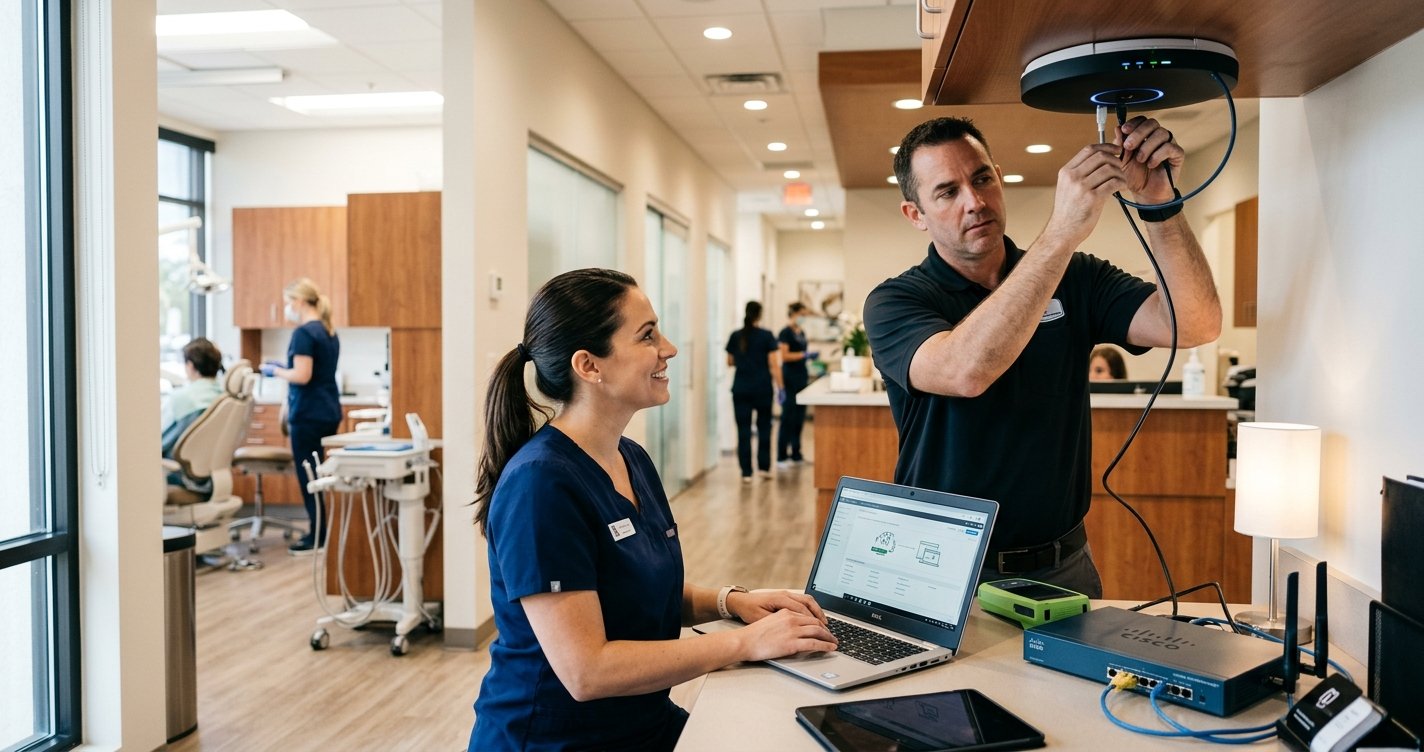
Most dental offices didn’t set up their Wi-Fi with HIPAA-compliant WiFi for dental offices in mind. A router from the internet provider, a single network password shared with staff and patients, and maybe a separate guest network – that’s the typical setup. It’s also a setup that almost certainly falls short of what federal law requires.
Radio signals don’t stop at your walls. Any device within range of your access point can attempt to connect, intercept unencrypted traffic, or probe your internal network for weaknesses. If your clinical systems – practice management software, digital X-ray stations, CBCT imaging units – share a network with the waiting room iPad or a staff member’s personal phone, patient data is at risk. That risk isn’t theoretical; it’s a documented compliance gap that the HHS Office for Civil Rights investigates during breach audits. A quick way to check where your current setup stands is to run a free network safety scan through TechEd Shield’s Wi-Fi Security Checker before going further. Take the free Cybersecurity Health Check as a quick way to check where your current setup stands before going further.
What HIPAA Actually Requires from Your Network
Building HIPAA-compliant WiFi for dental offices starts with 45 CFR § 164.312, which requires that any system handling electronic Protected Health Information – called ePHI – must have specific technical safeguards in place. Dental practices are covered entities under this rule because they electronically transmit health information for insurance claims and patient care.
The Five Technical Safeguards That Apply to Wi-Fi
- Access Control (§ 164.312(a)(1)): Every user and device must have a unique identity on the network. Shared passwords don’t qualify.
- Audit Controls (§ 164.312(b)): The network must log who connected, when, and what happened – and those logs must be kept for six years.
- Integrity Controls (§ 164.312(c)(1)): Data in transit must be protected from tampering or unauthorized alteration.
- Person or Entity Authentication (§ 164.312(d)): Every person or device connecting to the network must be verified to be who or what it claims to be – this is the requirement that certificate-based 802.1X/RADIUS authentication (covered below) is built to satisfy.
- Transmission Security (§ 164.312(e)(1)): ePHI must be protected any time it moves across a network, through two addressable implementation specifications – integrity controls and encryption (§ 164.312(e)(2)(ii)). Addressable means practices must either apply the control or document a valid reason why an equivalent alternative was used instead. In practice, encryption is almost always the required outcome.
Reading through five federal safeguards is one thing — knowing whether your own network actually meets them is another. Before you get into segmentation, encryption standards, and vendor BAAs, take 60 seconds to see where your current setup stands.
Whatever your score, the fixes aren’t mutually exclusive — segmentation, WPA3-Enterprise, MFA, and encrypted log retention build on each other. The rest of this guide walks through each one in the order that closes the biggest gaps first.
Why Wireless Is Uniquely Dangerous for ePHI
This is exactly why HIPAA-compliant WiFi for dental offices requires extra care: wired connections stay inside your walls, but wireless signals don’t. An attacker sitting in your parking lot can potentially pick up your Wi-Fi signal, attempt to connect, or intercept unencrypted data passing through the air. Without proper encryption and network segmentation, your clinical data is exposed to anyone within range – no physical break-in required.
Split Your Network Into Four Separate Zones
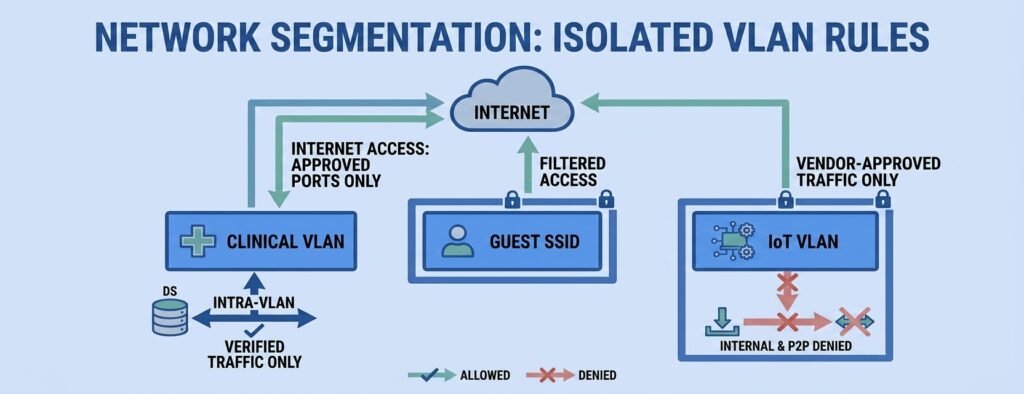
The most effective structural fix for HIPAA-compliant WiFi for dental offices is network segmentation – dividing your single network into four isolated zones, each with its own purpose and strict boundaries. This is done using a technology called VLANs (Virtual Local Area Networks), which allow one physical network to behave like four completely separate ones.
Clinical Zone: Where ePHI Lives (VLAN 20)
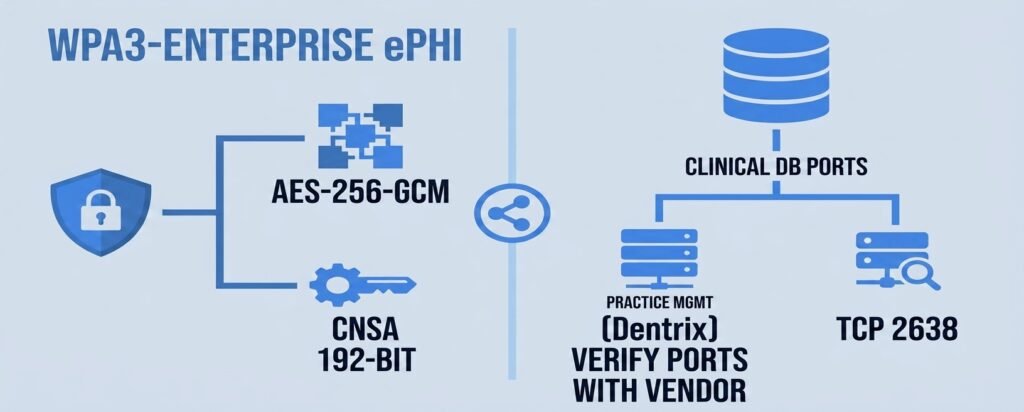
This is the most protected zone on your network. Reserved exclusively for corporate-owned clinical devices: operatory workstations, practice management servers (like Dentrix or Eaglesoft), digital X-ray stations, intraoral cameras, and CBCT imaging systems. No personal devices, no guest access, no exceptions. Communication in this zone is tightly controlled – for example, Eaglesoft uses TCP port 2638 for its database engine. Dentrix port requirements vary by version and deployment type, so confirm the specific ports with your software vendor or IT provider before writing firewall rules. Only those verified traffic paths need to be open; everything else is blocked.
Guest, IoT, and Management Zones
- Guest Zone (VLAN 30): Provides internet access for patients and visitors. Completely blocked from reaching any internal clinical system. Devices on this network cannot see or communicate with each other.
- IoT Zone (VLAN 40): Dedicated to non-clinical equipment – smart TVs, thermostats, IP cameras, and audio systems. These devices often run outdated firmware and are common targets for attackers. Isolating them prevents a compromised thermostat from becoming a path into patient records.
- Management Zone (VLAN 10): Used exclusively by IT or a managed service provider to configure access points, switches, and firewalls. Completely invisible to staff and patients.
The Firewall Rules That Keep Them Separated
Segmentation only works if a firewall enforces it. The governing principle is “Default Deny All” – no traffic crosses between zones unless there’s an explicit rule permitting it. Guest devices are blocked from reaching clinical systems entirely. IoT devices can only reach their vendor’s update servers. Clinical devices can access the internet for cloud services, but only on approved ports. Any traffic that doesn’t match an approved rule is blocked and logged.
Choosing a Compliant Wi-Fi Encryption Standard
Encryption is where HIPAA-compliant WiFi for dental offices most often goes wrong. Not all Wi-Fi security settings are equal under HIPAA – and the wrong choice is a compliance failure, regardless of how secure it feels.
WPA3-Enterprise vs. WPA2-Enterprise: What Actually Qualifies
WPA3-Enterprise is the gold standard for clinical networks. It uses 192-bit cryptographic strength aligned with the Commercial National Security Algorithm Suite, and authenticates each device individually using digital certificates – meaning there’s no shared password to steal or guess. If hardware constraints prevent WPA3-Enterprise, WPA2-Enterprise with AES-CCMP encryption is an acceptable fallback for existing deployments, but WPA3 should be the target for any new equipment purchases.
Why WPA2-Personal and WPA3-Personal Both Fail HIPAA
Both personal modes use a single shared passphrase for the entire network. That immediately violates HIPAA’s unique user identification requirement. If one person knows the password, everyone on the network effectively has the same identity – and there’s no way to revoke access for a single device without changing the password for everyone. WPA3-Personal is technically stronger than WPA2-Personal, but it still relies on a shared key, making it non-compliant for clinical use. Its use should be limited to the IoT zone, where 802.1X authentication isn’t always supported by the devices.
How 802.1X and RADIUS Certificates Work in Plain Terms
Instead of a password, WPA3-Enterprise uses a system where each device holds a unique digital certificate – like a digital ID card. When a clinical workstation tries to connect, it presents that certificate to a RADIUS server (a dedicated authentication service, either on-site or cloud-hosted). The RADIUS server verifies the certificate, confirms the device is authorized, and dynamically assigns it to the correct network zone. No certificate, no access – and revoking a lost or stolen device’s access is as simple as canceling its certificate.
MFA for Network Admin Access: A Critical Readiness Priority
MFA is quickly becoming a non-negotiable part of HIPAA-compliant WiFi for dental offices. Multi-factor authentication for administrative access to network devices – firewalls, wireless controllers, cloud dashboards – is a strong best practice that is rapidly becoming a hard legal requirement. The HHS Office for Civil Rights has already cited the absence of MFA as a compliance concern in breach investigations, even before any formal mandate takes effect.
What the Proposed 2026 HIPAA Updates Would Change
Proposed updates to the HIPAA Security Rule – published by HHS in January 2025 and not yet finalized as of mid-2026 – would make MFA explicitly mandatory for all workforce members accessing systems that handle ePHI, including network management consoles. Under the proposal, MFA must combine at least two factors: something you know (a strong passphrase), something you have (a FIDO2 hardware key or authenticator app), or something you are (biometric). SMS-based two-factor codes are being phased out due to SIM-swapping risks. The proposal also includes an automatic session timeout requirement for idle admin sessions, referencing the logoff standard under 45 CFR § 164.312(a)(2)(iii). Practices should treat these requirements as an immediate readiness priority rather than waiting for final rulemaking.
Not Every Wi-Fi Vendor Can Sign a BAA
Vendor selection is another piece of HIPAA-compliant WiFi for dental offices that’s easy to get wrong. Any vendor whose cloud infrastructure handles metadata about your network – including device names, connection logs, and performance data – may qualify as a Business Associate under HIPAA. That means they’re legally required to sign a Business Associate Agreement (BAA) before you use their service with a clinical network.
Cisco Meraki, Aruba, and Fortinet: What to Configure
Cisco Meraki offers a formal BAA for healthcare clients. After signing it, administrators should review client data settings in the Meraki Dashboard to limit what device information is uploaded to cloud servers, and disable any packet capture features that could retain payload data. Admin MFA must also be enforced across all dashboard accounts.
HPE Aruba is a widely used enterprise networking platform. Practices should confirm BAA availability directly with their Aruba account representative, as terms may vary by licensing model. Medical offices work through this same vendor evaluation — see our HIPAA-compliant WiFi for medical offices without an IT team for how it compares to Cisco Meraki and Ubiquiti UniFi on cost and BAA availability. As a general best practice, AOS-10 management profiles should be configured to route diagnostic logs to an on-premises syslog collector rather than cloud-hosted analytics repositories.
Fortinet is a strong option for practices that want to keep everything on-premises. FortiAP access points can be managed entirely by a local FortiGate firewall with no cloud dependency – and a BAA is available for practices that do use FortiLAN Cloud.
Ubiquiti UniFi: Verify BAA Availability Before Deploying in the Cloud
Ubiquiti’s published documentation emphasizes an edge-first architecture with minimal cloud dependencies, but practices should directly verify whether a BAA is available for any UniFi cloud services used in a clinical environment before deployment. If a BAA cannot be obtained, the compliant path is to run an on-premises UniFi Network Controller on the management VLAN, disable all remote cloud access and automated analytics uploads in controller preferences, and block outbound traffic from the controller to Ubiquiti’s cloud endpoints at the firewall. Ubiquiti hardware can be used compliantly – but cloud management services require BAA confirmation first.
Audit Logs Must Be Encrypted, Timestamped, and Kept for Six Years
Audit logging is another required piece of HIPAA-compliant WiFi for dental offices. Under 45 CFR § 164.316(b)(2), all activity logs from your wireless network must be retained for a minimum of six years. This retention requirement applies to the full practice, not just wireless — see our HIPAA cybersecurity for small clinics: no-IT-staff buyer’s guide for the complete five-tool stack this fits into. That includes 802.1X authentication attempts, device connection and disconnection events, rogue device detections, and administrative configuration changes. Logs stored only on access points don’t count – those devices clear their memory on reboot. All log data must be forwarded in real time to a dedicated log collector using encrypted syslog over TLS on port 6514, not the unencrypted UDP syslog method. Log storage must use write-once configurations to prevent tampering, satisfying the data integrity requirement under § 164.312(c)(1).
Detect and Stop Wireless Threats the Legal Way
Common Wireless Threats HIPAA-Covered Practices Face
Detecting wireless threats is the final piece of HIPAA-compliant WiFi for dental offices. The most serious threats include rogue access points (unauthorized routers plugged into your network by staff or contractors, bypassing all firewall rules), evil twin attacks (a device outside your office broadcasting your exact network name at higher power to trick clinical tablets into connecting), and ad-hoc personal hotspots (staff using phone hotspots as unauthorized network bridges).A Wireless Intrusion Detection System (WIDS) continuously scans the 2.4 GHz, 5 GHz, and 6 GHz bands for these threats and alerts administrators in real time.
Why RF Jamming Is Illegal and What to Do Instead
When a rogue device is detected, the instinct might be to knock it offline immediately. Transmitting RF noise to jam or disrupt a wireless signal is a federal crime under FCC Part 15 regulations – full stop. The legal containment method for a rogue access point physically connected to your internal network is automated switch port shutdown: when the WIDS identifies the rogue device’s MAC address on a switch port, it sends a command to disable that specific port. Under WPA3 with Protected Management Frames (PMF) enabled, legacy deauthentication injection techniques are also ineffective – PMF cryptographically validates management traffic, causing compliant endpoints to ignore spoofed disconnect commands.
A Compliant Wi-Fi Network Is Achievable Without an IT Team
Building HIPAA-compliant WiFi for dental offices sounds technical – and it is. But it doesn’t require an in-house IT department to implement. Modern enterprise Wi-Fi platforms from Cisco Meraki, HPE Aruba, and Fortinet are designed to be managed through clear dashboards with guided configuration options. Cloud RADIUS services like IronWiFi offer certificate-based authentication and automatic VLAN assignment without requiring on-premises servers. The key is knowing what to configure and in what order. Start with network segmentation, lock down encryption, enable MFA on admin accounts, and set up encrypted log forwarding. Each step builds on the last, and each one closes a real compliance gap.
TechEd Shield helps dental practices set up HIPAA-compliant WiFi for dental offices. For the same vendors evaluated outside a healthcare compliance context, see our 7 business WiFi security tools to stop small business breaches.