

Key Takeaways
- Moving to the cloud does not automatically make your business secure – you remain responsible for protecting your own data, accounts, and settings.
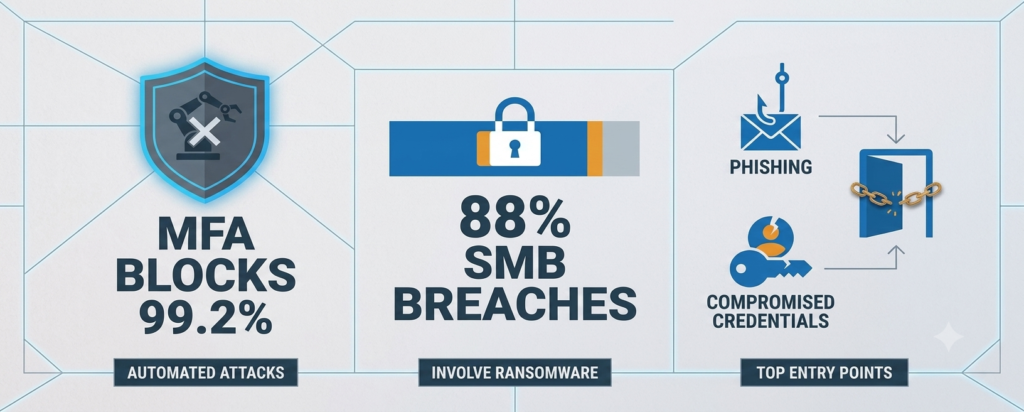
- Multi-Factor Authentication (MFA) alone can block more than 99.2% of account takeover attempts, according to Microsoft’s own research, making it one of the highest-impact steps any small business can take.
- Ransomware is now present in 88% of confirmed small business breaches, with average ransom demands reaching $247,000 – cloud migration without a security plan can make things worse, not better.
- The 12 steps below are sequenced so that the most impactful protections come first – no IT team required.
- TechEd Shield was built specifically to help small business owners handle exactly this kind of challenge with clear, jargon-free guidance.
A cloud security checklist for small business owners matters more than most realize – moving to the cloud feels like progress, and it is. But there’s a gap between being in the cloud and being secure in the cloud that catches a lot of owners off guard. This checklist closes that gap, one practical step at a time.
Check off each step as you complete it. Your progress is a good proxy for how exposed your migration actually is right now.
Your 12-Step Migration Tracker
Check off each step as you complete it.
You don’t need all 12 done before you move to the cloud — you need to know which ones aren’t done yet. That’s the difference between a plan and an assumption.
Ransomware Is in 88% of SMB Breaches – And the Cloud Doesn’t Protect You Automatically
This is exactly why a cloud security checklist for small business owners matters right now: ransomware attacks on small and midsize businesses have climbed sharply in recent years. Today, ransomware is present in 88% of confirmed SMB breaches, with average ransom demands hitting $247,000 and average downtime stretching to 24 days. For a small business, 24 days without normal operations is not just painful – it can be fatal. The average cost of a data breach for businesses with fewer than 500 employees is $3.31 million when you factor in legal fees, customer notifications, and lost revenue. Nonprofits face this same exposure on a tighter budget — see our nonprofit cybersecurity budget under $1,500/year for a full stack built specifically around that constraint.
What makes this more alarming: nearly half of businesses with fewer than 50 employees spend nothing on cybersecurity. The assumption is that the cloud provider handles security. It does not – not fully. Understanding where that responsibility line sits is the first thing to get right. TechEd Shield exists specifically to help small business owners understand and act on exactly this kind of risk, without needing a technical background to do it.
The Dangerous Myth About Cloud Security
Skipping a cloud security checklist for small business owners often comes from one widespread belief: that migrating to Google Workspace, Microsoft 365, or AWS means security is handled. Gartner estimates that through 2026, 99% of cloud security failures will be the customer’s fault – not the provider’s. Canada’s own government has published a parallel baseline standard for this — see our guide to cyber security for small business with no IT team in Canada. That is not a technicality. It is the foundation of how cloud security actually works.
What the Cloud Provider Actually Covers
Cloud providers secure the physical data centers, the hardware, and the underlying network infrastructure. Think of it as the building itself – walls, locks on the server room, fire suppression systems. That part is genuinely not your problem.
What You’re Still Responsible For
Everything inside your account is yours: user accounts, data, app configurations, access settings, and backups. If an employee uses a weak password and gets hacked, the cloud provider is not liable. If a storage folder is accidentally left public, that is on the business. Knowing this distinction is what makes the rest of this checklist make sense.
Know What You Own Before You Move It
Map Every App, Account, and Data Type
Step one of any cloud security checklist for small business owners starts before a single file moves to the cloud: build a complete list of everything the business runs on – apps, SaaS tools, accounts, integrations, even that spreadsheet someone emailed around three years ago. Skipping this step is one of the top drivers of cost overruns during migrations – broken connections, missing data, and surprise dependencies show up mid-move when there is no good time to fix them. Many businesses also uncover unauthorized tools being used by staff during this process, each adding unplanned complexity.
Label Sensitive Data Before It Leaves
Not all data needs the same protection. Categorize information into tiers – public, internal, confidential, restricted – before it goes anywhere. Customer payment details, health records, and personal information need tighter controls than a public pricing document. Labeling data upfront means the right protections get applied automatically, and it keeps compliance obligations from becoming a surprise later.
Lock the Front Door: Identity and Access
MFA Blocks More Than 99.2% of Account Takeovers
MFA is the highest-impact item on any cloud security checklist for small business owners – Microsoft’s own research shows it blocks more than 99.2% of account compromise attempts. Even if a password is stolen, an attacker still cannot get in without a second form of verification – a code from an authenticator app, a hardware key, or a push notification. Enable it on every account: email, cloud storage, admin portals, accounting software. Remote teams have additional exposure worth covering separately — see our remote team security checklist for small businesses. No exceptions.
Important note: SMS-based verification (text message codes) is better than nothing, but it is vulnerable to SIM-swapping attacks. An authenticator app like Google Authenticator or Microsoft Authenticator is the better default choice.
Stop Sharing Logins and Admin Accounts
Shared passwords and shared admin accounts are one of the fastest ways for a breach to spread. Every person on the team needs their own login, generated and stored with a proper business password manager rather than a shared spreadsheet or sticky note — see our roundup of the best password managers for small businesses to pick one that fits your team. Admin-level access should be limited strictly to people who genuinely need it for their role – and reviewed regularly. When someone leaves the business, their access should be revoked the same day.
Human Error Drives Most Cloud Security Failures
Human error is why a cloud security checklist for small business owners has to go beyond just tools. Gartner identifies cloud misconfigurations as a leading source of data breaches, and human error – wrong settings, forgotten toggles, or well-meaning employees who did not know the risk – is the root cause behind the vast majority of those failures. The uncomfortable truth is that most incidents were not caused by sophisticated hackers.
The Top Offender: Publicly Exposed Storage Buckets
A storage bucket is simply a folder in the cloud where files are kept. By default, some cloud platforms allow these to be made public – useful for sharing a file quickly, dangerous when left that way permanently. Misconfigured, publicly accessible storage buckets are among the most common causes of cloud data breaches for small and midsize businesses, often left open after testing, file sharing, or a migration. The fix is simple: audit storage permissions regularly and set all buckets to private unless there is a specific, documented reason for them to be public.
Encrypt, Patch, and Monitor – Without an IT Team
Encryption That Requires Zero Technical Skill
Most cloud platforms handle encryption automatically if the right settings are turned on. Make sure storage encryption is enabled for all buckets, drives, and databases. For files moving between systems, ensure connections use HTTPS. On business laptops and desktops, enable full-disk encryption – BitLocker on Windows, FileVault on Mac. Both are built-in and free.
Automated Patching So Nothing Falls Through the Cracks
Software updates exist largely because security flaws have been found and fixed. Delaying them leaves those flaws open to exploitation. Automated patching is another easy win on this cloud security checklist for small business owners. Patch status is also one of the first things a formal review checks — see the 7 critical areas a small business security audit covers. Enable automatic updates on every device and every cloud service that supports it. Manual patching schedules almost always fall behind – automation removes that risk.
Audit Logs You’ll Actually Use
Every major cloud platform – AWS, Google Cloud, Microsoft Azure – has built-in audit logging. Turn it on. These logs record who logged in, what they accessed, and what changed. Set up alerts for unusual events: a login from an unexpected country, someone accessing files at 3 a.m., or a large data download. Store logs in a separate, isolated location – logs stored only within the main account can be deleted by an attacker who gains access.
Build a Backup That Ransomware Can’t Touch
The 3-2-1 Rule, Explained Simply
Backups are a non-negotiable line item on any cloud security checklist for small business owners. CISA endorses the 3-2-1 backup strategy as a core defense against ransomware. In plain terms:
- 3 copies of your data
- Stored on 2 different types of media (e.g., cloud storage and an external drive)
- With 1 copy kept offsite or in a logically isolated, separate cloud account
The critical detail: the backup copy must be isolated from the main account. Ransomware can and does delete backups connected to the same system it just encrypted. Enable object locking or immutable storage on cloud backup repositories – this prevents any software, including ransomware, from deleting or altering backup files. For specific tools that handle MFA, EDR, and backups without a dedicated IT hire, see our roundup of the best cybersecurity tools for small businesses with no IT team.
Why You Must Test Restores Regularly
A backup that has never been tested is a backup that might not work. Regular restore tests – actually pulling a backup and confirming the files open correctly – are a strong best practice for critical business data. Discovering a corrupted backup or a missing encryption key during an actual ransomware incident is not a situation anyone recovers from quickly.
When Something Goes Wrong, Have a Plan
Most SMBs Still Have No Incident Response Plan
Incident response is often the most skipped item on a cloud security checklist for small business owners – a large share of small businesses have no documented incident response plan. That means when something goes wrong – and statistically, for a growing number of small businesses, it will – the response is improvised under pressure. Improvised responses are slower, more expensive, and more likely to make things worse. A basic plan does not need to be long. It needs to answer: who gets called, what gets shut down first, who talks to customers, and who handles legal or compliance notifications.
The Four Roles Every Small Business Needs Assigned
Even without a dedicated IT team, four roles should be assigned by name – with a backup person for each:
- Incident Lead – makes decisions and coordinates the response
- IT Contact – the person (internal or external) who handles technical containment
- Communications Contact – handles customer, vendor, and staff notifications
- Legal/Compliance Contact – advises on reporting obligations and liability
Cloud-based incidents also carry unique wrinkles: shared infrastructure, API-connected tools, and resources that can disappear – or be destroyed as evidence – quickly. A cloud-specific plan accounts for these realities.
Your Team Is Your Last Line of Defense – Train Them
The last item on this cloud security checklist for small business owners is also the most human: most breaches do not start with a technical exploit. They start with a person – someone clicking a convincing phishing email, reusing a password, or plugging in an unknown USB drive. Regular security awareness training does not need to be a full-day seminar. Short, practical sessions focused on recognizing phishing attempts, safe password habits, and what to do when something looks suspicious are enough to meaningfully reduce risk. Running occasional simulated phishing tests – where fake phishing emails are sent internally to see who clicks – is one of the most effective ways to reinforce training and identify who needs more support.
Cover These 12 Steps and You’re Safer Than Most Businesses Online
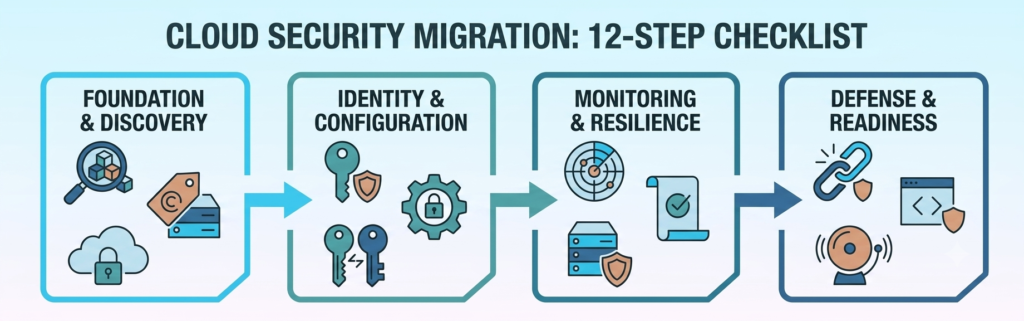
Here is the full checklist in brief:
- Map every app, account, and data type
- Label and classify sensitive data before migration
- Set up a secure cloud environment with proper network boundaries — see our guide to business WiFi security tools if wireless access is one of those boundaries
- Enable MFA on every account, for every user
- Remove shared logins and limit admin access by role
- Audit storage settings and close any publicly exposed buckets
- Enable encryption for data at rest and in transit
- Automate software and system patching
- Turn on audit logging with alerts for suspicious activity
- Build a 3-2-1 backup with immutable, isolated storage – and test it regularly
- Write a simple incident response plan with four named roles
- Train your team to recognize phishing and report incidents promptly
None of these steps in this cloud security checklist for small business owners require a dedicated IT team or technical expertise. If you’d rather hand the whole thing to a provider instead of running it yourself, our guide to choosing a cyber security company for UK SMEs without an IT team covers what to look for and what it should cost. They do require intention and follow-through. If you’d rather have a third party verify these are actually in place, see what a small business security audit typically costs in 2026. The businesses that get breached are not usually the ones who tried and failed at security – they are the ones who assumed the cloud had it covered.
For small business owners who want a clear, step-by-step system to protect their business without the jargon, TechEd Shield offers practical cybersecurity education and tools built specifically for non-technical business owners. Take the free Cybersecurity Health Check to see how exposed your migration really is right now.