

Key Takeaways
- Compromised credentials are the leading cause of small business data breaches – a password manager is no longer optional.
- The “SCIM tax” – vendors locking automated user provisioning behind expensive enterprise tiers – is a hidden cost trap that can break a small business budget.
- Zero-knowledge architecture, SSO integration, and audit logging are the three non-negotiables when evaluating any business-grade tool.
- The best password manager depends on your team size, industry, and identity infrastructure – not just price per seat.
- TechEd Shield’s evaluation framework below scores seven leading platforms across security, admin control, and total cost of ownership to help you decide with confidence.
The best password managers for small businesses do more than store passwords – picking the wrong one costs more than the subscription fee. It costs time during employee onboarding, creates gaps when someone leaves, and exposes credentials in tools your IT team never knew were in use. This guide applies a structured scoring framework and a side-by-side look at the seven best options for small businesses in 2026.
Compromised Credentials Are SMBs’ Biggest Security Risk
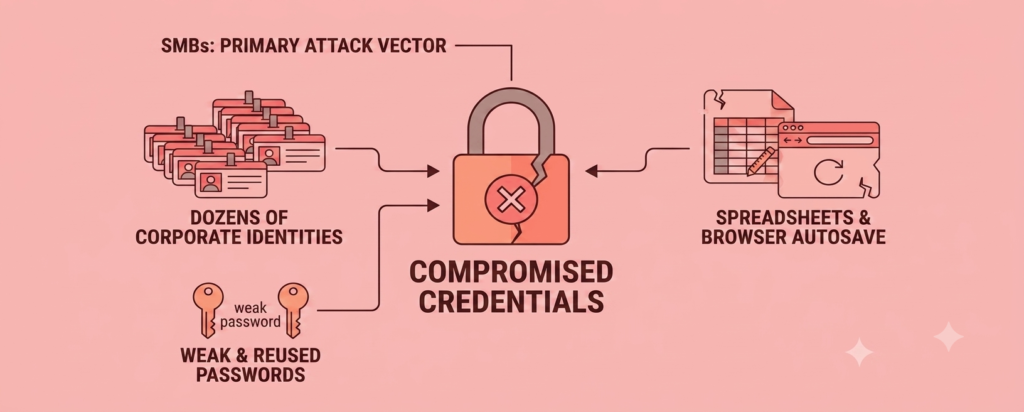
This is exactly the gap the best password managers for small businesses are built to close. The average small business employee manages dozens of login credentials across SaaS tools, internal systems, and client portals. Without a centralized credential system, the predictable result is password reuse, weak master passwords, and credentials stored in spreadsheets or browser autosave – none of which are secure. Password reuse in particular is one of the most exploited weaknesses in small business security, and it’s worth understanding exactly how a password manager shuts that risk down.
Modern hybrid work has stretched the traditional network perimeter to near-irrelevance. Business tools live in the cloud, employees work from personal devices, and IT visibility shrinks with every new app added to the stack. Router credentials are one of the most overlooked accounts worth storing here — see our home Wi-Fi security checklist for remote workers for where this fits into a remote worker’s setup. In this environment, compromised credentials have become the primary attack vector for organizational breaches – not sophisticated malware, just stolen or guessed passwords.
Business password managers have evolved to address this directly, shifting from simple vault tools into core components of Zero Trust Architecture and Identity and Access Management strategies, the same identity controls covered in our cloud security checklist. Before evaluating any platform, auditing existing passwords is a practical first step – run this free password strength checker to see where your team’s current passwords stand before any migration.
What Actually Separates Business-Grade Tools
What separates the best password managers for small businesses from consumer tools comes down to scope: consumer password managers handle one job, store and autofill passwords. Business-grade platforms do that, plus enforce policies across an entire team, integrate with identity directories, log every access event, and revoke access automatically when an employee is terminated. Two technical pillars drive most of that capability.
Zero-Knowledge Cryptography and Key Derivation
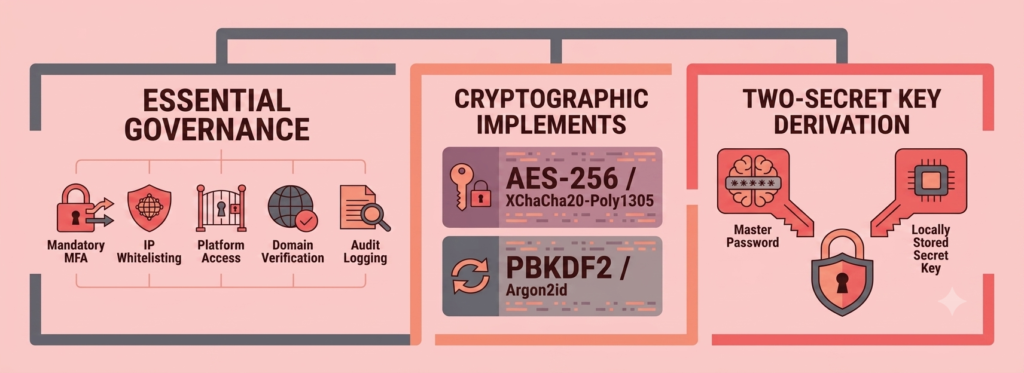
Every reputable business password manager advertises zero-knowledge encryption, but the implementation details matter. The baseline requirement is client-side encryption – vault data is encrypted and decrypted on the user’s device, not on the vendor’s server. Even if a vendor’s cloud infrastructure is fully compromised, raw credentials remain inaccessible.
The encryption primitive matters too. Most platforms use AES-256-bit encryption; NordPass uses XChaCha20-Poly1305, which performs faster on mobile without hardware acceleration and resists timing-based side-channel attacks. Equally important is the key derivation function (KDF) – PBKDF2 with high iteration counts or Argon2id – which makes brute-force cracking computationally expensive even when a weak master password is chosen. 1Password adds a second layer with its Two-Secret Key Derivation (2SKD) model, pairing the master password with a locally stored Secret Key that never leaves the device.
This is one area where the best password managers for small businesses separate themselves from the rest: cryptographic claims should always be backed by independent third-party audits and published penetration test results. Any platform that does not publish these regularly warrants extra scrutiny.
SCIM and SSO Integration: What It Costs Across Tiers
SSO and SCIM support is one of the clearest differentiators among the best password managers for small businesses. Single Sign-On (SSO) via SAML 2.0 or OpenID Connect lets employees access their vault through the company’s existing identity provider – Microsoft Entra ID, Okta, or Google Workspace. SCIM 2.0 (System for Cross-domain Identity Management) automates user provisioning: when a new hire is added to the directory, their vault account is created automatically; when someone leaves, access is revoked instantly.
The problem is what the industry calls the “SCIM tax” – the practice of locking SCIM and SSO behind high-cost enterprise tiers, forcing small businesses to either pay enterprise prices or manage user lifecycles manually. Manual offboarding is a genuine security risk: former employees retaining vault access for days or weeks is a direct path to unauthorized access. Among the seven platforms reviewed here, Dashlane and RoboForm both include SCIM and SSO in their standard Business plans – a meaningful structural advantage for budget-conscious SMBs. A password manager handles the vault side of identity security, but it works best paired with strong authentication — see the most common MFA setup mistakes small businesses make for the gaps that undo even a well-chosen password manager.
How to Score Any Password Manager
Scoring the best password managers for small businesses requires more than a feature checklist – a weighted scoring matrix gives decision-makers a structured way to compare platforms across dimensions that actually affect security outcomes and operational cost.
Cryptographic Integrity (25%)
The highest-weighted category. Requires verified client-side zero-knowledge encryption, either AES-256 or XChaCha20-Poly1305, a strong KDF (PBKDF2 or Argon2id), and independently published audit results. A minimum score of 8/10 should be the threshold – cryptographic architecture either meets the standard or it does not.
Identity Lifecycle and SSO Integration (20%)
Covers native SAML 2.0 or OIDC SSO federation, SCIM 2.0 automated provisioning, and directory connectors for Entra ID, Okta, and Google Workspace. Platforms that include these features in baseline business plans score significantly higher than those that gate them behind enterprise upgrades.
Admin Controls and Audit Logging (20%)
Evaluates granular role-based access control (RBAC), delegated administrative recovery, customizable security policies, and audit logs covering a minimum of 50 discrete event types. Logs should support export or real-time streaming to SIEM platforms like Microsoft Sentinel or Splunk. Non-repudiable audit trails are essential for regulated industries. Medical practices face an even stricter version of this requirement, including a mandatory Business Associate Agreement — see our HIPAA password managers for small practices with no IT team guide. CPA firms face a specific, legally mandatory version of this requirement — see our password managers for CPA firms: FTC Safeguards & MFA compliance guide.
Threat Telemetry and TCO (25%)
Threat telemetry includes dark web domain monitoring, real-time phishing protection, password health scoring, and developer secrets management for API keys and SSH credentials. TCO analysis looks beyond the per-seat sticker price – accounting for tiering thresholds, minimum seat requirements, and add-on fees for features that should arguably be standard. These two factors are weighted together because an inexpensive platform that requires multiple paid add-ons to reach feature parity carries a higher true cost.
The 7 Best Password Managers Compared
These are the best password managers for small businesses evaluated across the scoring framework above. Each has a clear best-fit use case – there is no single winner for every small business.
| Platform | Best For | Business Plan Pricing | SCIM/SSO on Business Tier? |
|---|---|---|---|
| 1Password Business | Developer & hybrid teams | $8.99/user/month | ✅ Yes |
| Bitwarden Teams/Enterprise | Open-source transparency | $4.00-$6.00/user/month | ⚠️ Enterprise only |
| Keeper Security | Regulated industries | $3.75-$4.00/user/month | ⚠️ Enterprise only (SCIM) |
| Dashlane Business | Built-in phishing protection | $8.00/user/month | ✅ Yes |
| NordPass Business | Modern encryption engine | $3.59/user/month | ⚠️ Enterprise only (full SCIM/Entra/Okta) |
| RoboForm Business | Lowest long-term per-seat cost | From ~$1.37/user/month (5-yr) | ✅ Yes |
| Proton Pass Business | Swiss privacy & data residency | Competitive SMB pricing | ✅ Yes |
Seven platforms, one right answer for your situation. Answer two questions and get a starting recommendation.
Which Password Manager Fits Your Business?
Answer 2 questions to get a starting recommendation.
This is a starting point, not a final answer — read the full profile below for whichever platform comes up before you commit.
Which Tool Fits Your Business Size and Budget
Best for Developer and Hybrid Teams: 1Password Business
1Password is built for organizations running hybrid environments or engineering workflows. Its Two-Secret Key Derivation (2SKD) model, developer CLI tools, SSH key signing, and CI/CD secrets pipeline integrations go well beyond standard credential vaulting. The Watchtower dashboard provides continuous visibility into password health, missing 2FA, and passkey adoption across the organization. Every Business seat includes a free 1Password Families account. 1Password Business is also our top pick in the roundup of the best cybersecurity tools for small businesses with no IT team. The trade-off: pricing jumps sharply when a team exceeds 10 users and moves from the Teams Starter Pack – now priced at $24.95/month following a July 2026 increase from $19.95 – to the Business plan at $8.99/user/month (also increased from $7.99).
Best for Open-Source Transparency: Bitwarden
Bitwarden’s fully open-source codebase is continuously reviewed by independent researchers and audit firms including Cure53 and Insight Risk Consulting – a level of cryptographic transparency no closed-source competitor can match. For a closer look at Bitwarden and other fully open-source options, see our roundup of the best open-source password managers for small business. The Teams tier at $4.00/user/month covers unlimited collection sharing, Directory Connector syncing, full audit logs, and Duo MFA. SCIM and federated SSO are reserved for the Enterprise tier at $6.00/user/month – still among the lowest enterprise-tier prices in this category. Self-hosted deployment via Docker containers is a unique capability for air-gapped or compliance-restricted environments. For a full cost and risk breakdown of whether that’s actually the right call for a small business, see our cloud vs. self-hosted password manager guide. Bitwarden is also the platform we cover at nonprofit pricing in our nonprofit cybersecurity budget under $1,500/year.
Best for Regulated Industries: Keeper Security
Keeper holds FedRAMP High Authorizationand FIPS 140-3 validation – certifications most competitors simply do not pursue. For defense contractors, healthcare providers, and financial services firms, this is often decisive. A broad set of administrative policies, per-item permissions in shared folders, and the KeeperPAM ecosystem extend into full Privileged Access Management. The main friction: automated SCIM provisioning is gated behind the Enterprise tier, and modules like BreachWatch dark web monitoring are sold as separate paid add-ons.
Best Phishing Protection Built-In: Dashlane Business
Dashlane’s browser extension uses real-time machine learning to analyze page elements and block credential input on suspected phishing domains – active protection, not just alerts. Its dark web surveillance database delivers instant alerts and guided remediation for affected accounts. SAML 2.0 SSO and automated SCIM provisioning are both included in the standard Business plan at $8.00/user/month. The higher per-seat starting price is the main deterrent for lean budgets.
Best Modern Encryption Engine: NordPass Business
NordPass is the only platform in this group using XChaCha20-Poly1305 encryption – a modern algorithm that outperforms AES-256 on mobile hardware and resists side-channel timing attacks. Its Vanta integration helps automate audit evidence collection for SOC 2 and ISO 27001, saving meaningful time for compliance-focused teams. Google Workspace SSO is included on the Business tier at $3.59/user/month, but Microsoft Entra ID, Okta, and full SCIM provisioning require the Enterprise tier – a notable gap for Microsoft-heavy organizations.
Lowest Long-Term Per-Seat Pricing: RoboForm Business
RoboForm’s multi-year pricing structure stands out: 5-year contracts reduce per-seat costs to approximately $1.37/user/month – and that price includes SAML 2.0 SSO and SCIM provisioning in the base Business plan without any enterprise upgrade. For cost-conscious organizations with stable team sizes, the long-term TCO advantage is difficult to beat. RoboForm’s form-filling engine is well-regarded for handling complex multi-page web forms. The limitations are a functionally dated interface and a closed-source codebase that limits independent cryptographic verification.
Best for Swiss Privacy and Data Residency: Proton Pass Business
Proton Pass hosts all vault data in Switzerland, placing it under the Swiss Federal Data Protection Act (FADP) – outside the jurisdiction of US and EU surveillance agreements. For a deeper look at why vendor jurisdiction matters as much as data location, see our GDPR password managers for small business: EU hosting and data residency guide. For legal practices, media organizations, and European teams with strict data sovereignty requirements, this is a structural advantage no other platform on this list offers. The built-in Hide-My-Email alias feature lets employees generate randomized email addresses when signing up for third-party tools, preventing domain tracking and targeted phishing at the account-creation level. An integrated TOTP authenticator reduces reliance on separate authenticator apps.
SCIM Access Can Determine True Cost for Identity-Dependent SMBs
Identity infrastructure is one of the biggest factors separating the best password managers for small businesses from one another. For any small business already running Microsoft Entra ID, Okta, or Google Workspace as its identity backbone, SCIM provisioning is a security requirement. Manual offboarding is slow, error-prone, and leaves former employees with vault access that should have been revoked on their last day.
When comparing the best password managers for small businesses on true cost, start by identifying which tier unlocks SCIM and SSO for your identity provider, then price from there. For the full SSO setup process this feeds into, see our 7-step guide to setting up SSO and MFA for small business. Dashlane and RoboForm include both on their standard Business plans. 1Password includes them on the Business tier (not the Teams Starter). Bitwarden, Keeper, and NordPass require enterprise upgrades for full SCIM support – which may still represent excellent value depending on team size, but the comparison must be made at the correct tier.
Choosing among the best password managers for small businesses depends heavily on context: the right platform for a 15-person healthcare practice looks very different from the right one for a 40-person software agency. Match the platform to your identity infrastructure, compliance requirements, and realistic long-term headcount – and the scoring framework above will do the rest.
For more help comparing the best password managers for small businesses and other cybersecurity tools, take the free Cybersecurity Health Check to see where your current password practices stand today.
A note on pricing: Prices correct at time of writing. Always check current pricing before purchasing.